9 10
Disable / Enable RCC Signal Reception
1. Press and hold [ RCC ] button 8 seconds to disable the reception.
2. Press and hold [ RCC ] button 8 seconds to enable automatic RCC reception.
RC on RC off
To Turn on/off Alarm Clock (With Ice-alert Function)
1. Press the [ ALARM ] button any tine to show the alarm time.
2. Press [ ALARM ] button to activate the alarm.
3. Press again to activate alarm with ice-alert function.
4. To disable the alarm, press until the alarm icon disappears.
Alarm off Alarm on Alarm with ice-alert
To Set the Alarm Time
1. Press and hold [ ALARM ] button for 2 seconds to enter alarm setting mode. HOUR will begin
ÀDVKLQJ
2. Use [ UP ]/[ DOWN ] button to adjust HOUR, and press [ ALARM ] button to proceed to set
MINUTE.
3. Repeat 2 above to set MINUTE, then press [ ALARM ] button to exit.
NOTE:
1. Once the alarm time is set, alarm function will be activated automatically.
2. Pressing the [ ALARM ] button twice when alarm time is being displayed will activate the
temperature-adjusted pre-alarm. The alarm will sound 30 minutes earlier if it detects outside
temperature at below -3°C.
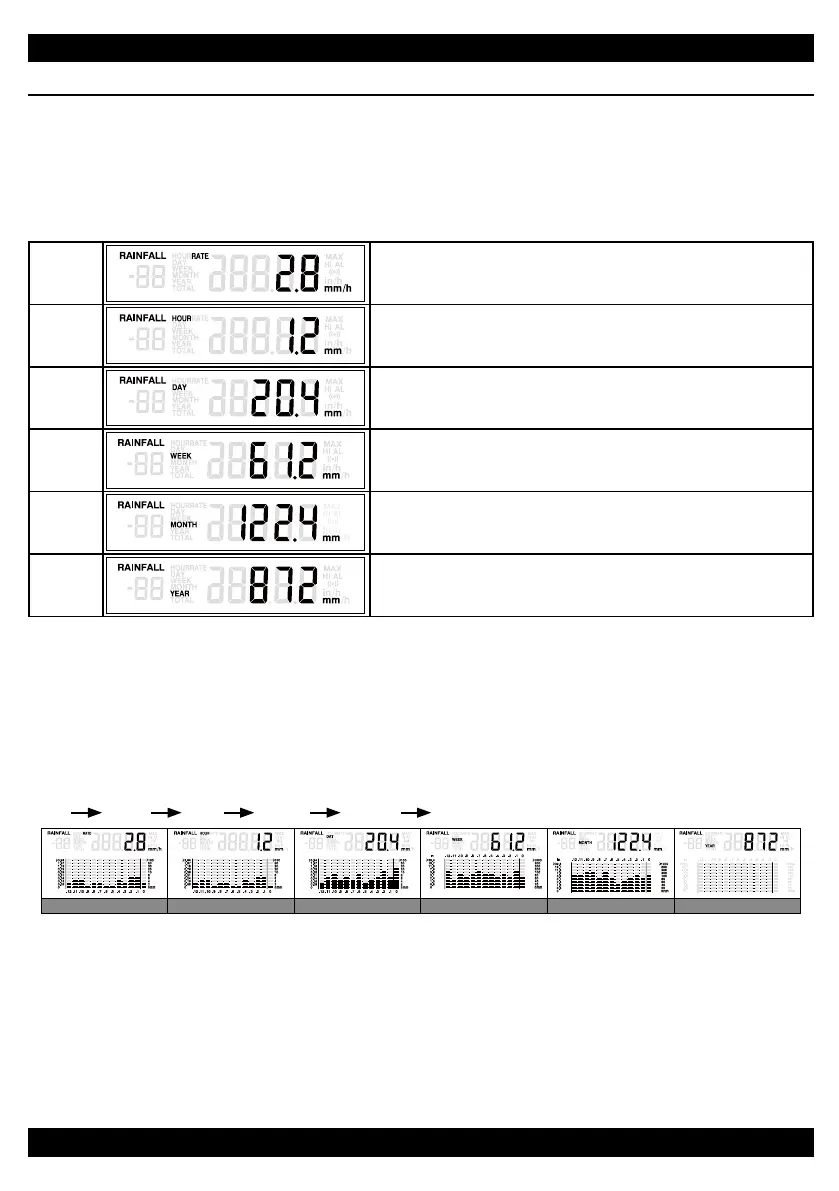
RAINFALL
The device displays how many millimeters / inches of rainfall are accumulated over a time period,
based on current rainfall rate that is updated every minute.
To Select the Rainfall Display Mode
Press [ RAIN ] button to toggle between:
RATE
Current rainfall rate in past 60 minutes (e.g., 07:40~08:40)
HOUR
The HOUR display indicates the total rainfall for
current hour (from the hour)
DAY
The DAY display indicates the total rainfall within a day
(from midnight)
WEEK
The WEEK display indicates the total rainfall within a
week (from midnight of Sunday)
MONTH
The MONTH display indicates the total rainfall within a
PRQWKIURP¿UVWGD\RIWKHPRQWK
YEAR
The YEAR display indicates the total rainfall within a
\HDUIURP¿UVWGD\RIWKH\HDU
NOTE:
User can select the measurement unit for rainfall by sliding the [ MM/IN ] switch.
Graphical Histogram Display
Histogram presents an easy view of rainfall change pattern over a period of time in a graphical
manner. The time scale of the graph automatically changes according to the rainfall display modes:
Rate
Hour Day Week Month Year
Hour rainfallRate rainfall Day rainfall Week rainfall Month rainfall Year rainfall
NOTE:
1. By default, the graph is presented in Hourly scale when rainfall is in Rain Rate.
2. There is no graphical display when Yearly Rainfall is selected.
10
Disable / Enable RCC Signal Reception
1. Press and hold [ RCC ] button 8 seconds to disable the reception.
2. Press and hold [ RCC ] button 8 seconds to enable automatic RCC reception.
RC on RC off
To Turn on/off Alarm Clock (With Ice-alert Function)
1. Press the [ ALARM ] button any tine to show the alarm time.
2. Press [ ALARM ] button to activate the alarm.
3. Press again to activate alarm with ice-alert function.
4. To disable the alarm, press until the alarm icon disappears.
Alarm off Alarm on Alarm with ice-alert
To Set the Alarm Time
1. Press and hold [ ALARM ] button for 2 seconds to enter alarm setting mode. HOUR will begin
ÀDVKLQJ
2. Use [ UP ]/[ DOWN ] button to adjust HOUR, and press [ ALARM ] button to proceed to set
MINUTE.
3. Repeat 2 above to set MINUTE, then press [ ALARM ] button to exit.
NOTE:
1. Once the alarm time is set, alarm function will be activated automatically.
2. Pressing the [ ALARM ] button twice when alarm time is being displayed will activate the
temperature-adjusted pre-alarm. The alarm will sound 30 minutes earlier if it detects outside
temperature at below -3°C.
RAINFALL
The device displays how many millimeters / inches of rainfall are accumulated over a time period,
based on current rainfall rate that is updated every minute.
To Select the Rainfall Display Mode
Press [ RAIN ] button to toggle between:
RATE
Current rainfall rate in past 60 minutes (e.g., 07:40~08:40)
HOUR
The HOUR display indicates the total rainfall for
current hour (from the hour)
DAY
The DAY display indicates the total rainfall within a day
(from midnight)
WEEK
The WEEK display indicates the total rainfall within a
week (from midnight of Sunday)
MONTH
The MONTH display indicates the total rainfall within a
PRQWKIURP¿UVWGD\RIWKHPRQWK
YEAR
The YEAR display indicates the total rainfall within a
\HDUIURP¿UVWGD\RIWKH\HDU
NOTE:
User can select the measurement unit for rainfall by sliding the [ MM/IN ] switch.
Graphical Histogram Display
Histogram presents an easy view of rainfall change pattern over a period of time in a graphical
manner. The time scale of the graph automatically changes according to the rainfall display modes:
Rate
Hour Day Week Month Year
Hour rainfallRate rainfall Day rainfall Week rainfall Month rainfall Year rainfall
NOTE:
1. By default, the graph is presented in Hourly scale when rainfall is in Rain Rate.
2. There is no graphical display when Yearly Rainfall is selected.


 To Next Page
 Loading...