11
Total Rainfall SINCE function
Press [ SINCE ] button to display the total rainfall record. The commencing date and year will be
shown.
To clear the existing commencing date and reset it to re-start again, press and hold [ SINCE ] until
the record is cleared. The total rainfall will now be equal to DAY rainfall of today and the unit will
start again to collect the rainfall data.
To Select the Measurement Unit for the Rainfall
1. Slide the [ MM/IN ] switch to <MM> position to select millimeter unit.
2. Slide the [ MM/IN ] switch to <IN> position to select inch unit.
HISTORY DATA OF ALL RECORD
Data logger stores and gathers data to display historical rainfall according to your selected time-
scale (e.g. up to past 24 hours, past 31 days, past 52 weeks, past 12 months or past 5 years)
To check history data:
1. Press [ RAIN ] button to select rainfall display modes.
2. Press the [ HISTORY ] button repeatedly to read the data for each period of time scale
selected backward.
When HOUR time scale is selected, the LCD will display the past indoor temperature & humidity,
outdoor temperature, for each hour on the hour simultaneously for the past 24 hours.
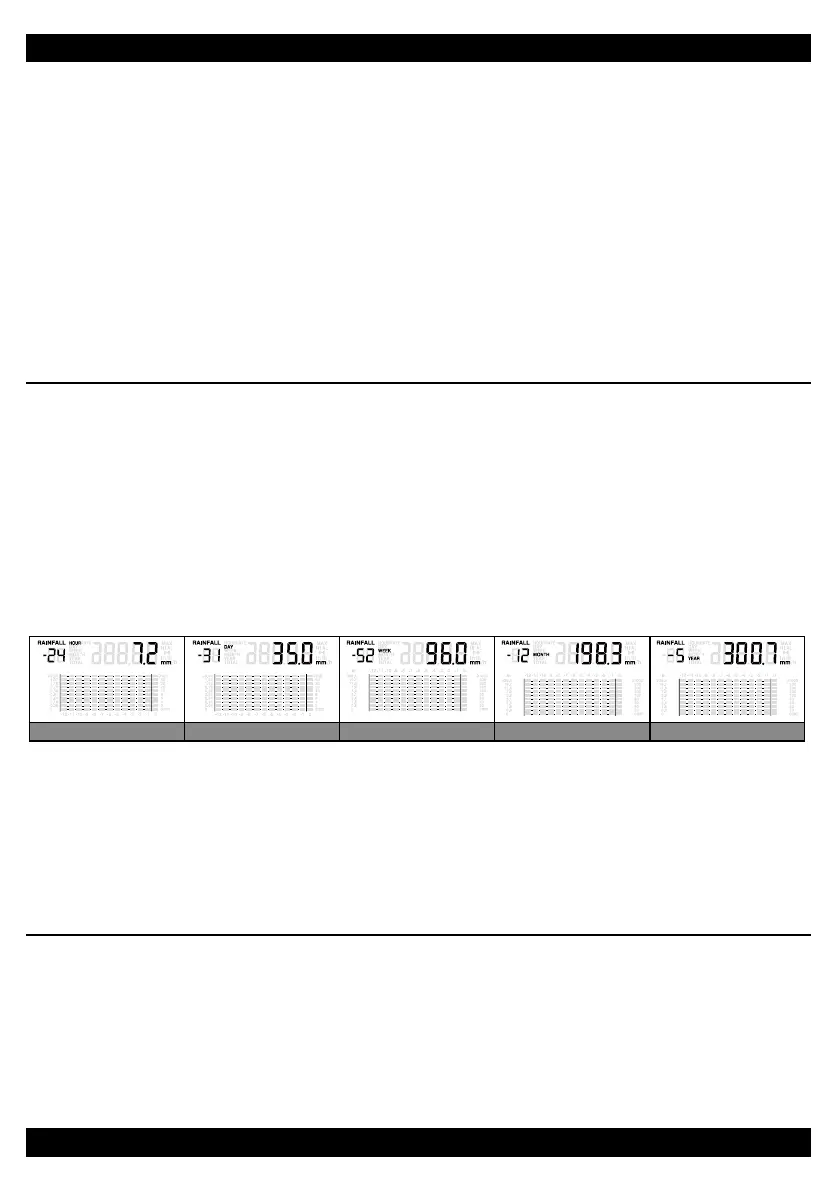
-24 Hour rainfall -31 Day rainfall -52 Week rainfall -12 Month rainfall -5 Year rainfall
NOTE:
The main unit can check the records according to the time and calendar of the clock, i.e. it can
display the records of the past, but not any records in the future.
E.g. The main unit recorded data from Jan. 1st, 2012 to Feb. 31st, 2014. If the time is changed to
Jan. 1st, 2013, then only data in 2012 can be displayed.
TEMPERATURE & HUMIDITY DISPLAY
The Main Display Unit displays outdoor temperature received from the wireless Thermo-Rain
Gauge sensor, as well as indoor temperature and humidity from the built-in sensors.
User may select temperature unit by sliding the [ °C / °F ] switch.
MAXIMUM / MINIMUM MEMORY FUNCTION
To Check the Memory:
Press [ MEM ] button repeatedly to check the maximum/minimum records.
Area
Outdoor
Temperature
Indoor Temperature Indoor Humidity
Hour/Day/Week/
Month/Year rainfall
Type of
memory
Max. Min. Max. Min. Max. Min. Max.
NOTE:
When maximum or minimum reading is displayed, the corresponding time and date stamp will be
shown.
To Clear Individual Records
While displaying the maximum/minimum records, press and hold [ MEM ] button for 2 seconds to
clear the individual record.
HI / LO ALERT
HI/LO are used to alert the users of certain weather conditions. Once activated, the alarm will turn
RQDQGUHG/('VWDUWVÀDVKLQJZKHQDFHUWDLQSUHVHWFULWHULRQLVPHW7KHIROORZLQJDUHDUHDVDQG
type of alert provided.
Area Type of Alert available
Indoor temperature HI and LO alert
Indoor humidity HI and LO alert
Outdoor temperature HI and LO alert
Hour rainfall HI alert
Day rainfall HI alert *
NOTE:
* Daily rainfall since midnight.
To Set the HI / LO Alert
1. Press the [ ALERT ] button until the desired area is selected.
2. Use [ UP ] / [ DOWN ] buttons to adjust the setting.
3. Press [ ALERT ]EXWWRQWRFRQ¿UPDQGFRQWLQXHWRQH[WVHWWLQJ
11 12
Total Rainfall SINCE function
Press [ SINCE ] button to display the total rainfall record. The commencing date and year will be
shown.
To clear the existing commencing date and reset it to re-start again, press and hold [ SINCE ] until
the record is cleared. The total rainfall will now be equal to DAY rainfall of today and the unit will
start again to collect the rainfall data.
To Select the Measurement Unit for the Rainfall
1. Slide the [ MM/IN ] switch to <MM> position to select millimeter unit.
2. Slide the [ MM/IN ] switch to <IN> position to select inch unit.
HISTORY DATA OF ALL RECORD
Data logger stores and gathers data to display historical rainfall according to your selected time-
scale (e.g. up to past 24 hours, past 31 days, past 52 weeks, past 12 months or past 5 years)
To check history data:
1. Press [ RAIN ] button to select rainfall display modes.
2. Press the [ HISTORY ] button repeatedly to read the data for each period of time scale
selected backward.
When HOUR time scale is selected, the LCD will display the past indoor temperature & humidity,
outdoor temperature, for each hour on the hour simultaneously for the past 24 hours.
-24 Hour rainfall -31 Day rainfall -52 Week rainfall -12 Month rainfall -5 Year rainfall
NOTE:
The main unit can check the records according to the time and calendar of the clock, i.e. it can
display the records of the past, but not any records in the future.
E.g. The main unit recorded data from Jan. 1st, 2012 to Feb. 31st, 2014. If the time is changed to
Jan. 1st, 2013, then only data in 2012 can be displayed.
TEMPERATURE & HUMIDITY DISPLAY
The Main Display Unit displays outdoor temperature received from the wireless Thermo-Rain
Gauge sensor, as well as indoor temperature and humidity from the built-in sensors.
User may select temperature unit by sliding the [ °C / °F ] switch.
MAXIMUM / MINIMUM MEMORY FUNCTION
To Check the Memory:
Press [ MEM ] button repeatedly to check the maximum/minimum records.
Area
Outdoor
Temperature
Indoor Temperature Indoor Humidity
Hour/Day/Week/
Month/Year rainfall
Type of
memory
Max. Min. Max. Min. Max. Min. Max.
NOTE:
When maximum or minimum reading is displayed, the corresponding time and date stamp will be
shown.
To Clear Individual Records
While displaying the maximum/minimum records, press and hold [ MEM ] button for 2 seconds to
clear the individual record.
HI / LO ALERT
HI/LO are used to alert the users of certain weather conditions. Once activated, the alarm will turn
RQDQGUHG/('VWDUWVÀDVKLQJZKHQDFHUWDLQSUHVHWFULWHULRQLVPHW7KHIROORZLQJDUHDUHDVDQG
type of alert provided.
Area Type of Alert available
Indoor temperature HI and LO alert
Indoor humidity HI and LO alert
Outdoor temperature HI and LO alert
Hour rainfall HI alert
Day rainfall HI alert *
NOTE:
* Daily rainfall since midnight.
To Set the HI / LO Alert
1. Press the [ ALERT ] button until the desired area is selected.
2. Use [ UP ] / [ DOWN ] buttons to adjust the setting.
3. Press [ ALERT ]EXWWRQWRFRQ¿UPDQGFRQWLQXHWRQH[WVHWWLQJ


 To Next Page
 Loading...