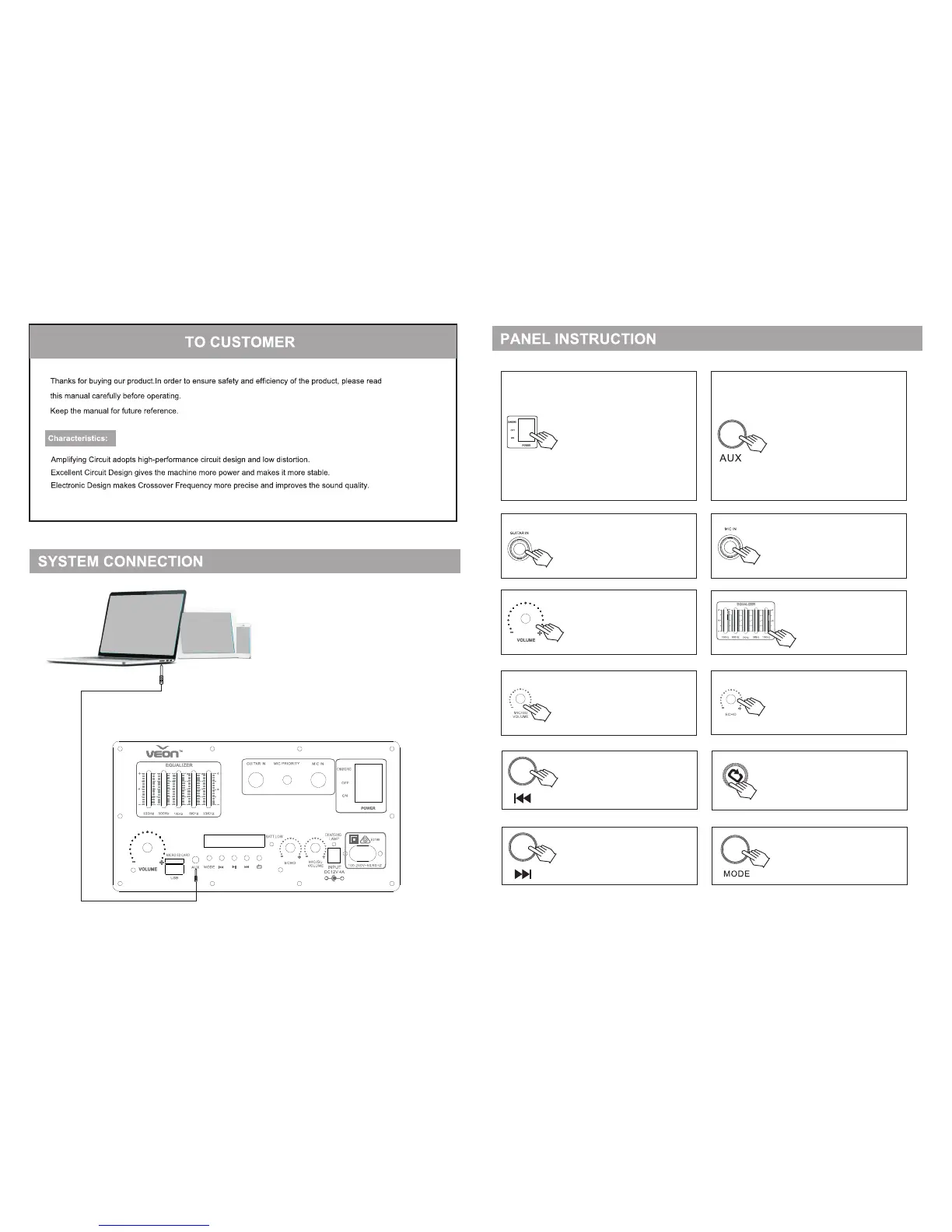
GUITAR Input Jack
Master Volume Control
Microphone/Guitar Volume Control
Band Equalizer: Adjust the
music play back to your
preferred Level.
Microphone ECHO Control
Repeat Button: Press one time to
repeat current track, press two
times to repeat all track
AUX Line In Input Jack: You could
connect to external device with our
unit by using this jack.
Tips: Please insert the Audio
Connect Cable in the spare part to
connect with your external device
(Mobile/Computer/TV) with
earphone jack and AUX jack
of our unit. Change the 【Mode】
to AUX, and play the music from
external device to our unit.
Microphone Input Jack
Mode Button: Select different
mode from USB/FM/AUX/
Bluetooth
Power Status Change:
Charging: The Unit is only charging
battery and it will not play
music.
Off: The unit will close and not
charge the battery
On: The Unit will start working and
charging the battery at the
same time.
Previous Track Button: Under the
USB/Micro SD/Bluetooth Function,
press to play the previous Track.
Under the FM function, press to
play the previous FM Radio Station.
Next Track Button: Under the
USB/Micro SD/Bluetooth Function,
press to play the next Track. Under
the FM function, press to play the
next FM Radio Station.
3 4


 To Next Page
 Loading...