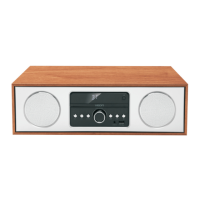
The VEON VN3292MS is a CD Micro System designed for home audio playback, offering a range of features for various media types. This compact system includes a CD player, USB input, FM radio tuner, and AUX-IN connectivity, all controllable via a full-function remote.
Function Description:
The core function of the VEON VN3292MS is to provide audio playback from multiple sources. It features a CD player compatible with CD, CD-R, MP3, and CD-RW discs, allowing users to enjoy their physical music collection. For digital audio, a USB input is provided on the front panel, enabling playback of MP3 files from USB sticks, flash drives, or memory sticks. It's important to note that this USB port is solely for media playback and not for charging devices. The system automatically recognizes and organizes MP3 files from the connected USB device.
An integrated FM radio tuner allows users to listen to their favorite radio stations. Manual tuning, auto-scanning, and the ability to store preferred FM frequencies as preset stations are available. For external audio devices, a 3.5mm AUX-IN (LINE IN) port is located on the front panel, facilitating connection to smartphones, tablets, or other audio sources.
Bluetooth connectivity is a key feature, allowing wireless audio streaming from compatible devices such as laptops, smartphones, or computers. The system's Bluetooth pairing name is "VEON-VN3292MS." When in pairing mode, the "BT" indicator on the LED display blinks, becoming constant once a connection is established. A default pass code of "0000" may be requested by the connecting device. The Bluetooth connection can be disabled by holding down the PLAY/PAUSE button.
The system is operated via a front panel with essential controls and a full-function remote control. The remote offers comprehensive control over all functions, including standby, clock settings, sleep timer, display dimmer, program/memory functions, fast rewind/forward, play/pause, stop, folder navigation (FOLD+/-), track skipping (10-/10+), volume control, equalizer modes, repeat, and random playback.
Important Technical Specifications:
- Power Supply: AC 100-240V~50/60Hz
- Power Consumption: 30W
- Working Environment Temperature: -10~+35℃
- Working Environment Relative Humidity: 5%~90%
- Frequency Response: 20Hz~20kHz
- Disc Output S/N (A weight): >72dB (1kHz)
- Disc Output Dynamic Range: ≥70dB (1kHz)
- Disc Output THD+NOISE: ≤-60dB (1kHz)
- Tuner FM Band Range: 87.5MHz~108MHz
- Power Output (Max): 15W x 2
- Frequency Response (Speakers): ±3dB (20Hz~20kHz)
The system features two speaker outputs, indicating a stereo audio setup.
Usage Features:
-
General Operation:
- STANDBY: Press to switch the unit on or put it into standby mode.
- SOURCE: Repeatedly press to cycle through CD, LINE IN, BLUETOOTH, USB, and FM TUNER modes.
- DIMMER: Adjusts the display brightness.
- SLEEP: Sets a sleep timer (S-00 to disable), after which the unit enters standby.
- TIMER: In standby, press and hold to enter alarm setting mode ("ALA on"). Use track navigation buttons to set time, source, and confirm. Press to toggle between ALA ON, ALA OFF, and alarm time.
- VOLUME+/-: Adjusts the audio volume.
- MUTE: Temporarily mutes/unmutes the sound.
- EQ: Cycles through equalizer modes.
- CLOCK: In standby, hold to enter clock set mode, use track navigation buttons to select 12H/24H display and set time. In play mode, press to display clock for 5 seconds.
-
CD Operation:
- OPEN/CLOSE: Opens or closes the disc tray.
- STOP: Stops playback.
- PLAY/PAUSE: Temporarily pauses/resumes playback. Hold for 3 seconds to disconnect Bluetooth.
- NEXT/PREVIOUS (Track): Skips to the next/previous chapter/track.
- FAST REWIND/FORWARD: Hold down for fast rewind/forward playback.
- PROGRAM: In stop mode, allows programming of desired tracks for playback.
- RANDOM: Toggles random play mode.
- REPEAT: Cycles through repeat modes.
- 10+/10-: Increases/decreases track number by ten.
- FOLD+/FOLD-: Skips to the next/previous folder (for MP3 CDs).
-
USB Operation:
- Select USB mode via the SOURCE button.
- Insert a USB device; the system will display "READING" and automatically begin MP3 playback.
- Use PLAY/PAUSE, NEXT, PREVIOUS, and STOP controls.
-
FM Tuner Operation:
- TUN+/-: Fine-tunes the frequency (increase/decrease). Hold down for continuous tuning.
- AUTO: Hold down to auto-scan for radio channels. Press again to stop.
- MEMORY: After tuning to a frequency, press MEMORY, use track navigation buttons to select a preset station, and press MEMORY again to confirm and save.
- NEXT/PREVIOUS (Preset): Skips to the next/previous stored preset station.
-
LINE IN/AUX Operation:
- Select LINE IN/AUX mode via the SOURCE button.
- Connect an external device to the 3.5mm AUX-IN port on the front panel.
Maintenance Features:
- General Safety: The manual emphasizes general safety precautions, including keeping the apparatus away from water, not blocking ventilation, avoiding heat sources and direct sunlight, and connecting to a suitable power supply (100-240V ~ 50/60Hz).
- Cleaning: Clean only with a damp cloth and dry with a dry towel. Avoid harsh abrasives that may damage plastic parts.
- Power Cord: Do not abuse or damage the power cord. If damaged, it must be replaced by the manufacturer, service agent, or a similarly qualified person.
- Battery Care (Remote): Remove the battery from the remote if not used for a long time. Do not mix new and used batteries or different types. Weak batteries can leak and damage the remote. Dispose of batteries according to manufacturer's instructions.
- Troubleshooting: A dedicated section provides solutions for common issues such as no power (check power cord, main power button), remote not working (remove obstacles, check batteries, replace dead batteries), disc not playing (check disc orientation, type, damage/dirt, moisture condensation), and distorted noise (clean/check disc).
- Servicing: Refer all servicing to qualified personnel. Do not attempt to service double-insulated apparatus yourself.
- Warranty: The product comes with a two-year guarantee against faulty materials and workmanship. The warranty is void if the product has been tampered with, damaged by accident, improper use, or purchased second-hand. For commercial use, the warranty is limited to 90 days. Retain the warranty card and purchase receipt for service.


 To Next Page
 General