-8-
Insert the battery into the remote control. Point the remote control at the sensor on the front panel. The remote control works within a
reasonable proximity (4-5 Metres) and angle of the unit's sensor.
Note:
●Remove the battery when you do not intend to use the remote control for a long time.
●Do not mix new and used batteries, or different types of batteries.
●Weak batteries can leak and severely damage the remote control.
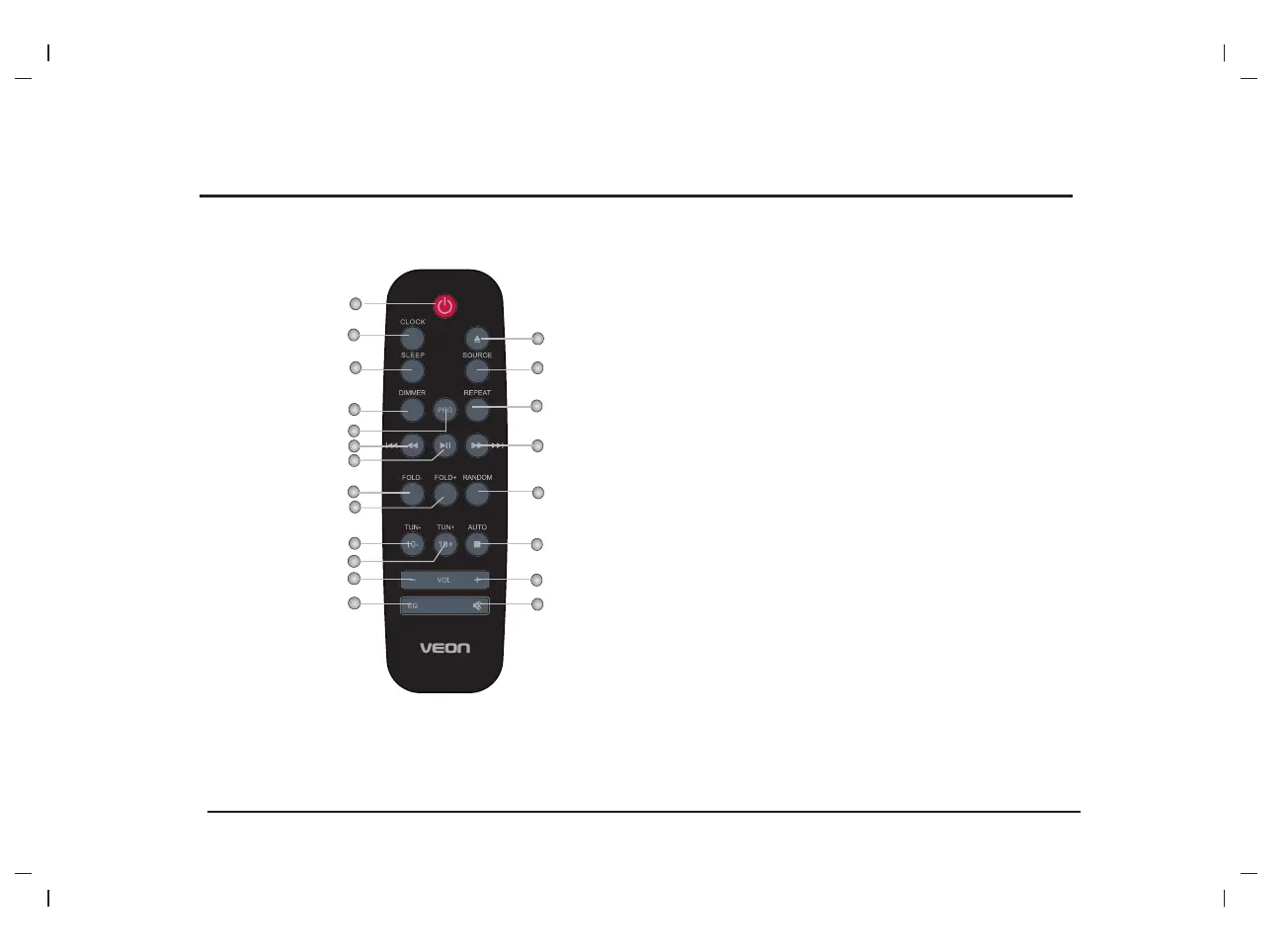
REMOTE CONTROL OVERVIEW
TIMER
MEMORY
2
20
7
6
12
1
3
4
17
5
8
18
19
9
15
14
13
11
10
16
21
1 STANDBY
2 CLOCK
3 SLEEP/TIMER
4 DIMMER
5 PROG/MEMORY
6 FAST REWIND/
PREVIOUS
7 PLAY/PAUSE
8 FOLD-
9 FOLD+
10 10-/TUN-
11 10+/TUN+
12 VOLUME-
13 EQ
14 OPEN/CLOSE
15 SOURCE
16 REPEAT
17 FAST FORWARD/NEXT
18 RANDOM
19 STOP/AUTO
20 VOLUME+
21 MUTE


 To Next Page