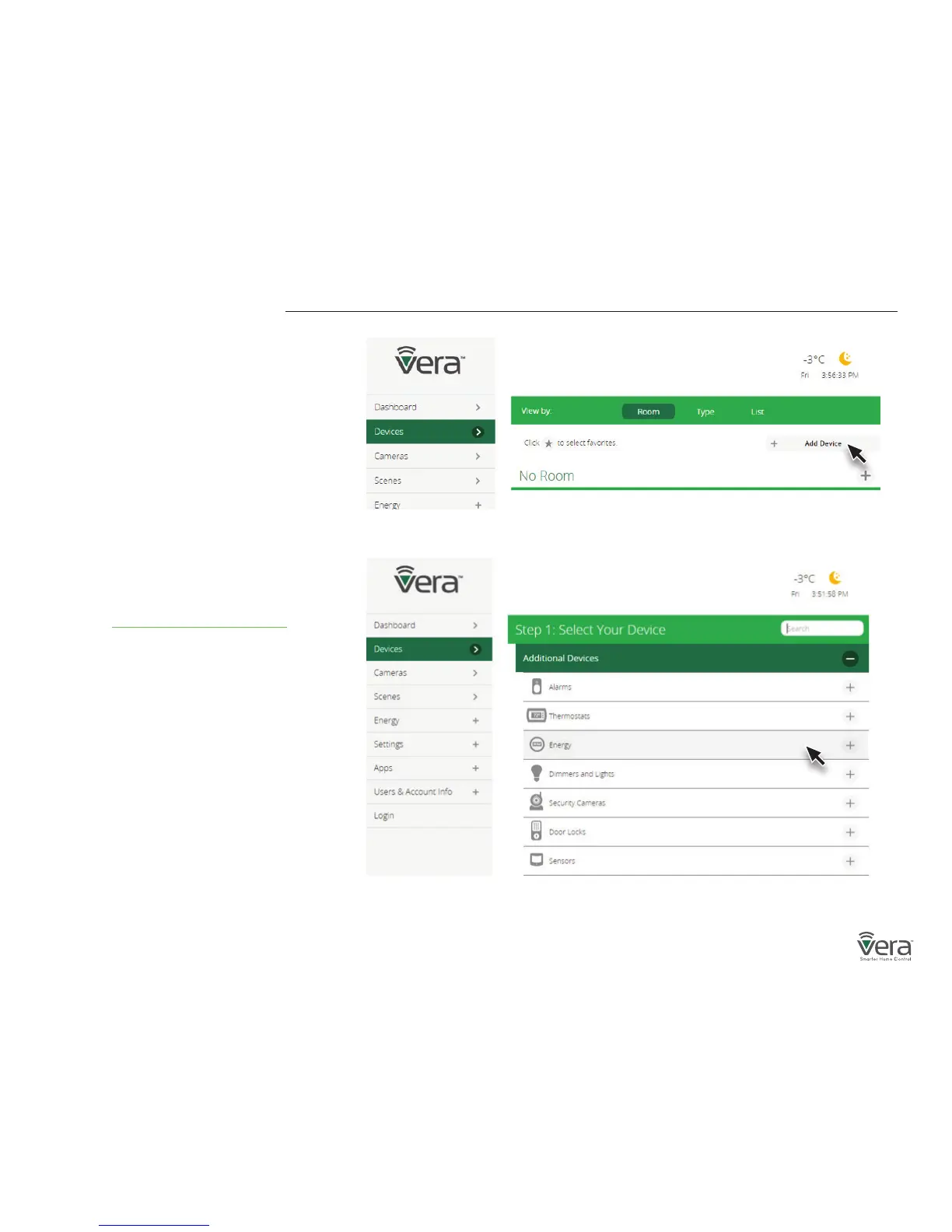
Figure 1-1: Add Device
Figure 1-2: Device Paring menu
Inclusion and Exclusion
Your VeraSecure Controller can work with all
Z-Wave devices, such as sensors, alarms, door
locks, thermostats, etc. Over a thousand Z-Wave
devices are available from many brands. (Z-Wave
is a wireless communications system; check the
package or specs to see if a device uses Z-Wave.)
Before VeraSecure can control a device, it must
be included into the Vera system.
Vera Custom Device Wizards are available for
select devices that pass stringent Vera Labs
testing for compatibility and quality. The Custom
Device Wizards make Inclusion/Exclusion easiest,
with specic details for each device.
A list of these devices is available and
updated at http://getvera.com/compatibility/
For all other Z-Wave devices, a
Generic Device Wizard is used for Inclusion/
Exclusion. A Generic Device Wizard is available
for each device category (thermostats, sensors,
alarms, etc.)
To get started, after setting up your
VeraSecure Controller, use the Vera UI to
select Devices and then Add Device
(Figures 1-1 & 1-2).


 To Next Page