Need help?
Do you have a question about the VeriFone PinPad VX520 and is the answer not in the manual?
Essential checks and considerations before starting the update process.
Procedure for entering and selecting the Electronic Marketing Application (EMA).
Navigating and configuring the terminal's download settings menu.
Inputting the required password to authorize terminal operations.
Navigate menu options and initiate the PINPad software download.
Confirm download settings and exit the configuration menu.
Confirm download parameters or contact support if blank.
Observe download progress bar and await terminal reboot.
Initiate the PINPad initialization sequence.
Process for initializing the external PINPad module.
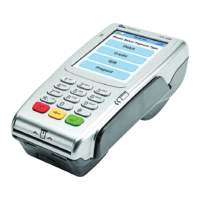
The VeriFone PinPad, specifically the VX 520 model, is a robust and versatile payment terminal designed to facilitate secure and efficient transaction processing. Its primary function is to serve as a point-of-sale (POS) device, enabling merchants to accept various forms of payment, including credit and debit cards, and to manage related operations such as sales, voids, and refunds. The device is equipped with a physical keypad and a monochrome display, providing a clear interface for user interaction and transaction information.
The core function of the VeriFone PinPad is to process payment transactions. This involves reading card data, securely transmitting it for authorization, and receiving approval or denial responses. The device supports a range of transaction types, including sales, which are standard purchases; voids, used to cancel a transaction before it has been settled; and refunds, for returning funds to a customer for a previously completed transaction. Beyond these basic functions, the PinPad is designed to handle updates and maintenance procedures, ensuring its continued secure and optimal operation. It can connect to a server to download software updates, which are crucial for maintaining compliance with security standards and introducing new features. The process of updating the PinPad's software, particularly the "Update PINPad" function, is a key maintenance feature that ensures the device remains current and secure. The terminal also includes an "Init Ext PP" function, which is used to initialize an external pin pad, indicating its capability to integrate with additional hardware for enhanced functionality or customer interaction. This initialization process ensures that the external pin pad is properly configured and ready to accept input.
The VeriFone PinPad offers several usage features that streamline the transaction process for both merchants and customers. The physical keypad, with clearly labeled numeric and function keys, allows for easy data entry, such as PINs, transaction amounts, and menu selections. The monochrome display provides real-time feedback, showing transaction details, menu options, and status messages like "Please Wait..." or "Downloading...". The device's menu structure is designed for intuitive navigation, with dedicated function keys (F1-F4) that correspond to on-screen options, making it straightforward to select desired operations. For instance, pressing the "*" key typically grants access to the EMA (Electronic Merchant Application) menu, which is the gateway to various administrative and maintenance functions. Within the EMA, users can navigate to "Settings" to configure device parameters or initiate software updates. The "Download Settings" menu, for example, allows users to manage software updates for the PinPad itself. The ability to "page down" through menu options using a dedicated button (often the first purple button on the left) ensures that all available settings and functions are accessible. The device also incorporates a "Back" key (often yellow) for correcting input or returning to previous screens, enhancing user experience. Security is paramount, and the device requires a password for accessing sensitive settings, ensuring that only authorized personnel can perform critical operations. The password entry is masked with asterisks for privacy. The "Enter" key (green) is used to confirm selections and inputs, while the "Cancel" key (red) allows users to abort operations or return to the main screen. The terminal's ability to connect via IP for downloads signifies its modern connectivity features, allowing for efficient software distribution.
Maintenance of the VeriFone PinPad is primarily focused on software updates and initialization procedures to ensure security and functionality. The "Update PINPad" feature is a critical maintenance function, allowing the device to receive and install the latest software versions. This process can take a significant amount of time (15-60 minutes), depending on the connection speed, and requires the terminal to be free from active transactions. Before initiating any downloads, it is crucial to settle all open transactions to prevent data loss or corruption. The download process involves several steps, starting from accessing the EMA menu, navigating to "Settings," and then selecting "Update PINPad." During the download, the device displays a "Downloading..." progress bar, and upon completion, the terminal will automatically reboot to apply the updates. This reboot is a standard part of the update cycle, ensuring that the new software is properly loaded. Another important maintenance feature is the "Init Ext PP" (Initialize External Pin Pad) function. This is used to set up and configure an external pin pad that may be connected to the main terminal. The initialization process ensures that the external pin pad communicates correctly with the terminal and is ready for use. Similar to other sensitive operations, accessing the "Init Ext PP" function requires a password, reinforcing the device's security protocols. During initialization, the external pin pad will display "Please Wait..." and eventually "Welcome" once successfully configured. If the "Init Ext PP" option is not visible in the menu, it indicates a potential configuration issue, and technical support should be contacted to ensure the pin pad is part of the terminal's build. These maintenance features are essential for keeping the VeriFone PinPad secure, compliant, and operational in a dynamic payment environment.
 General
| Display | 128x64 pixel backlit LCD |
|---|---|
| Connectivity | RS-232, USB, Ethernet |
| Card Reader | Magnetic stripe |
| Operating System | Verix |
| Power Supply | 12V DC |
| Operating Temperature | 32°F to 122°F (0°C to 50°C) |
| Compliance | PCI PTS, EMV Level 1 and 2 |
| Security | PCI PTS 4.x certified, Tamper-resistant security module (TRSM) |


 To Next Page