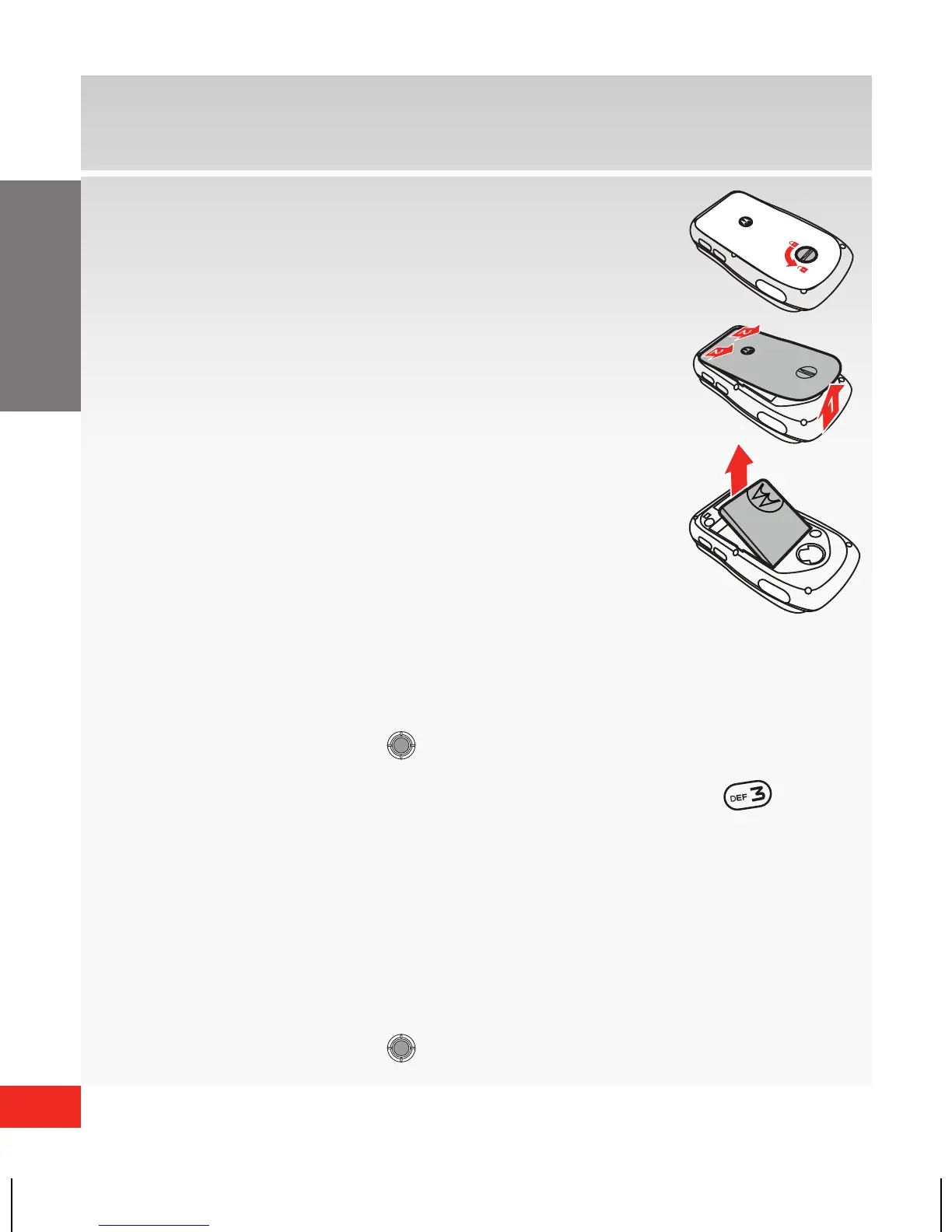
Removing the battery
1 . Rotate the locking screw a half turn to
the left.
2. Lift the bottom end of the cover, then
pull the cover down and off the phone.
3. Lift the battery up from the top of the
phone and remove.
Using Bluetooth®
How to turn on Bluetooth
1. From the home screen, press the center of the
Directional Key (
Directional Key
Camera Key
Send Key
Clear Key
Power/End Key
Center Select Key
CLR
) to access the Main Menu.
2. Scroll to and select Settings & Tools. Press ( )
Bluetooth, and then press the Left Soft Key to
Turn On.
How to pair your Bluetooth headset with your
wireless device
1. From the home screen, press the center of the
Directional Key (
Directional Key
Camera Key
Send Key
Clear Key
Power/End Key
Center Select Key
CLR
) to access the Main Menu.
68000202325_V860_QRG_VZW_ENG.indd 10 8/31/09 1:17:51 PM














 To Next Page