41
/ WIFI SETTINGS
http://setup.verizon.com/businessinternetgateway | ©2024 Verizon. All Rights Reserved
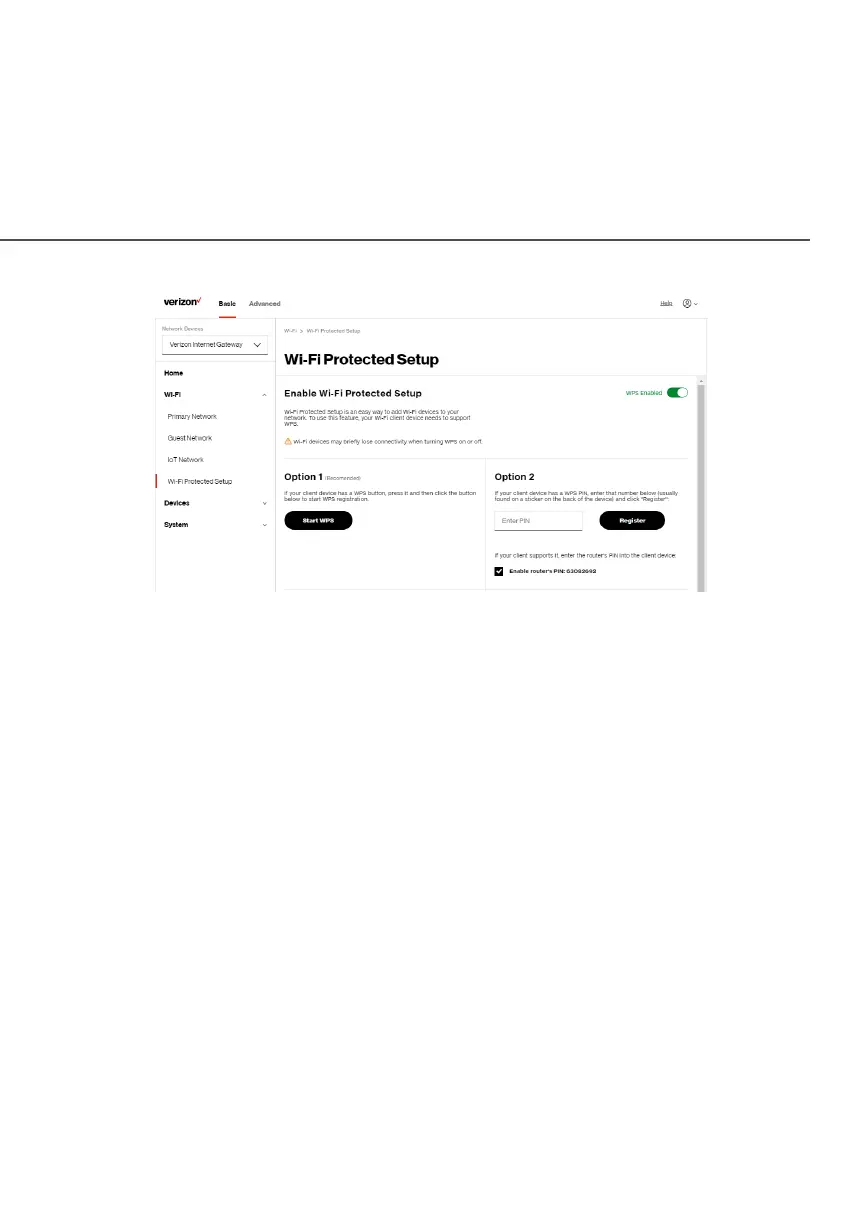
2. Enable the protected setup by moving the selector to onon.
3. Use one of the following methods:
• If your Wi-Fi client device has a WPS button, press the WPS button
on your Gateway for more than two seconds, then click the Start Start
WPSWPS button in Option 1Option 1 to start the WPS registration process.
• If your client device has a WPS PIN, locate the PIN printed on the
client’s label or in the client documentation. Enter the PIN number in
Option 2Option 2 on the user interface.
• Click RegisterRegister.
• Alternatively, you can enter the Gateway’s PIN shown on this screen
into the WPS user interface of your device, if this PIN mode is
supported by your Wi-Fi device.




 To Next Page