EasyManua.ls Logo

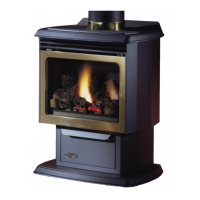
Vermont Castings RFSDV34 - User Manual

Vermont Castings RFSDV34
36 pages
Print Icon
To Next Page IconTo Next Page
Loading...
RFSDV_24_34_line
1_3550
rev. 0602 rjs
Installation Instructions and
Homeowners Manual
10003550 6/08 Rev. 6
DO NOT STORE
OR USE GASOLINE OR
OTHER FLAMMABLE VAPORS
AND LIQUIDS IN THE VICINITY
OF THIS OR ANY OTHER
APPLIANCE.
WHAT TO DO IF YOU SMELL GAS:
Do not try to light any appliance.
Do not touch any electric switch;
do not use any phone in your
building.
Immediately call your gas
supplier from your neighbors
phone. Follow the gas suppliers
instructions.
If you cannot reach your gas
supplier call the fire department.
WARNING!
IF THE INFORMATION IN THIS
MANUAL IS NOT FOLLOWED
EXACTLY, A FIRE OR
EXPLOSION MAY RESULT
CAUSING PROPERTY
DAMAGE, PERSONAL INJURY
OR LOSS OF LIFE.
PLEASE READ THIS MANUAL
BEFORE INSTALLING AND
USING APPLIANCE
INSTALLER/CONSUMER
SAFETY INFORMATION
FOR YOUR SAFETY
Installation and service must
be performed by a qualified
installer, service agency or
the gas supplier.
Freestanding Direct Vent
Fireplace
Models: RFSDV24, RFSDV34
INSTALLER: Leave this manual with the appliance.
CONSUMER: Retain this manual for future reference.

Other manuals for Vermont Castings RFSDV34

Questions and Answers

  • C
    Christine ByrdAug 2, 2025
    How to fix battery icon on LCD on Vermont Castings Stove transmitter?
    • T
      Thomas CrossAug 2, 2025
      If you see a battery icon on the LCD of your Vermont Castings Stove transmitter, it likely indicates a low battery. Replace the batteries, ideally every 6 months. Also, ensure the batteries are correctly installed. If the issue persists, try pressing the reset button on the back of the transmitter.
  • B
    Billy CampbellAug 8, 2025
    Why is the LCD display blank on my Vermont Castings Stove?
    • T
      thompsonmaryAug 9, 2025
      If the LCD display on your Vermont Castings Stove is blank, the first step is to replace the batteries, and it's recommended to do this every 6 months. Then, check the battery installation to ensure they are correctly placed. If the screen remains blank, press the reset button on the back of the transmitter.
  • A
    amy46Aug 16, 2025
    What to do if blower is not on after the Vermont Castings Stove is turned on?
    • J
      Jordan CampbellAug 16, 2025
      If the blower on your Vermont Castings Stove isn't working after turning on the stove, ensure the blower setting isn't off by pressing the FAN key to select your desired fan speed. Also, check the blower delay setting by pressing and holding the Fan key to set the desired ON/OFF delays in minutes.
  • M
    michaelcochranAug 25, 2025
    Why does my Vermont Castings Stove LCD display show a “funny” display?
    • M
      Micheal AnthonyAug 26, 2025
      If the LCD display on your Vermont Castings Stove shows a 'funny' display, it is likely due to low battery. To resolve this, replace the batteries, and consider changing them every 6 months. Also, check the battery installation. As a last resort, press the reset button located at the back of the transmitter.

Summary

INSTALLER;CONSUMER SAFETY INFORMATION

General Safety Guidelines

Critical safety warnings and precautions for installation and operation.

Gas Leak Detection Procedure

Steps to follow if a gas smell is detected.

Installation & Operating Instructions

Operating Instructions

Lighting and Operating Instructions

Safety Checks Before Lighting

Essential safety precautions and checks before lighting the pilot.

Pilot Lighting Procedure

Step-by-step guide for safely lighting the pilot light.

RF Comfort Control Valve Operation

Troubleshooting

Common Operational Issues and Solutions

Diagnosis and resolution for common operational errors and failure codes.

LIMITED LIFETIME WARRANTY

Warranty Terms and Limitations

Details of coverage, conditions, exclusions, and limitations of the warranty.

Vermont Castings RFSDV34 Specifications

General IconGeneral
BrandVermont Castings
ModelRFSDV34
CategoryIndoor Fireplace
LanguageEnglish

Related product manuals