EasyManua.ls Logo

Versa Networks CSG700 Series - User Manual

Versa Networks CSG700 Series
39 pages
Print Icon
To Next Page IconTo Next Page
Loading...
CSG700 Series Hardware Guide
At a Glance
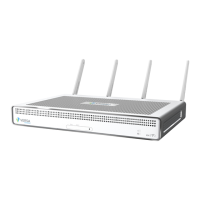
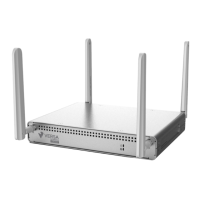
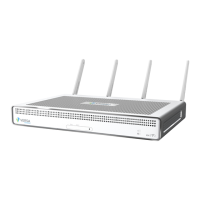
The Versa Cloud Services Gateway (CSG) 700 series appliances deliver highly secure site-to-site data connectivity to
small- and medium-sized businesses and to home offices.
These appliances provide the following features:
Unified board design that supports different CPUs and memory sizes
Up to 10 Ethernet ports including:
Four built-in 1 Gigabit per second (GB) Ethernet over copper (EoC) ports
Two 1-GB EoC or SFP ports, available through separate interfaces
Four 1-GB EoC with Power over Ethernet (PoE) ports, available if a Network Interface Card (NIC) module is
installed
MDI and MDIX autoswitchable EoC ports
Two USB ports for plugging in external LTE or WiFi modems
PoE source support on four Ethernet ports
Two built-in wireless slots
GPS connector for geographical location
External AC power supply
Kensington security lock to physically lock down the appliance
Fanless design
Fixed chassis with no field-replaceable parts
Desktop mount or rack-mountable in a 19” rack
CSG700 Appliance Models
The CSG700 appliances are available in the following models:
CSG730
CSG750
CSG770
https://docs.versa-networks.com/Hardware/Cloud_Services_Gateway_700_Series/Complete_CSG700_Series_Hardware_Gui…
Updated: Tue, 18 Oct 2022 06:10:27 GMT
Copyright © 2021, Versa Networks, Inc.
1
Question and Answer IconNeed help?

Do you have a question about the Versa Networks CSG700 Series and is the answer not in the manual?

Summary

At a Glance

Key Features Overview

Overview of the CSG700 series appliance's hardware features and capabilities.

Appliance Model Listing

Lists the available CSG700 series appliance models.

Chassis Views

Front Panel Component Identification

Details of the CSG700 appliance's front panel, including LEDs and SIM slots.

Rear Panel Component Identification

Details of the CSG700 appliance's rear panel, including ports and buttons.

CSG700 Series Appliance Specifications

Chassis Specifications

Services and Slot Density Details

Specifies the number and types of ports and slots available on the CSG700 chassis.

Power Supply Specifications

Details electrical input voltage, frequency, and power consumption.

Chassis Physical Dimensions

Provides physical dimensions and weight of the CSG700 appliance chassis.

Operating Conditions

Specifies the environmental conditions under which the appliance operates.

Storage Conditions

Specifies the environmental conditions for storing the appliance.

CSG700 Series Appliance SKUs

SKU Format and Model Indicators

Explains the structure of CSG700 series SKUs and the meaning of its components.

Regulatory Compliance Overview

Safety and Security Compliance Standards

Lists safety standards (e.g., UL, IEC) and security features (e.g., TPM).

EMC and Environmental Compliance

Details electromagnetic compatibility (EMC) and environmental (RoHS) compliance.

Product Certifications

European Union Certifications

Lists product safety and RF certifications for the European Union.

America Region Certifications

Lists product safety and RF certifications for North and South America.

Japan Region Certifications

Lists telecom, radio, and EMI certifications for Japan.

Export Control Information

ECCN, HTS, and CCATS Number Details

Provides export control classification numbers for software modules and hardware.

Front Panel Component Details

Front Panel LED Indicators

Describes the status and power LEDs located on the front panel of the appliance.

SIM Card Slots Usage

Rear Panel Component Details

Rear Panel LED Indicators

Details the status LEDs on the rear panel and their meaning.

Power Button Operation Guide

Reset Button Functionality

Factory Default Reset via CLI

Kensington Security Lock Slot

GPS Input Connector

Network Interface Cards (NICs)

NIC Types and Supported Models

Describes the different types of Network Interface Cards (NICs) supported by the CSG700 series.

NIC Type Specifics

Gigabit Ethernet NIC Options

Details on Gigabit Ethernet NICs, including PoE options and port configurations.

ADSL;VDSL and T1;E1 NIC Options

Details on NICs for ADSL/VDSL and T1/E1 connectivity, including Annex support.

NIC Module Specifications

NIC Item and Power Specifications

Technical specifications for NICs, including power consumption and system input.

NIC Physical Dimensions

Physical dimensions (height, width, depth) of the NIC modules.

NIC Module Environment and Weight

NIC Module Weights

Weights of various NIC modules.

NIC Operating and Storage Environment

Environmental conditions for NIC module operation and storage.

LTE Modem Module Details

LTE Modem Technical Specifications

Technical specifications for the LTE modem, including data rates and supported bands.

LTE Modem Functionality

LTE Modem Capabilities and Features

Details on LTE modem features like firmware upgrade, secure boot, and carrier aggregation.

LTE SIM Card Installation Procedures

Instructions for inserting SIM cards into the LTE modem module for activation.

WiFi Access Point Module

WiFi AP Module Capabilities

Overview of WiFi AP module features, including dual-band operation and MIMO support.

WiFi AP Module Security and Management

WiFi AP Security Features

Details on the WiFi AP module's security engine and encryption methods.

Ethernet Port to VNI Mapping

Diagram and explanation of Ethernet port to Virtual Network Interface (VNI) mapping.

Power Supply and Airflow Management

AC Power Supply Unit Information

Information on the AC power supply unit and its specifications.

Airflow Requirements for Cooling

Supported SFP Transceivers

Compatible Remote Switches

Ethernet Connection Recommendations

Compatibility Issues and Workarounds

General Installation Guidelines

General Safety Guidelines

FCC Interference Statement

FCC Cautionary Notes

Radiation Exposure Statement

Regional Interference Statements

Antenna Gain Specifications for Radio Modules

NBTC Thailand Statement

Site Preparation for Installation

Site Preparation Guidelines

Instructions for preparing the physical environment for appliance installation.

Environmental Requirements for Operation

Specifies environmental conditions like air circulation, temperature, and humidity for operation.

Rack Mounting Requirements

CSG700 Series Appliance Installation Guide

Unpacking the CSG700 Series Appliance

Step-by-step guide on how to unpack the CSG700 series appliance and its accessories.

CSG700 Series Appliance Packing List

Mounting the CSG700 Series Appliance in a Rack

Required Tools for Rack Mounting

Lists the necessary tools for physically mounting the appliance into a 19-inch rack.

Rack Mounting Procedure Steps

Detailed steps for attaching mounting ears and inserting the appliance into a rack.

Connecting the CSG700 Series Appliance

Step 1: Connect AC Power

Step 2: Configure Management Console Connection

Default Console Port Settings

Default serial port settings (baud rate, data bits, parity, flow control) for console connection.

PuTTY Configuration Guide

Step-by-step instructions for configuring the PuTTY terminal emulator for console access.

Step 3: Connect Appliance to Management Console

Versa Networks CSG700 Series Specifications

General IconGeneral
ModelCSG700 Series
CategoryGateway
VPN SupportIPsec, SSL VPN
Power SupplyRedundant Power Supplies
InterfacesMultiple 1G/10G Ethernet ports
Security FeaturesFirewall, Anti-Malware
ManagementCLI

Related product manuals