At a Glance
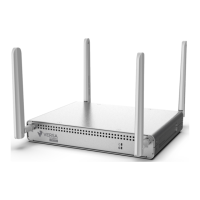
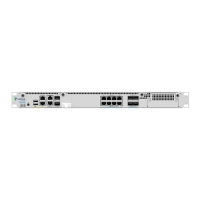
The Versa Cloud Services Gateway (CSG) 300 series appliances deliver highly secure site-to-site data connectivity to
small businesses and to home offices.
These appliances provide the following features:
• Single hardware platform that supports different CPUs and memory sizes
• Management Ethernet ports with dual use and dedicated options:
• One RJ45 RS232 console port
• One USB 2.0 management port for plugging in external LTE or WiFi modems
• One Cu GE dual purpose port for data and management
• MDI and MDIX autoswitchable EoC ports
• PoE source support on four Ethernet ports with NIC module add-on
• Wireless options:
• CSG350–Two built-in wireless slots
• CSG355 and CSG365–Three dedicated built-in wireless slots to support LTE
• External AC power supply
• Fan-based cooling
• Desktop or ceiling mount, rack-mountable in a 19” rack
CSG300 Appliance Models
The CSG300 appliances are available in the following models:
• CSG350—Compact and optimized appliance for deployment in small branches (up to 75 users) that require
advanced application and cloud intelligence with hierarchical QoS, providing a cost-effective SD-WAN solution.
• CSG355–Powerful appliance perfect for deployment in both small- and medium-sized branches that need
advanced SD-Security (NGFW and UTM) along with comprehensive advanced application and cloud-intelligent
SD-WANservices on-premises.
• CSG365—High performance, powerful appliance for deployment at a medium-sized branch locations that
require advanced application and cloud-intelligent SD-WAN services, advanced SD-Security (NGFW and UTM).
The CSG300 appliance models provide the following CPU, memory, and storage sizes. See Table 1.
Table 1: CSG300 Appliance Models
https://docs.versa-networks.com/Hardware/Cloud_Services_Gateway_300_Series/Overview/At_a_Glance
Updated: Tue, 31 Mar 2020 19:09:37 GMT
Powered by
1

 Need help?

 To Next Page
 General