2.
Place a waypoint on the target drop zone
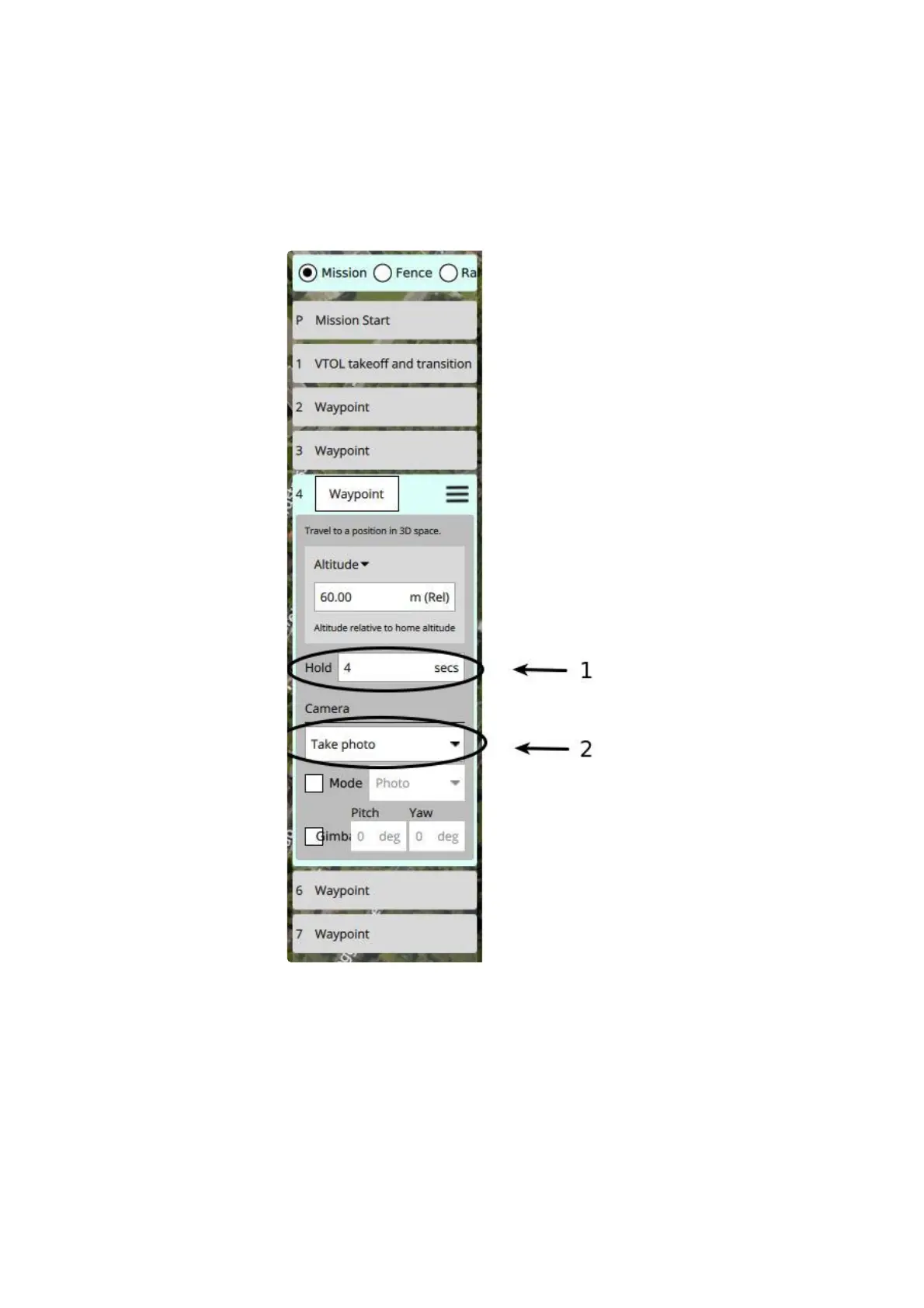
3. Change the "Hold" value of the waypoint to 4 seconds, indicated below (1)
1. If the payload is dropped too late use a lower value
2. If the payload is dropped too soon use a higher value
4. Expand the "Camera" options by clicking on it
5. Set the camera action to "Take photo", indicated below (2)
Multi rotor precision drop
When planning a precision drop the vehicle will return to hover mode, drop the payload, and return back to
fixed wing mode. This requires proper planning and should only be performed in low wind conditions (<
6m/s). When using precision drop please make sure that the vehicle has sufficient battery power to do so. At
minimum 20% battery use must be considered for this procedure.
To plan a precision drop use the following steps;
1. Plan a standard mission as indicated in the section. Planning a mission
2



 To Next Page