Need help?
Do you have a question about the Vertilux VTi Smart Hub and is the answer not in the manual?
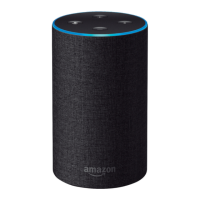
Overview of using Amazon Echo and Alexa to control Vertilux Celtic Motors and shades.
Prerequisites: VTi Smart Hub, HomeMate app account, and Alexa app readiness.
Guidelines for effective voice commands and naming shades in the VTi HomeMate app.
Steps 1-3: Locating and choosing the Vertilux Shades skill within the Alexa application.
Steps 4-6: Enabling the skill and connecting your VTi HomeMate account.
Steps 7-9: Enabling Alexa to find your shades and setting up custom routines.
Steps 10-12: Managing devices, using routines, and operating shades via voice commands.
 General
| Control | Mobile App, Voice Control |
|---|---|
| Operating Temperature | 0°C to 40°C |
| Certifications | CE, FCC |
| Connectivity | Wi-Fi, Bluetooth, Zigbee |
| Compatibility | Amazon Alexa, Google Assistant |
| Power Supply | 100-240V AC, 50/60Hz |
| Operating Humidity | 10% to 90% RH (non-condensing) |

 To Next Page