To contact Vertiv Technical Support: visit www.VertivCo.com
© 2019 Vertiv Co. All rights reserved. Vertiv and the Vertiv logo are trademarks or registered trademarks of Vertiv Co. All other names and logos referred to are trade names,
trademarks or registered trademarks of their respective owners. While every precaution has been taken to ensure accuracy and completeness herein, Vertiv Co. assumes no
responsibility, and disclaims all liability, for damages resulting from use of this information or for any errors or omissions. Specifications are subject to change without notice.
LIEBERT® PST5™ 350 – 500 VA
Quick Installation Guide
2 590-1789-501C/SL-70204_REV2_3-19
Setup and Start-up
Inspect the UPS for any signs of
obvious damage. If damage is
visible, do not proceed with the
setup and call our warranty support
line for assistance 1-800-222-5877
menu option 3, e mail:
microups.warranty@vertivco.com.
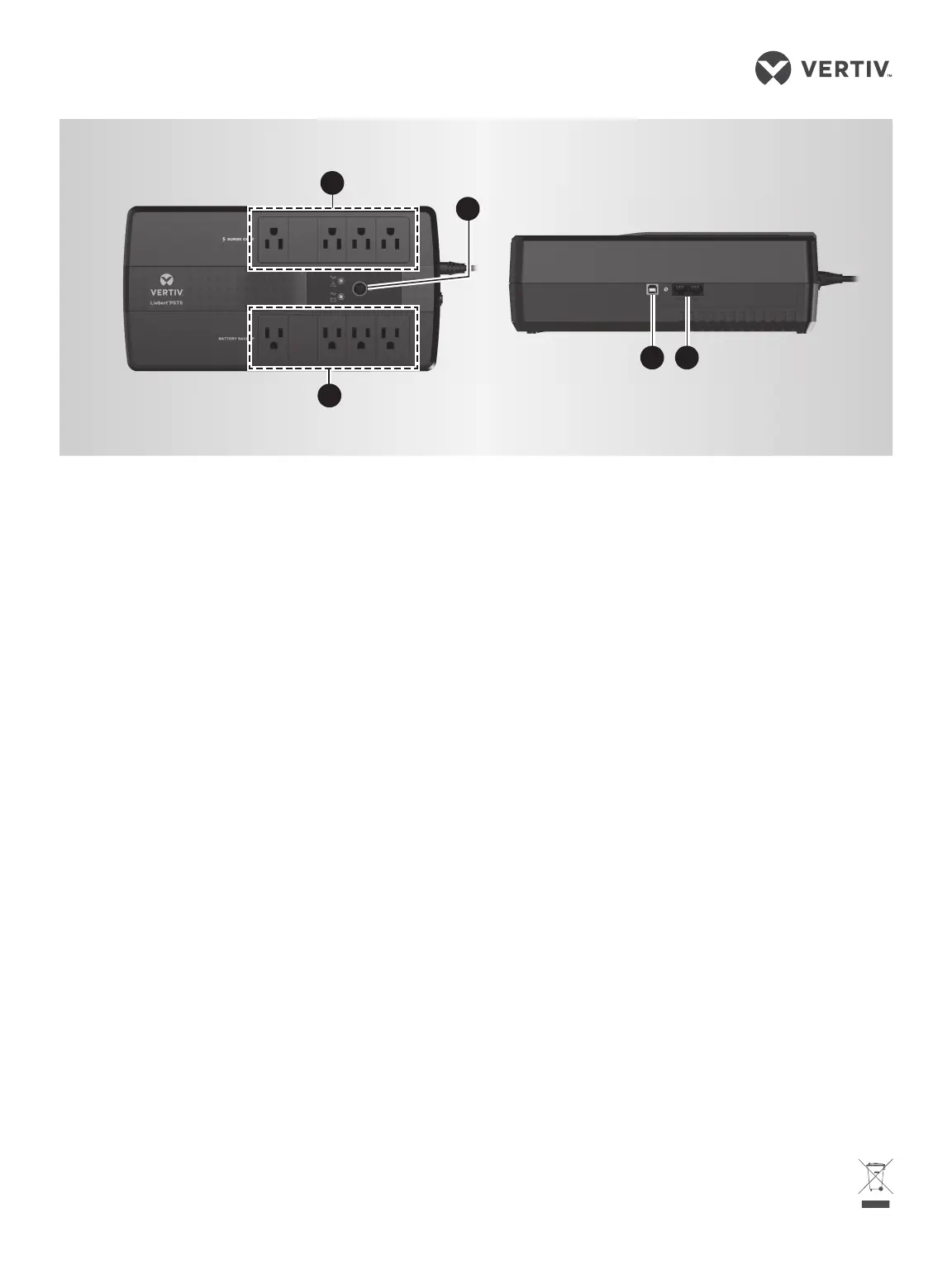
1. The UPS has 4 battery-
backed and surge-
protected receptacles
and 4surge-protected-
only receptacles.
Plug your critical equipment
(such as computer, monitors,
etc.) into the battery-backed
receptacles and your less-
critical equipment (such as
printers and other less-often
used peripherals) into the
surge-only receptacles.
2. To use the USB
communication,
plug the provided cable into the
port on the UPS and the other
end into an open USB port on
your computer. This allows
unattended shutdown of your
computer using either the
built-in feature within the
Microsoft® Windows® operating
system or network-connected
Vertiv or third-party shut-down
software. Use of this feature is
not required for proper
operation of the UPS.
3. To protect your computer
network connection or
telephone,
use the network/telephone
surge-protection ports on the
side. Use the “IN” port to
connect the line from the wall
jack and the “OUT” port to
connect to your device port.
Use of this feature is not
required forproper operation of
the UPS.
4. Start the UPS.
Plug the UPS input cord into
the wall outlet. Plug-in all
equipment to protect in the
appropriate receptacles. To
turn on the UPS, press and hold
the ON/OFF button until you
hear the UPS beep, then
release the button. The
connected equipment
immediately receives power
and the UPS starts a short, self
system test (electronics and
battery check). When the unit
passes all self checks, only the
green LED should be lit
indicating normal operation.
While every precaution has been
taken to ensure that the battery is
in good condition, we recommend
allowing the UPS to charge the
battery for at least 12 hours prior to
providing full back-up time
protection for any utility-power
abnormality.
1
4
2 3
Liebert® PST5
TM
1










 To Previous Page