English - 17IB v7.3.0 2021 © 2021 Vestel - All rights reserved
1.1.2 - ATTACHED CABLE MODEL
1.1.2.1 - VEHICLE CONNECTION & CHARGING
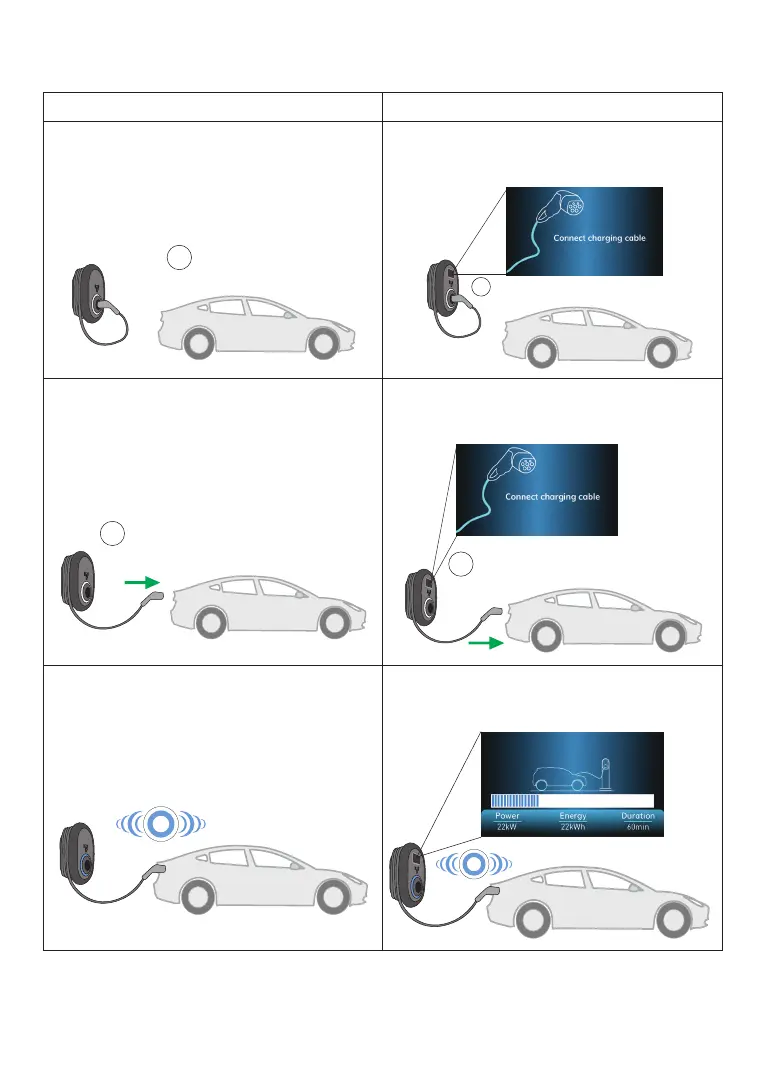
Model Without Display Model With Display
1 - Ensure that your vehicle and the station is
ready for charging.
1 - Ensure that your vehicle and the station is
ready for charging.
2 - Insert the charging plug to the vehicle
inlet and charging station socket outlet.
2 - Insert the charging plug to the vehicle
inlet and charging station socket outlet.
3 - Charging starts automatically, and status
indicator LED glows in blue.
3 - Charging starts automatically, and status
indicator LED glows in blue.
No LED Indication
No LED Indication
No LED Indication
No LED Indication



 To Next Page