English - 33IB v7.3.0 2021 © 2021 Vestel - All rights reserved
ERROR AND FAULT CONDITIONS
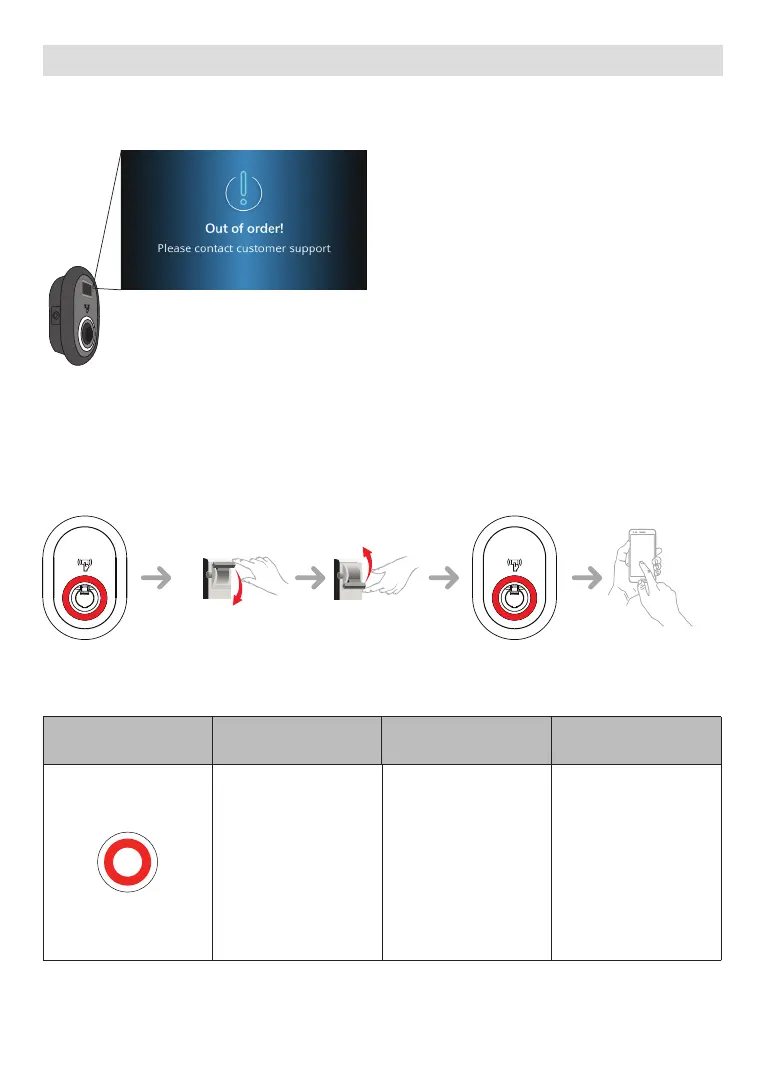
Due to any fault, in display models, you can see “Out of order!“ screen in charging station.
1 - GENERAL ERROR CONDITION
If the status information LED is constant red, turn off the charging station and turn on again.
if the LED is still constant red then call an authorized service.
(0850) 393 56 33
2 - OTHER ERROR CONDITIONS
Status Indicator Problem Possible Causes
Recommended
Solutions
Constant LED. AC supply voltage may
not be in the range in
the operation manual,
grounding connection
may not be performed
and/or phase/neutral
connections may
be reversed or the
charging station may
have a fault.
Please ensure that
the voltage is in the
specified range
and that the
grounding connection
have been performed.
If the button is still
solid red, please
contact authorized
service.



 To Next Page