English - 29IB v7.3.0 2021 © 2021 Vestel - All rights reserved
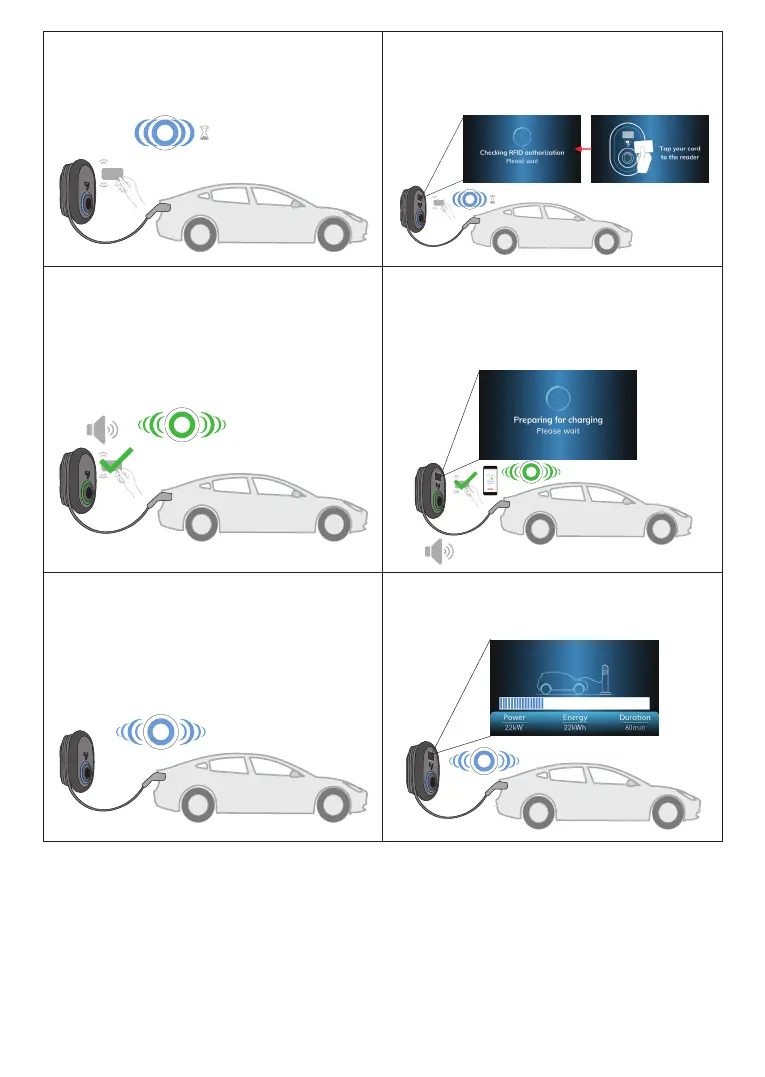
3- Tap the RFID card to the RFID reader.
You may start charging with a card which is
registered to your charging operator.
3- Tap the RFID card to the RFID reader.
You may start charging with a card which is
registered to your charging operator.
4- You may start charging with a card that has
been authorized before. If the RFID Card is
authorized by OCPP Central System, charging
will start.
4- You may start charging with a card that has
been authorized before. If the RFID Card is
authorized by OCPP Central System, charging
will start.
5 - Charging starts and status indicator LED
glows in blue.
5 - Charging starts and status indicator LED
glows in blue.
NOTE
• Charging operation is rejected by the charging station when you want to start charging with
an unauthorized card.
• It takes around one minute to reboot your charging station after it resets.
4 sec.
4 sec.



 To Next Page