This document provides the user manual for a VEVOR Drawer Fridge Freezer. The device is designed to offer refrigeration and freezing capabilities, with specific models catering to different storage needs, including wine bottles.
Function Description
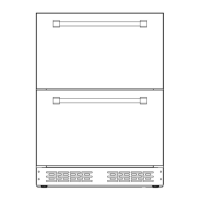
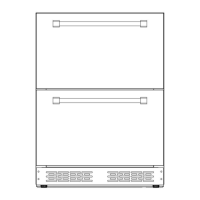
The VEVOR Drawer Fridge Freezer is an appliance designed for cooling and freezing items. It features a drawer-style design, allowing for easy access to stored contents. The unit is available in single-zone (fridge only) and dual-zone (fridge/fridge or fridge/freezer) configurations, indicated by the model numbers. It utilizes a digital control panel for temperature settings and includes internal lighting. The appliance is suitable for both freestanding and built-in installations, with specific ventilation requirements for the latter.
Important Technical Specifications
Models:
- BC-145WS (Single Zone Fridge)
- BC-145WD (Dual Zone Fridge/Fridge)
- BCD-145WD (Dual Zone Fridge/Freezer)
Electrical:
- Voltage / Frequency: AC115V 60Hz for all models.
- Amperage: 1.0A for all models.
- Input Power: 87W for all models.
- Power Cord: 1 meter in length, fixed on the right side at the back (when looking from the front). Requires a standard 115/120 Volt AC ~/60Hz electrical ground outlet with three-prong. A surge protector is advised.
Capacity:
- BC-145WS: 145L total (UP: 74L, Down: 71L).
- BC-145WD: 138L total (UP: 16 bottles Red Wine, Down: 68.5L).
- BCD-145WD: 138L total (UP: 69.5L, Down: 68.5L).
Refrigerant:
- Type: R600a (environmentally friendly, flammable).
- Quantity: 37g for BC-145WS and BC-145WD; 45g for BCD-145WD.
Temperature Zones:
- BC-145WS: 1~10°C (34~50°F).
- BC-145WD: UP 5~22°C (41~72°F), DN 1~5°C (34~41°F).
- BCD-145WD: UP 3~10°C (37~50°F), DN -18~3°C (0~37°F).
Dimensions (Width x Depth x Height):
- 23.5" x 22" x 32.2"~34.2" (595 x 560 x 820~870mm) for all models.
Usage Features
Installation:
- Location: Must be in a well-ventilated area, away from heat sources and direct sunlight. Ambient temperature should be between 60°F (16°C) and 90°F (32°C) for optimal performance. Avoid moist areas.
- Leveling: The unit is equipped with 4 adjustable feet for leveling. It is recommended to tighten the back feet to the maximum and adjust the front feet to level the unit.
- Built-in Installation: Requires specific minimum installation dimensions (595mm width, 560mm depth, 820-870mm height) to ensure proper ventilation. "Built-in" units are front venting.
Operation:
- Initial Use: Allow 24 hours after installation before switching on. If unplugged or powered off, wait 3 to 5 minutes before restarting.
- Power On/Off: Press the power button for a few seconds.
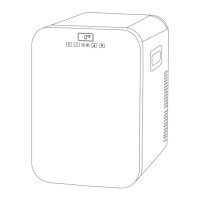
- Control Panel Lock: The control panel automatically locks after 5 seconds of inactivity. To unlock, press and hold both UP and DOWN buttons for 5 seconds.
- Temperature Setting: Use the UP and DOWN buttons to adjust the temperature. The display shows the actual internal air temperature by default.
- Temperature Display: Switch between Fahrenheit (°F) and Celsius (°C) using the °C/°F button.
- Lighting:
- Single Temp Fridge: Light goes off automatically when both drawers are closed; goes on when either drawer is pulled out.
- Double Temp Refrigerator: Light goes off automatically when the top drawer is closed; goes on when the top drawer is pulled out. No light in the bottom drawer.
- Memory Function: In case of power interruption, previous temperature settings are automatically preserved.
Temperature Settings (Factory Presets):
- BC-145WS: 41°F (5°C).
- BC-145WD: Upper zone 54°F (12°C), Lower zone 41°F (5°C).
- BCD-145WD: Upper zone 41°F (5°C), Lower zone 5°F (-15°C).
Maintenance Features
Safety Precautions:
- Grounding: Plug into a grounded 3-prong outlet. Do not remove the grounding prong, use adapters, or extension cords unless specifically UL/CUL-Listed and rated for 115 volts and at least 10 amperes.
- Flammable Refrigerant (R600a): Ensure refrigerant tubing is not damaged during transportation or installation. Avoid sharp objects near the appliance. In case of damage, disconnect from mains, ventilate the room, and contact customer service.
- Child Safety: Keep out of reach of children. Before discarding, remove the door but leave shelves in place to prevent entrapment.
- Cleaning: Disconnect power before cleaning. Do not use flammable fluids or solvent-based cleaning agents.
- Repair: Do not attempt to repair or replace parts unless specifically recommended. Refer all other servicing to a qualified technician. Unauthorized intervention voids the warranty.
Troubleshooting Guide:
The manual includes a troubleshooting guide for common issues such as:
- Unit not operating (not plugged in, circuit breaker tripped, fuse broken).
- Unit not cold enough (temperature setting, door opened too often, door not closed, gasket not sealing).
- Unit turns on and off frequently (room temperature, contents, door issues, temperature control, gasket).
- Light not working (not plugged in, circuit breaker, fuse, LED light out of order, door pressure switch).
- Vibrations (unit not level).
- Noise (rattling from refrigerant, gurgling, popping/crackling from contraction/expansion of walls, unit not level).
- Door not closing properly (door slide screw loose, debris stuck, slide track broken).


 To Next Page

 General