8
ENGLISH
REAR PANEL
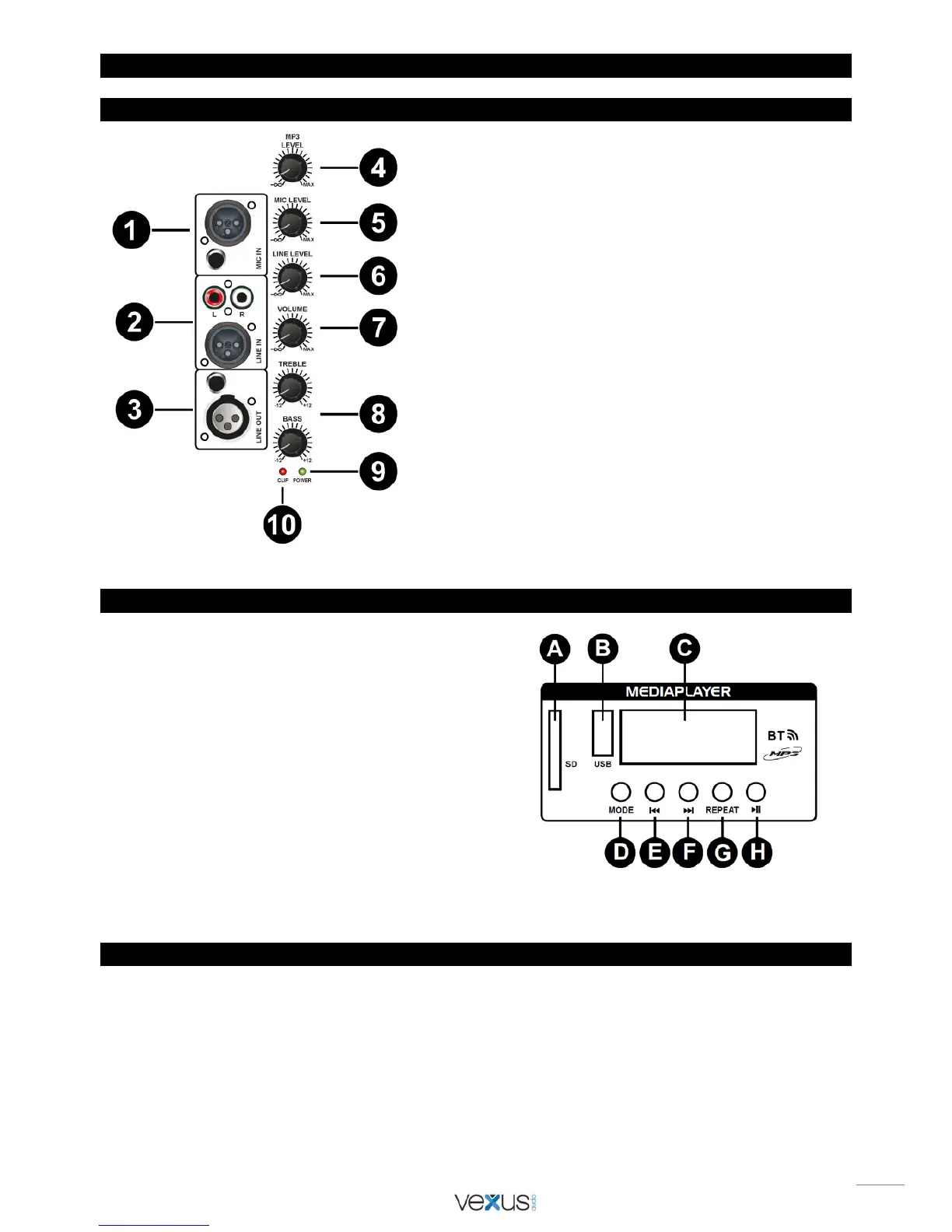
1. Input connector for microphone.
2. Line input connector for the audio input source e.g.
mixer, CD player, etc.
3. Line output connector to a second box or amplifier.
4. MP3 volume control for MP3 Panel.
5. Volume control for the microphone
6. Volume control for the line input
7. Volume control for the speaker output.
8. Tone control.
9. Power ON/OFF LED indicator
. This clear green indicator
will light when the amplifier is turned on.
10. Clip LED Indicator. These LED will light up when
amplifier are on max power. It can occur that these LED
will lit up now and then, this is not a problem. But if it
lights up continually you need to adjust the volume
down, otherwise permanent damage to equipment might
occur!
MEDIAPLAYER
A. SD CARD CONNECTION
For connection of a SD CARD with MP3 files
B. USB CONNECTION
For connection of a USB stick with MP3 files
C. DISPLAY
Shows MP3 information
D. MODE
Select playing from USB stick, SD card or Bluetooth
E. PREV
Play previous track
F. NEXT
Play next track
G. REPEAT
Track repeating
H. PLAY/PAUSE
Track play or pause mode
HOW TO CONNECT WITH YOUR BLUETOOTH DEVICE:
First turn on the speaker, then press on “MODE” (D) till you see “AUX”. Then use your mobile or computer to search a Bluetooth
device. When you find the
“BT-STREAM” then connect. The password is: 0000


 To Next Page