C)
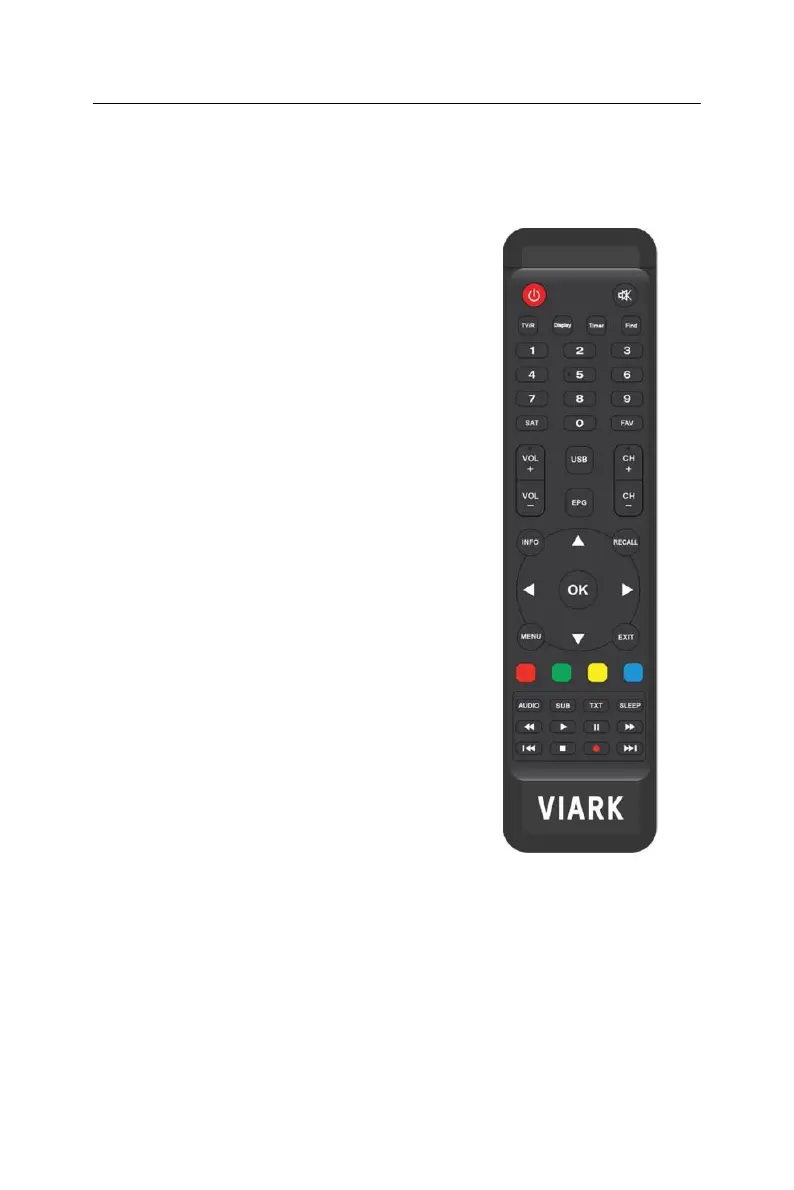
Remote Control
-
POWER: Switch between normal and standby
modes.
-
MUTE: Mute the
audio.
-
TV/R: Switch between TV and
RADIO.
-
DISPLAY: Set the HDMI
mode.
-
TIMER: Enter event
Timer.
-
FIND: Quickly find channels which you
want.
-
NUMERIC KEY (0~9): Enter a TV/Radio
channel
number or menu option
number.
-
SAT: Show the scanned satellite
list.
-
FAV: Display favorite channel list you set
before.
-
VOL+/-: Decrease/Increase the volume in viewing
mode.
-
USB: Enter USB
menu.
-
EPG: Electronic Program
Guide.
-
CH +/-: Change program list from one channel
to
another channel.
-
INFO: Display the program
information.
-
RECALL: Show the previous viewed channels list. Or
switch to the previous viewed channel.
-
▲/▼: Change channel in viewing mode and move
the cursor up/down in menu
mode.
-
◄/►: Decrease/Increase the volume in viewing
mode
and change setting in menu
mode.
-
OK: Activate the highlighted sub menu in menu
mode and activate the channel list in viewing
mode.
-
MENU: Activate main menu or exit to live
channel.
-
EXIT: Exit current menu step by
step.
-
AUDIO: Display the audio
list.
-
SUB:
Display
the
subtitle
language
list
of
current
program.
-
TXT: Display the TXT of the
channel.
-
SLEEP: Set sleep
time.


 To Next Page