4
24
- Press the UP and DOWN keys to scroll to
MANUAL>PROGRAM and press MODE to
select it.
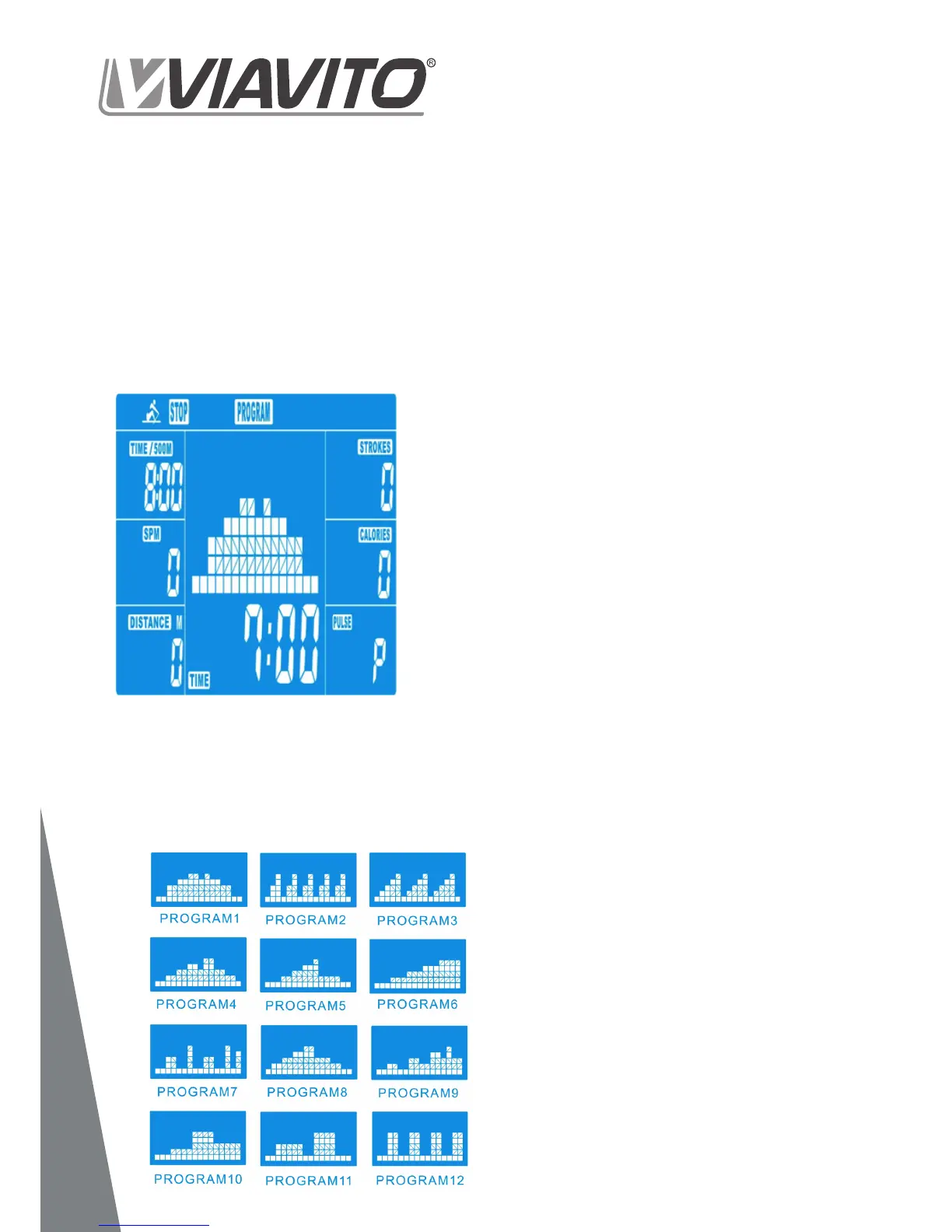
- Press UP and DOWN to select one of the
12 pre-set workouts (Drawing 4).
Set the desired session duration and
- Press START/STOP to start workout.
As soon as the TIME value counts down to
0.00 the program will stop and the console
alarm will sound for 8 seconds. Press any
button to stop the alarm.
- You can adjust the level of resistance
from 1-16 while rowing by pressing the
UP/DOWN keys. The newly set level of
resistance will be shown on the screen.
Program proles:
drawing 5 below. They are split into interval
programs (P2, P3, P7, P12), programs
with increasing resistance (P6, P9, P11)
and programs with both increasing and
decreasing resistance (P1, P4, P5, P8, P10).
These training programs are designed
• As a beginner you should start these
programs slowly and set a low resistance
level.
• You should only graduate to Interval
programs once you have worked out
- Press START/STOP to end exercising.
All training data will remain.
- Press RESET to return to the workout
selection menu.
www.viavito.com
5
2. Pre-set Programs


 To Next Page