EasyManua.ls Logo

Viconics VT7600A - Page 19

Viconics VT7600A
36 pages
Print Icon
To Next Page IconTo Next Page
To Previous Page IconTo Previous Page
Loading...
19 | PIR Ready VT76x7 Series-Installation Guide
** To schedule a day as occupied for 24 hours, set that day Occupied time to 12:00 AM
and Unoccupied time to 11:59 PM There will be a 1 minute unoccupied period every
night at 11:59 PM with this schedule configuration.
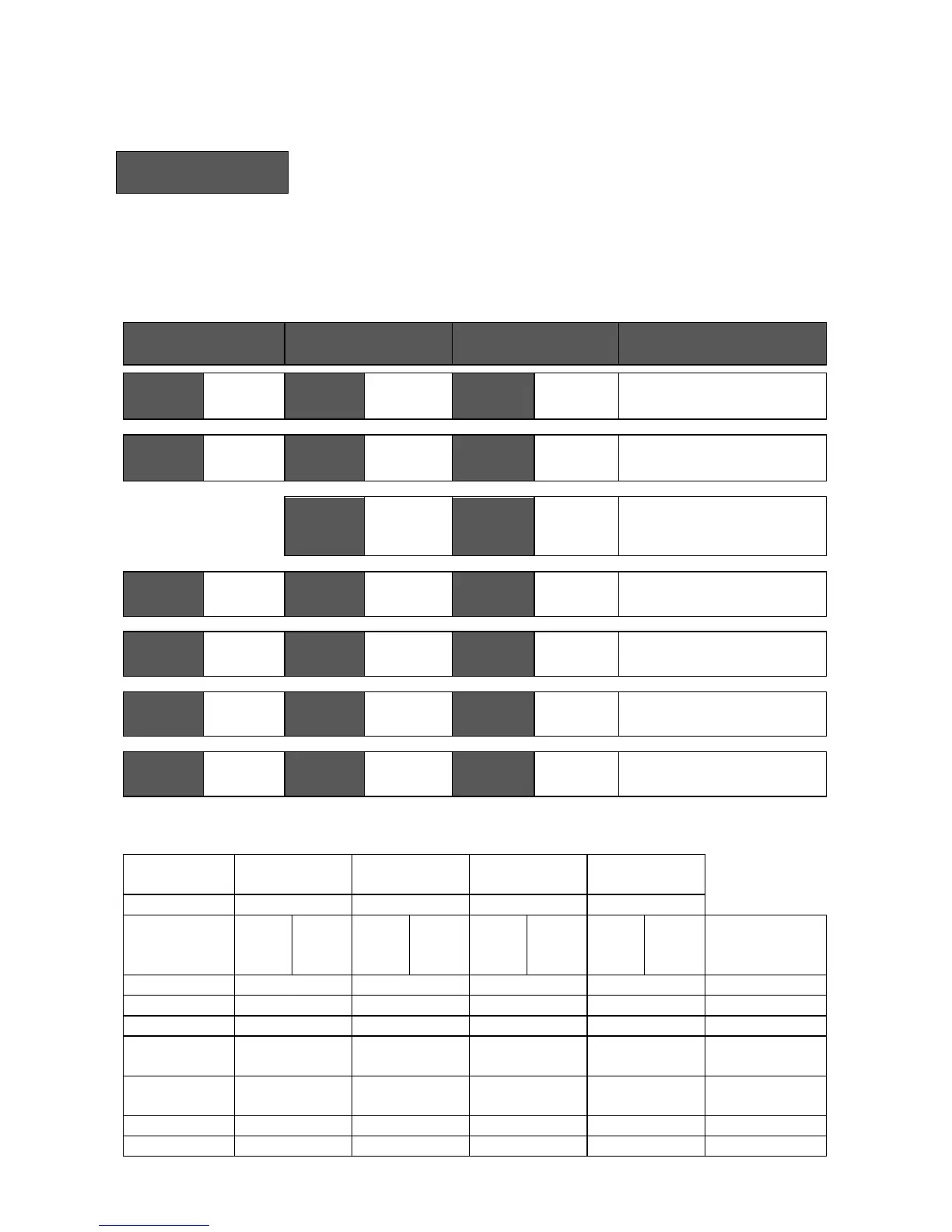
H) Schedule set (4 events)
Schedule
set Y/N
This section of the menu permits the user to set the whether 2 or 4 events is needed. Each
day can be tailored to specific schedules if needed.
4 events can be scheduled per day.
Occupied & Unoccupied periods can be set for each day.
Scheduling the 3 rd. & 4 th. events to the same time will cancel the last period.
Monday timer
Schedule set
Tuesday timer
Schedule set
Wednesday timer
Schedule set
Other days are identical
Monday
set? Y/N
No next
Yes down
Tuesday
set? Y/N
No next
Yes down
Wednesda
set? Y/N
No next
Yes down
Selects the day to be scheduled or
modified
Yes key to access day scheduling, No key to jump to next day
Occupied
Day? Y/N
No next
Yes down
Occupied
Day? Y/N
No next
Yes down
Occupied
Day? Y/N
No next
Yes down
Yes = Daily schedules will be
accessed
No = Unoccupied mode all day
Yes key to access day scheduling, No key to jump to next day
Copy Y/N
Previous
Yes next
No down
Copy Y/N
Previous
Yes next
No down
Yes = Will copy previous day
schedule
No = Daily schedules will be
accessed
Yes key to copy previous day, No key to set new time value for each day
Occupied
00:00 AM
Use ▲▼
To set
value
Occupied
00:00 AM
Use ▲▼
To set value
Occupied
00:00 AM
Use ▲▼
To set
value
Sets Event # 1 Occupied time
Will activate occupied setpoints
Use ▲▼ to set value, Yes key to confirm
Unoccup
00:00 AM
Use ▲▼
To set
value
Unoccup
00:00 AM
Use ▲▼
To set value
Unoccup
00:00 AM
Use ▲▼
To set
value
Sets Event # 2 Unoccupied time
Will activate unoccupied setpoints
Use ▲▼ to set value, Yes key to confirm
Occupie2
00:00 AM
Use ▲▼
To set
value
Occupie2
00:00 AM
Use ▲▼
To set value
Occupie2
00:00 AM
Use ▲▼
To set
value
Sets Event # 3 Occupied time
Will activate occupied setpoints
Use ▲▼ to set value, Yes key to confirm
Unoccup2
00:00 AM
Use ▲▼
To set
value
Unoccup2
00:00 AM
Use ▲▼
To set value
Unoccup2
00:00 AM
Use ▲▼
To set
value
Sets Event # 4 Unoccupied time
Will activate unoccupied setpoints
Use ▲▼ to set value, Yes key to confirm
Ex. #1 Four event retail establishment schedule

Event
Period 1 -
Event 1
Period 1 -
Event 2
Period 2 -
Event 3
Period 2 -
Event 4
Setpoint
Occupied
Unoccupied
Occupied
Unoccupied
Cool
Heat
Cool
Heat
Cool
Heat
Cool
Heat
Daily
72
°F
70
°F
80
°F
62
°F
72
°F
70 °F
80
°F
62 °F
Occupancy
Monday
7.00 AM
5.00 PM
12.00 PM *
12.00 PM *
Day time only
Tuesday
7.00 AM
5.00 PM
12.00 PM *
12.00 PM *
Day time only
Wednesday
7.00 AM
5.00 PM
12.00 PM *
12.00 PM *
Day time only
Thursday
7.00 AM
5.00 PM
7.00 PM
10.30 PM
Day/evening
time only
Friday
7.00 AM
5.00 PM
7.00 PM
10.30 PM
Day/evening
time only
Saturday
12.00 PM *
12.00 PM *
12.00 PM *
12.00 PM *
Unoccupied
Sunday
12.00 PM *
12.00 PM *
12.00 PM *
12.00 PM *
Unoccupied

Related product manuals