7
PRODUCT OVERVIEW
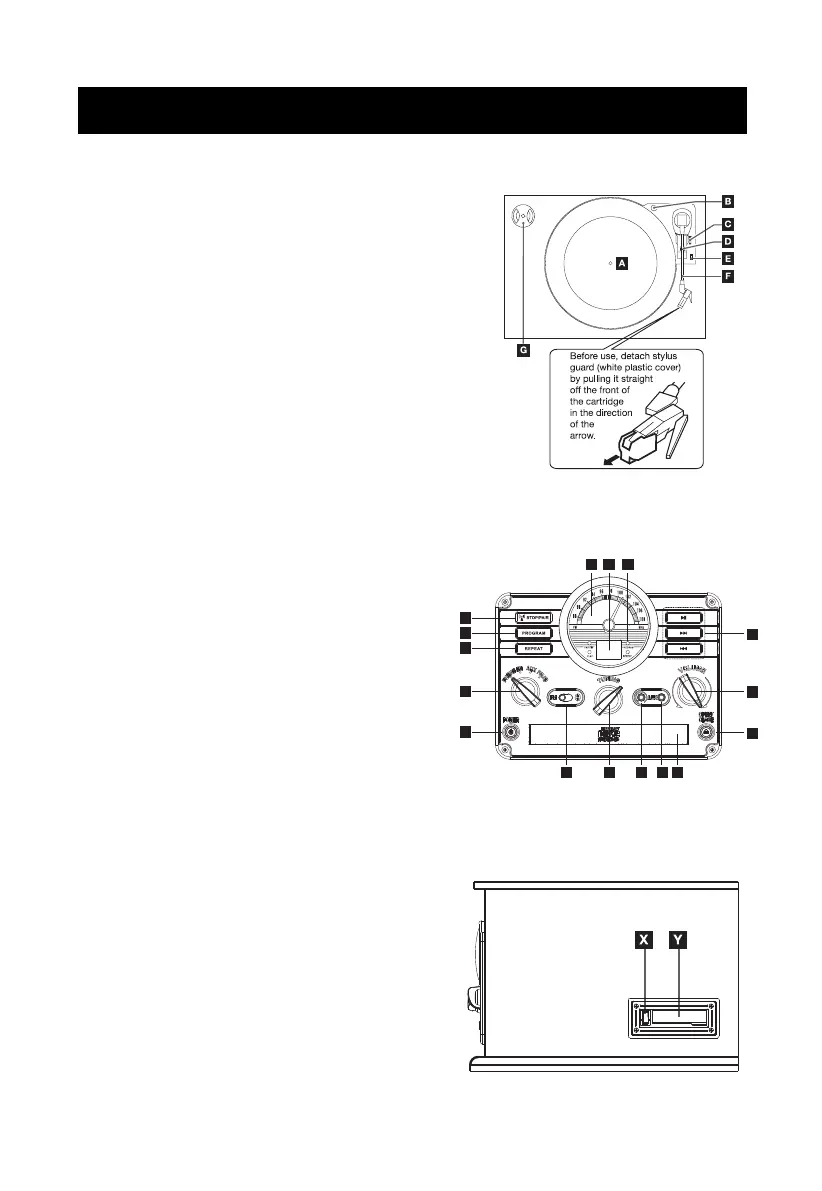
A. Turntable
B. Transportation Screw: Before use, completely
loosen the screw. When transporting the unit,
tighten the screw to secure the turntable.
C. Cue Lever: Use this lever to lift the tone arm.
D. Tone Arm H older
E. Speed Selector
F. Tone Arm
Parts of the Turntable
G. 45 RPM Adaptor and Holder
H. Stop/Pair Button: Press to stop playback in CD
mode. Press and hold to activate Bluetooth
®
pairing.
I. Program Button: Arrange the playback order in
CD mode
J. Repeat Button
K. Playback Control Buttons: PLAY/PAUSE,
NEXT, PREVIOUS.
L. FM dial
M. Display: Display playback information in CD mode.
N. Indicators: FM ST/BT, PLAY, PROGRAM,
REPEAT. The indicator will light up when the
labelled function is activated.
O. Function Knob: Rotate knob to select Phono,
CD, AUX, FM/Bluetooth
®
.
P. Mode Switch: Select FM or BT mode.
Q. Tuning Knob: Tune to a radio station in RADIO
mode.
R. Earphone Jack
S. 3.5mm AUX In Jack
T. CD Compartment Door
U. OPEN/CLOSE Button: Press to open or close
the CD disk tray
V. Volume Knob
W. POWER Button
X. Tape Eject / Fast Forward Button
Y. Cassette Compartment Door
Unit Functions
Side Panel
H
I
J
K
O
W
V
U
L
M N
P Q
R
S
T


 To Next Page