SIMPLE SETUP
BASIC OPERATION
Using the Power Switch, ip the unit’s power ON.
Connect your S1 using one of the wired or wireless pairing modes shown below.
Make sure the S1 is in the proper mode based on the MODE LED color guide on the
Quick Start Guide.
SETTING THE VOLUME
Set the volume knob on the S1 to the middle setting and begin playing music through
the connected speakers at an appropriate level.
With the music playing, adjust the volume knob on the S1 up or down to match the
main speaker volume according to your preference.
After adjusting, the master volume on the connected audio device will control the S1
simultaneously with the speaker’s volume.
WIRED CONNECTION
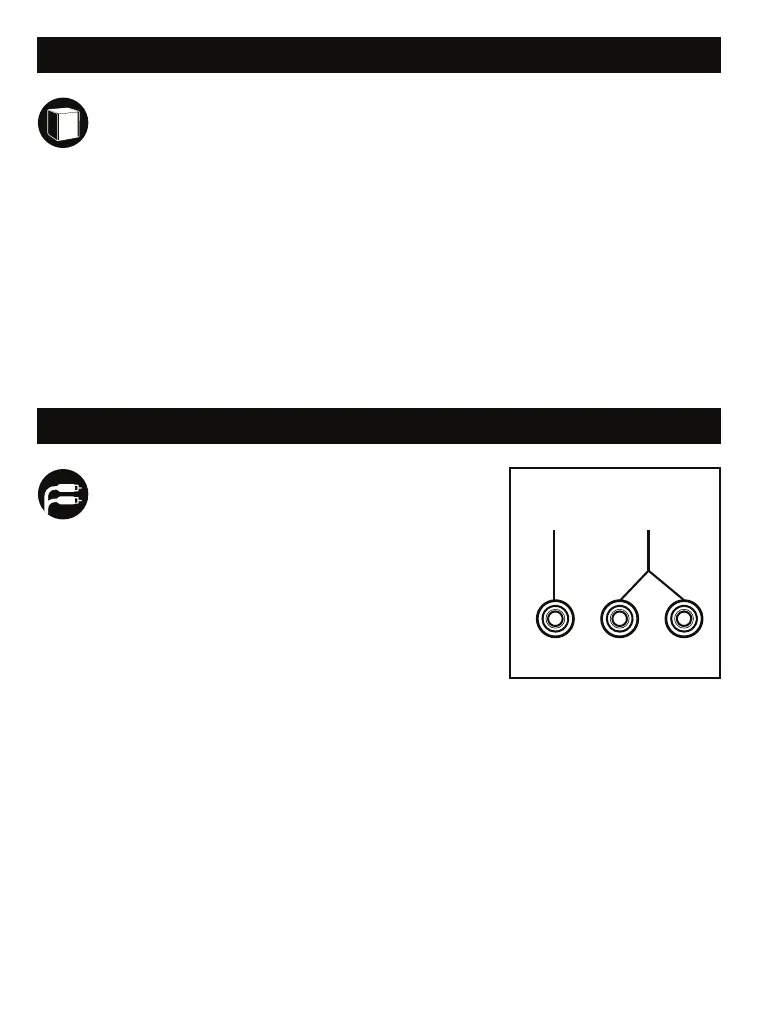
R RCA LSUB-IN
A B
HARDWIRING THE S1 SUBWOOFER
OPTION A (SUB-IN):
(Connection 1) Use the single SUB-IN port if you are
connecting a receiver/audio device with a SUB-OUT
port and you are using a single RCA subwoofer cable
(sold separately)
(Connection 2) Use the single SUB-IN port if you are
connecting a receiver/audio device with Left and
Right pre-outs instead of a single SUB-OUT port by
using the included subwoofer Y cable. Connect the R
and L RCA ends to the external device, and the single
RCA end to the SUB-IN port on the back of the S1.
OPTION B (RCA IN)
(Connection 1, most common for wired connections with the Victrola V1 or M1
using the included Y cable) Use the Left and Right RCA inputs if you are
connecting a receiver/audio device with a Single SUB-OUT port and you are using
the included subwoofer Y cable. The Single RCA end of the Y cable will connect to
the external device, and the R & L RCA ends will connect to the back of the S1.
(Connection 2) Use the Left and Right RCA inputs if you are connecting a
receiver/audio device with Left and Right pre-outs using a standard 2-male to
2-male RCA cable (sold separately).



 To Next Page
 Loading...