EN
12
The camera case is supplied with two protective covers, one is water-
proof, and the other is dust-proof. Please note that the dust-proof
cover WILL NOT protect the camera from water ingress.
The waterproof protective cover is used for underwater, beach, dust
and other adverse environment.
The dust-proof protective cover protects the camera against dust ,
enhances sound quality and also reduce wind noise when you are
riding, jogging, etc.
Dust-proof Cover Replacement
·
·
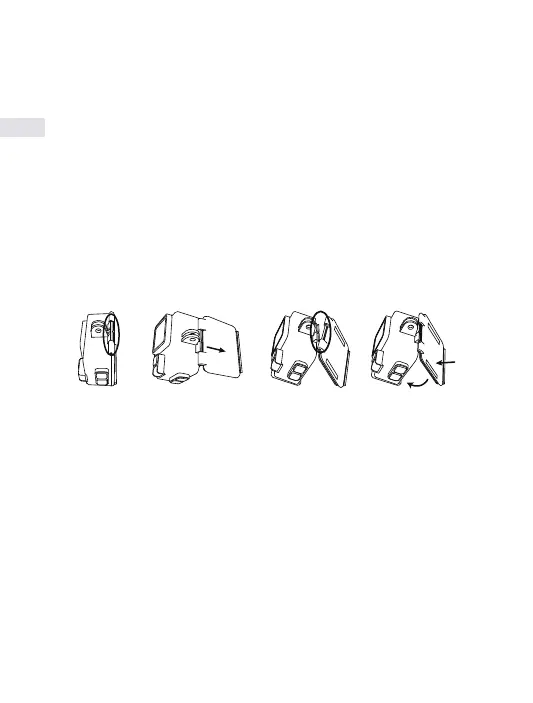
Find the slot of the waterproof case as red circled place showed in
step 1.
Hold the case with your hands as step 2 picture shows, face the slot on
the case front, tear the waterproof back cover off.
Find the dust proof back cover in your accessories, which has two
inter-spaces in left and right side. Insert the lower half of the cover in
the slot, then push the upper half into the slot as step 4 indicates until
the whole back cover being totally installed.
·
·
·
Step 1 Step 2 Step 3 Step 4


 To Next Page