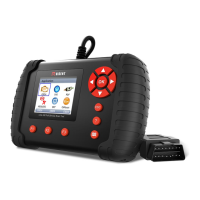
The Vident iLink300 PRO Scan Tool is a professional-level diagnostic handheld tool designed for vehicle system diagnostics across a wide array of car manufacturers. It offers various features for reading and clearing diagnostic trouble codes (DTCs), viewing live data readings, and accessing ECU information.
Function Description
The iLink300 PRO provides comprehensive diagnostic operations, including:
- Vehicle Identification: Automatically or manually identifies the vehicle being tested by acquiring VIN characters, sub-brand, model year, and engine size. It can also save tested vehicle information for quick identification.
- System Selection: Allows users to select specific systems for testing, offering both "Auto Scan" to determine installed control modules and obtain DTC overviews, and "Control Unit" for direct access to specific controllers.
- Diagnostic Functions:
- Read Codes: Reads current, permanent, and history trouble codes stored in the control unit, along with their descriptions.
- Erase Codes: Clears all current and stored DTCs from a selected control module, including temporary ECU information and freeze frame data.
- Freeze Frame Data: Displays a snapshot of critical vehicle operating conditions recorded at the time a DTC was set, aiding in fault determination.
- ECU Information: Shows identification data of the control module under test, such as identification string and coding.
- Live Data: Views and records real-time PID data from the electronic control module. This includes a "Complete Data List" for all supported PIDs and a "Custom Data List" to focus on specific parameters. Data can be viewed in text or graphical format, with options for single or dual PID graphs, and a "Merge Graph" function for intuitive diagnosis.
- Special Functions (& Active Test): Accesses vehicle-specific subsystem and component tests, allowing the tester to output commands to the ECU to drive actuators (e.g., solenoids, relays, switches) and monitor their operation. This helps determine the integrity of the system or parts.
Common Special Services/Functions
The tool also provides quick access to various scheduled service and maintenance operations, which can be found under the main menu, Maintenance menu, or specific control modules:
- Oil Light Service/Reset: Resets the oil service light, oil inspection light, and service mileage/intervals after car service or changing engine oil/electric appliances that monitor oil life.
- ABS Bleeding: Performs bleeding of the brake system to restore ABS brake sensitivity, necessary when the ABS contains air or if ABS components (computer, pump, master cylinder, brake cylinder, brake line, brake fluid) are replaced.
- Battery Matching: Resets the car battery monitoring unit to clear fault information about insufficient battery electric quantity and re-match the battery based on current information. This is crucial when the main battery or battery monitoring sensor is replaced to ensure accurate detection of battery usage and prevent auxiliary function invalidation.
- Electronic Parking Brake (EPB) Service: Allows for service and maintenance of brake systems, including deactivation/activation of the brake control system, bleeding brake fluid, opening/closing brake pads, and setting brakes after disc or pad replacement.
- Diesel Particulate Filter (DPF) Regeneration: Performs DPF cleaning to clear blockages by burning particulates, automatically turning off the DPF light upon completion.
- TPS (Throttle Body Alignment): Initializes the throttle actuation element to return the ECU learning value to its initial status, ensuring accurate regulation of throttle operations and intake air quantity. This is necessary after ECU replacement, disconnection, throttle assembly replacement, intake passage replacement/removal, or throttle cleaning.
- Steering Angle Sensor (SAS) Calibration: Calibrates the Steering Angle Sensor, permanently storing the current steering wheel position as straight-ahead in the sensor EEPROM and clearing its fault memory.
- TPMS Adaptation: Checks tire sensor IDs from the vehicle ECU and performs TPMS programming and reset after tire/TPM sensor replacement or tire rotation.
- Immobilizer: Performs anti-theft key matching to allow the immobilizer control system to identify and authorize remote control keys for car use, necessary when the ignition switch key, ignition switch, instrument panel, ECU, BCM, or remote control battery is replaced.
- Injector Coding: Writes or rewrites injector actual codes in the ECU to control or correct cylinder injection quantity more accurately, required after ECU or injector replacement.
- Gear Learning: Performs crankshaft position sensor adaptive learning to diagnose engine misfires more accurately, essential for cars with Delphi engines or when the engine ECU, crankshaft position sensor, or crankshaft flywheel is replaced.
- Suspension Match: Adjusts car body height, necessary when the car body height sensor or control module in the air suspension system is replaced or the car level is incorrect.
- Sunroof Initialization: Sets sunroof lockup close, close on rainy days, slide/tilt sunroof memory function, and outside temperature threshold.
- Gearbox Match: Learns the gearbox to improve shift quality and compensate automatically according to driving conditions after gearbox dismounting or repair.
- Odometer Calibration: Copies, writes, or rewrites chip data on the instrument panel to display actual mileages, necessary when the vehicle speed sensor is damaged or mileage is incorrect due to instrument panel faults.
- AFS (Adaptive Front Lighting System): Initializes the adaptive headlight system to automatically turn on headlights based on ambient light intensity, monitor driving speed and body posture, and adjust the headlight lighting angle.
OBDII/EOBD Diagnostics
The tool supports all 9 generic OBD modes, including:
- Read Codes: Reads stored, pending, and permanent codes.
- Freeze Frame Data: Views freeze frame data.
- Erase Codes: Clears codes.
- Live Data: Views, records, and plays back real-time PID data.
- I/M Readiness: Views a snapshot of emission system operations, indicating if monitors are OK, Incomplete (INC), or Not Applicable (N/A).
- O2 Sensor Test: Tests O2 sensors.
- On-Board Monitor Test: Receives test results for emission-related powertrain components and systems.
- Component Test: Controls the operation of vehicle components, tests, or systems.
- Vehicle Information: Requests VIN, calibration ID(s), calibration verification numbers (CVN(s)), and in-use performance tracking.
Important Technical Specifications
- Display: Backlit, 2.8" TFT color display.
- Working Temperature: 0 to 60 °C (32 to 140°F).
- Storage Temperature: -20 to 70°C (-4 to 158°F).
- Power Supply: 8-18V vehicle power, 12V AC/DC power.
- Tool Dimensions: 146*92*29mm (L*W*H).
- Gross Weight: 570g.
- Protocols: ISO15765 (CANBUS 11bit&29bit TP16, TP20, UDS, FIAT CAN, VOLVOCAN), ISO14230 (KWP2000), ISO91412, J1850VPW, J1850PWM, KWP1281, KWP2089, KW81, KW82, ALDL, SCI, DSI, DSII, LUCAS, MELCO, BENIX, ISO7800, SIMENMS_ISO1, SIMENMS_ISO2.
Usage Features
- User Interface: Features an LCD screen, diagnostic connector, function keys (F1, F2, F3) for executing commands or quick access, HELP key for tips, ESC key to return, selection keys (up/down/left/right) for navigation, OK key to confirm, and a Reset key for emergency reboots.
- System Setup: Allows adjustment of default settings such as language, unit of measure, beeper settings, and includes key and LCD tests.
- Data Record: Collects diagnostic data from vehicles, useful for diagnosing communication failures.
- Playback Data: Accesses and reviews saved diagnostic data, including live data and freeze frame data, with options to scroll through frames.
- Software Update: The tool's software can be updated via a Windows PC/Laptop and a TF Card Reader using the iScanzilla software. Users need to create an account, register their tool (using serial number and password), and then download available updates.
- Printing Data: Test results saved on the TF card can be printed out through the iScanzilla program.
Maintenance Features
- Software Updates: Regular software updates are available to ensure compatibility with new vehicle models and diagnostic features. Free updates are provided for a period, after which renewal packages can be purchased.
- TF Card Port: Holds the TF memory card for data backup and software updates. The TF card is essential for storing diagnostic data and facilitating software upgrades.
- Tool Cleaning: Keep the scan tool dry, clean, and free from oil/water or grease. A mild detergent on a clean cloth can be used for external cleaning.

 Need help?
 General

 To Next Page