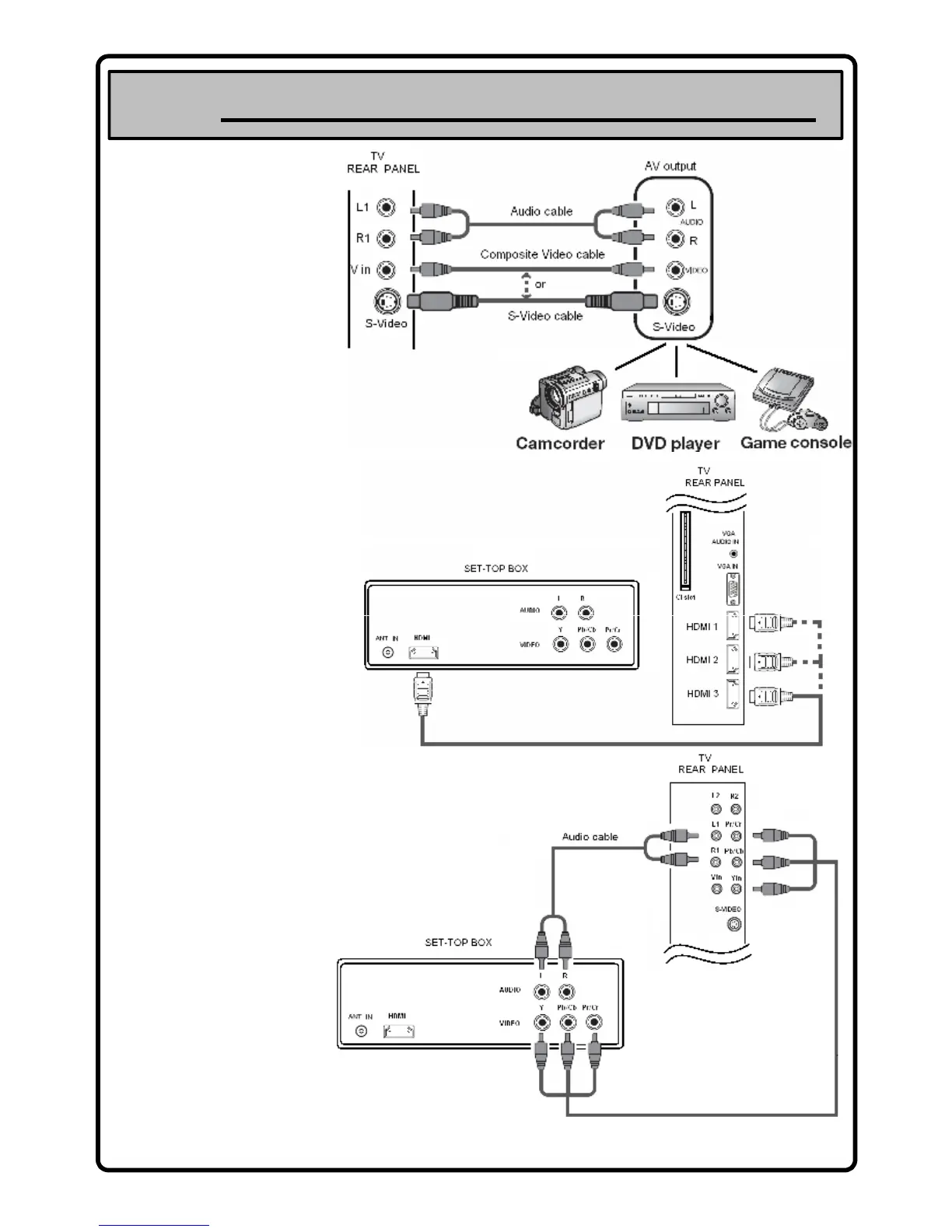
Connecting External Equipment to the TV
S-VIDEO or VIDEO / R-AUDIO-L
Connect RCA or S-VIDEO cable (not
supplied) to an appropriate
external A/V device such as VCR,
DVD or Camcorder. Connect RCA
audio cables (not supplied) to "R-
AUDIO-L" on your set and the other
ends to corresponding audio out
connectors on the A/V device.
AUDIO OUT [R-AUDIO-L]
Connect RCA audio cables (not
supplied) to AUDIO OUT [R-AUDIO-
L] on the rear of your set and the
other ends to corresponding audio
in connectors on the Amplifier or
DVD Home Theatre.
CABLE BOX/SATELLITE RECEIVER (SET-TOP BOX)
Connecting a Set-Top Box via Hdmi
Connect an HDMI Cable (Not supplied) between the HDMI IN (1, 2, or 3) jack on
the TV and the HDMI jack on the Set-Top Box.
26
No additional Audio connection is
needed for an HDMI to HDMI
connection.
1. Connect a Component Cable (Not supplied) between the
COMPONENT IN [Y, P
B
, P
R
] jacks on the TV and the
COMPONENT jacks on the Set-Top Box.
2. Connect Audio Cables (Not supplied) between the
COMPONENT IN [R-AUDIO-L] jacks on the TV and the AUDIO
OUT jacks on the Set-Top Box.
Connecting a Set-Top Box via Component Cables


 To Next Page