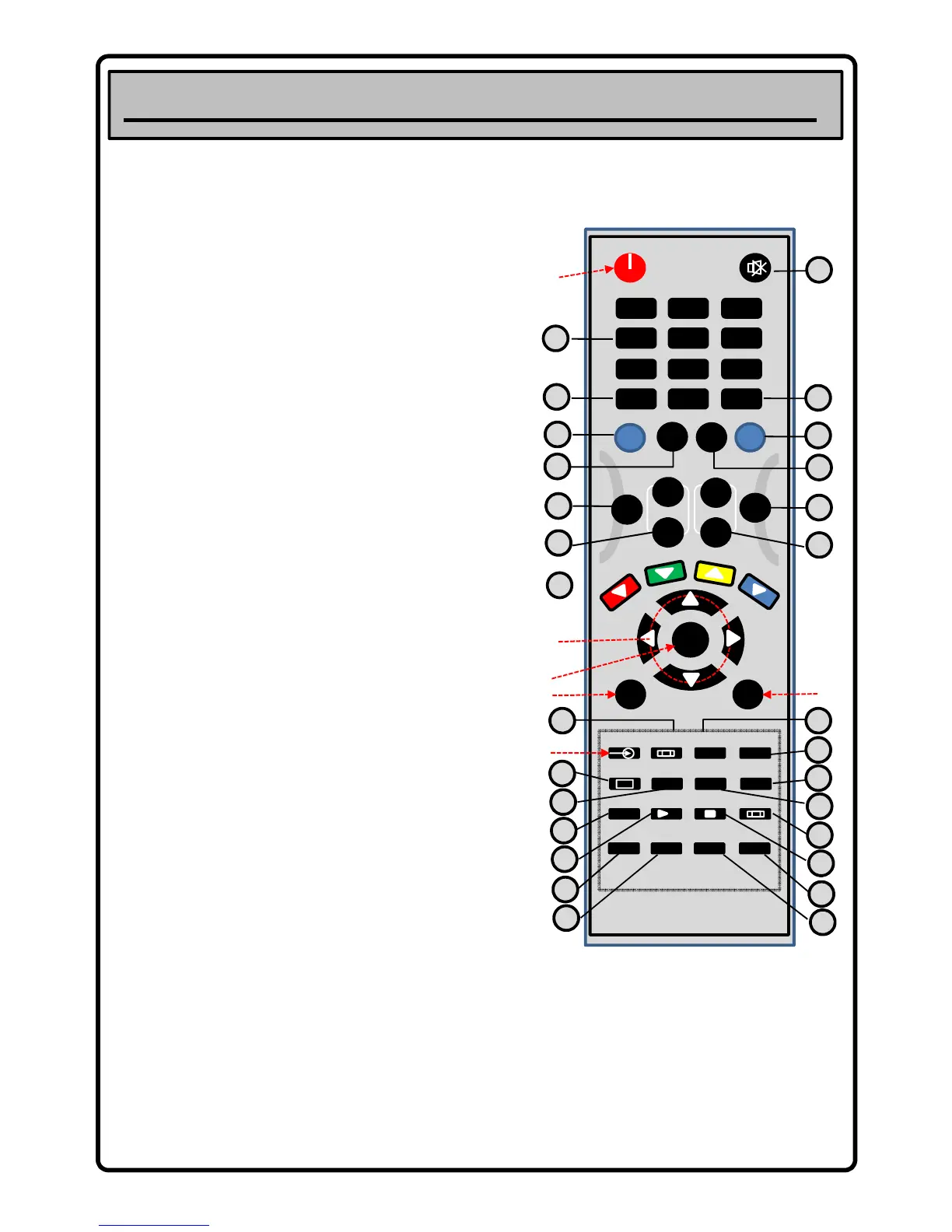
4. Operating Controls and Connections
A. POWER: To switch the TV onto standby or power on
B. DTV MENU: To display the Digital TV Menu
C. ARROW KEYS: Used to navigate the menu’s
D. SOURCE: To display TV input source menu.
E. ENTER or OK: Used to confirm menu selection
F. ATV MENU: To display the TV settings menu (+ Analogue
tuning)
1. MUTE: To disable or enable sound
2. NUMBER KEYS: 0 – 9 For direct access to channel selection.
For a 2/3 digit channel number press the 2
nd
/ 3
rd
digit
without hesitation. Also use these keys for text entry options
within the menu – e.g. channel naming in ATV
3. TV/ RADIO: Switches the TV between current TV channel and
the current radio channel (DTV)
4. SUBTL: In DTV mode used to turn subtitles on/ off and toggle
through subtitle language options (if available).
5. TV: Press this to have the remote operate the TV
6. SKY: Press this to have the remote operate a SKY box – all
blue key functions become active and normal TV operation is
disabled. Please note that this feature will only work with
certain SKY box models. (not Sky+ or HD)
audio tacks use this key to select which track to listen to.
8. EPG: Electronic Programme Guide – In DTV mode only - calls
up the TV guide system showing you what’s on.
9. QV PREV: Selects the previously viewed channel
10. FAV NEXT: To select your favourite channel list.
11. VOL +/-: To adjust sound level
12. CH +/-: To view the next or previous TV channel.
13. Colour Keys: Used to access Fastext options (Analogue TV)
14. ZOOM: Selects between 4:3 – 16:9 aspect ratio viewing
options
15. PICTURE: Recall default picture settings
16. SOUND: Recall default sound settings.
17. DISPLAY: Use to display TV and source information on screen
18. EXIT (I/II): Use to exit menu’s and teletext – I/II used to
switch between NICAM Stereo/ Mono options and NICAM
dual I/ dual II/ or mono - when in non menu operation.
19. PAGE+: Press to view the next EPG program (DTV)
20. PAGE-: Press to view the previous EPG program (DTV)
21. TEXT: Used to enter “Teletext” mode (Analogue and DTV)
22. INDEX: Use to go to text a – z index page.
23. CANCEL: Text option, used to temporarily display TV picture
until text page refreshes – gives notification on screen.
24. SIZE: Used to increase text size in teletext mode – press to
displays top half of text screen enlarged, press again to
display bottom half and press again to display normal.
25. MIX: Mix TV picture and text as an overlay
26. HOLD: Freeze text subpage on screen
27. SUBPG: Subpage Index Key
28. REVEAL: Use to display/ hide information on certain text
pages – quiz game solutions etc.
B
C
D
E
ENTER
ATV MENU
DTV MENU
SOURCE ZOOM
PICTURE SOUND
DISPLAY
EXIT REV
P
PAGE -
PAGE +
I/II
SEARCH
REPEAT
RETURNPROG
USR/ CR
SIZE
CANCEL
INDEX
TEXT
MIX SUBPG
REVEAL HOLD
HELP
P / TXT
i
ESC
II
T
T
T
T
S
+
FWD
VST-DTV
18
14
17
16
15
F
20
19
22
21
24
23
27
25
28
26
For illustration purposes only –
some functions apply to this brand
of VCR and DVD players only and as
such are not explained here.



 To Next Page