R-LOUVER & REF LED
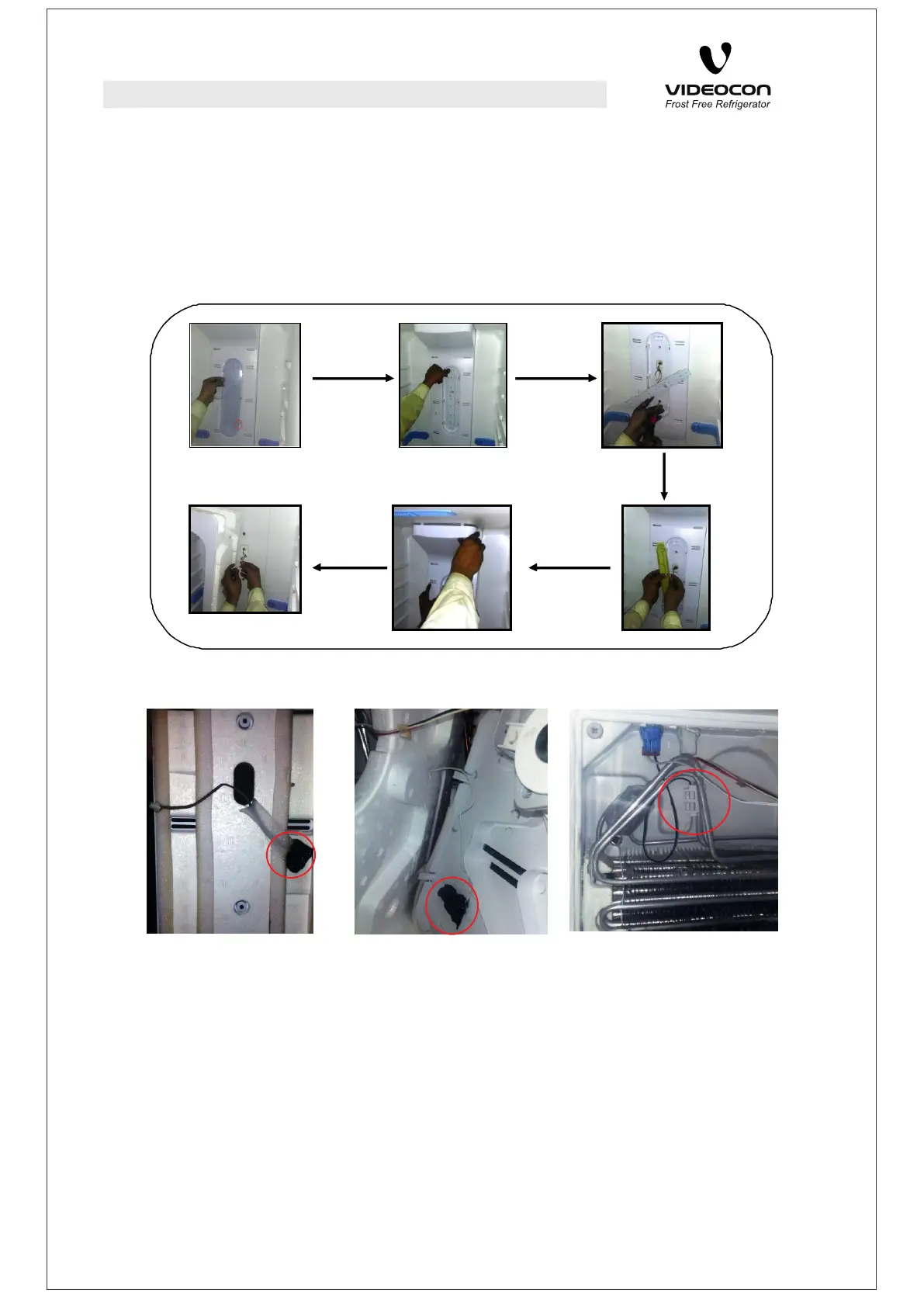
First of all, remove the LED PCB Cover which is snap fitted in R-Louver itself with
“-” type driver after putting it comfortably in given slot on lower right side.
Remove the LED PCB mounted in snaps on R-louver.
Remove the screws from R-Louver with ‘+’ type driver.
Disconnect the PCB from connector in Main Wiring Harness.
Dislodge the R-Louver from snaps in the upper side.
Remove the connection between auxiliary harness and main harness.
DISASSEMBLY
SENSORS LOCATION
REF SENSOR FREEZER SENSOR DEFROST SENSOR
To change or disassemble the sensors, they should be properly removed from their
respective locations.
1. Refrigerator sensors are located behind R-Louvers as marked in the picture. Please
disassemble the R-Louver as mentioned earlier and then remove the sensor.
2. Freezer sensor is fixed between F-Louver Cover and F-Louver EPS as shown in
the above image. Please disassemble the F-Louver properly then remove the
F-Louver EPS gently without breaking it and then remove the sensor.
3. Defrost Sensor is located in evaporator assembly area as shown in the picture
above. Open the F-Louver assembly and disengage the holder for removing the
sensor.
9



 To Next Page