11
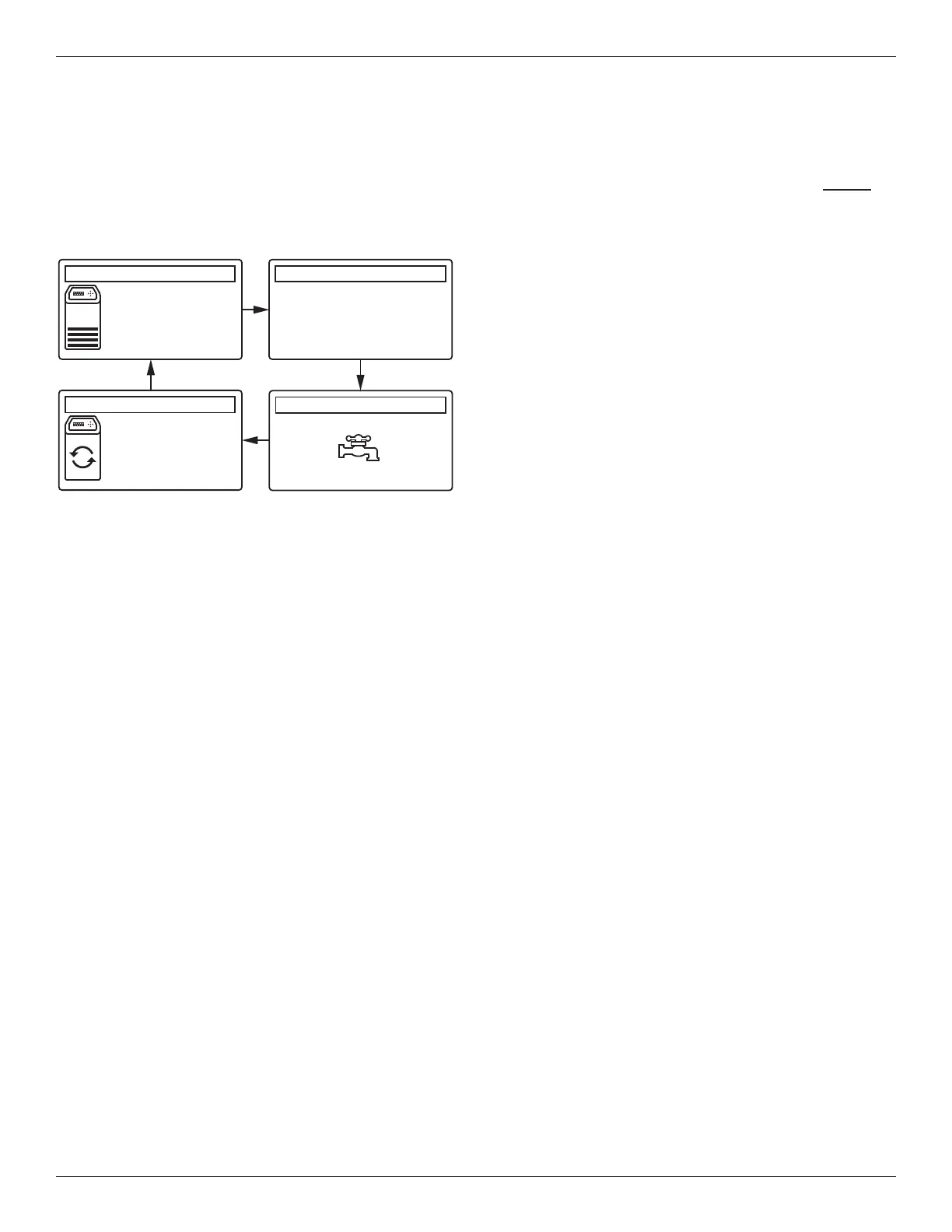
Pressing the softener’s RIGHT u button manually
advances to the next screen in the sequence. Pressing
the LEFT t button manually returns to the previous
status screen. If no buttons are pressed for 30 sec-
onds, the automatic rolling sequence resumes.
FIG. 25
0.0 LPM
Water flow
14:32
Salt status (NaCl)
14:32
Water use (liters)
14:32
Out of salt in
135 days
Recharge status
14:32
Set for automatic
recharge
Today: 456
Daily average: 625
Remaining: 2380
*
*Water remaining before the next recharge.
SOFTENER STATUS SCREENS
During normal operation, the water softener’s display
shows up to four status screens (Page 16 explains how
individual screens can be turned on or off). Each is
shown for six seconds, in a rolling sequence (See
Figure 25).
Programming the Water Softener
OTHER MESSAGES, ALERTS &
REMINDERS
The softener status screens described above will not be
displayed in a rolling sequence when one of the follow-
ing items is displayed:
=Recharge status (Displayed during recharges,
showing valve position and time remaining)
=Add salt or Out of salt (See Page 23)
=Current time setting screen instead of status
screens indicates time has been lost, perhaps after
a long power loss. Set the time (See Page 14).
=Error detected (Contact service technician)
FLASHING BACKLIGHT
The softener’s display is backlit to make it easy to read.
The backlight will flash on and off when one or more of
the following conditions occurs:
=Salt needs to be added
=Time needs to be set (Time has been lost)
=Error condition
The flashing will stop after any key is pressed.
However, it will start again at Midnight if the underlying
condition (e.g. low salt level) has not been addressed.



 To Next Page