23
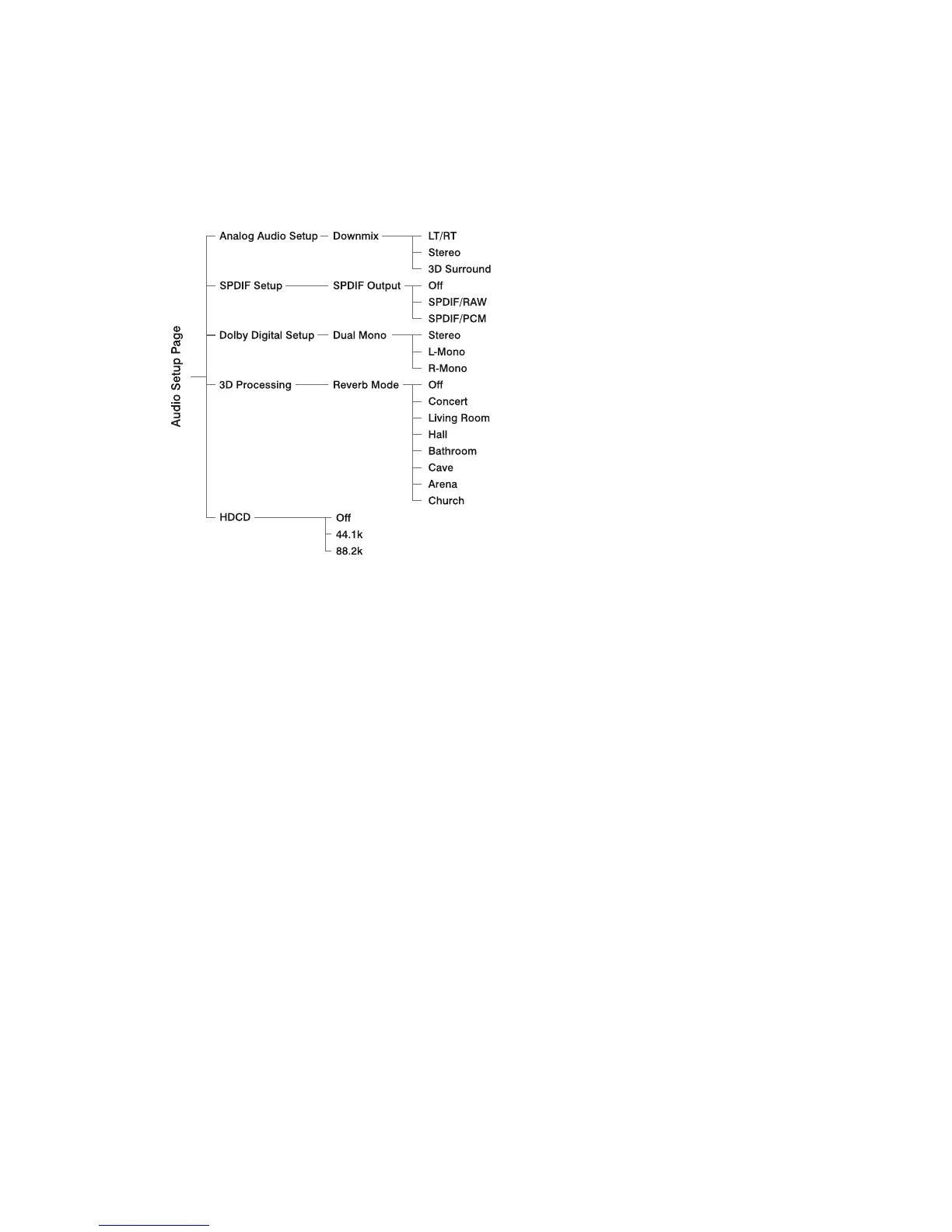
Audio Setup PageAudio Setup Page
Audio Setup PageAudio Setup Page
Audio Setup Page
Analog Audio SetupAnalog Audio Setup
Analog Audio SetupAnalog Audio Setup
Analog Audio Setup
When the disc has Dolby Pro Logic
stereo, you can choose LT/RT (Left/
Right audio) or Stereo or 3D Surround
(Virtual Surround Sound) mode to play
this disc.
SPDIF SetupSPDIF Setup
SPDIF SetupSPDIF Setup
SPDIF Setup
SPDIF Off......Turns off the SPDIF
output.
SPDIF RAW..If you have connected
your digital out.
SPDIF PCM..If your receiver is not
capable of decoding multi-channel
audio.
Dolby Digital SetupDolby Digital Setup
Dolby Digital SetupDolby Digital Setup
Dolby Digital Setup
Stereo......Left channel is output from
the left speaker, and right channel is
output from the right speaker.
L-MONO..Left channel is output from
the front left and right speakers.
R-MONO..Right channel is output from
the front left and right speakers.
3D Processing3D Processing
3D Processing3D Processing
3D Processing
This setting provides following sound
effects: Off, Concert, Living Room, Hall,
Bathroom, Cave, Arena and Church.
HDCDHDCD
HDCDHDCD
HDCD
When playing a HDCD disc, the audio
output width degree can be set here.
ComponentComponent
ComponentComponent
Component
Sets the video output according to
your video connection. This setting is
not required if you are using the
VIDEO OUTPUT jack (yellow) to
connect the DVD micro system to
your TV.
S-Video --- Select this if you have
connected the DVD micro system to
your TV using S-Video jack.
Pr/Cr Pb/Cb Y --- Select this if you
Video Setup PageVideo Setup Page
Video Setup PageVideo Setup Page
Video Setup Page


 To Next Page