6
Connecting the SpeakersConnecting the Speakers
Connecting the SpeakersConnecting the Speakers
Connecting the Speakers
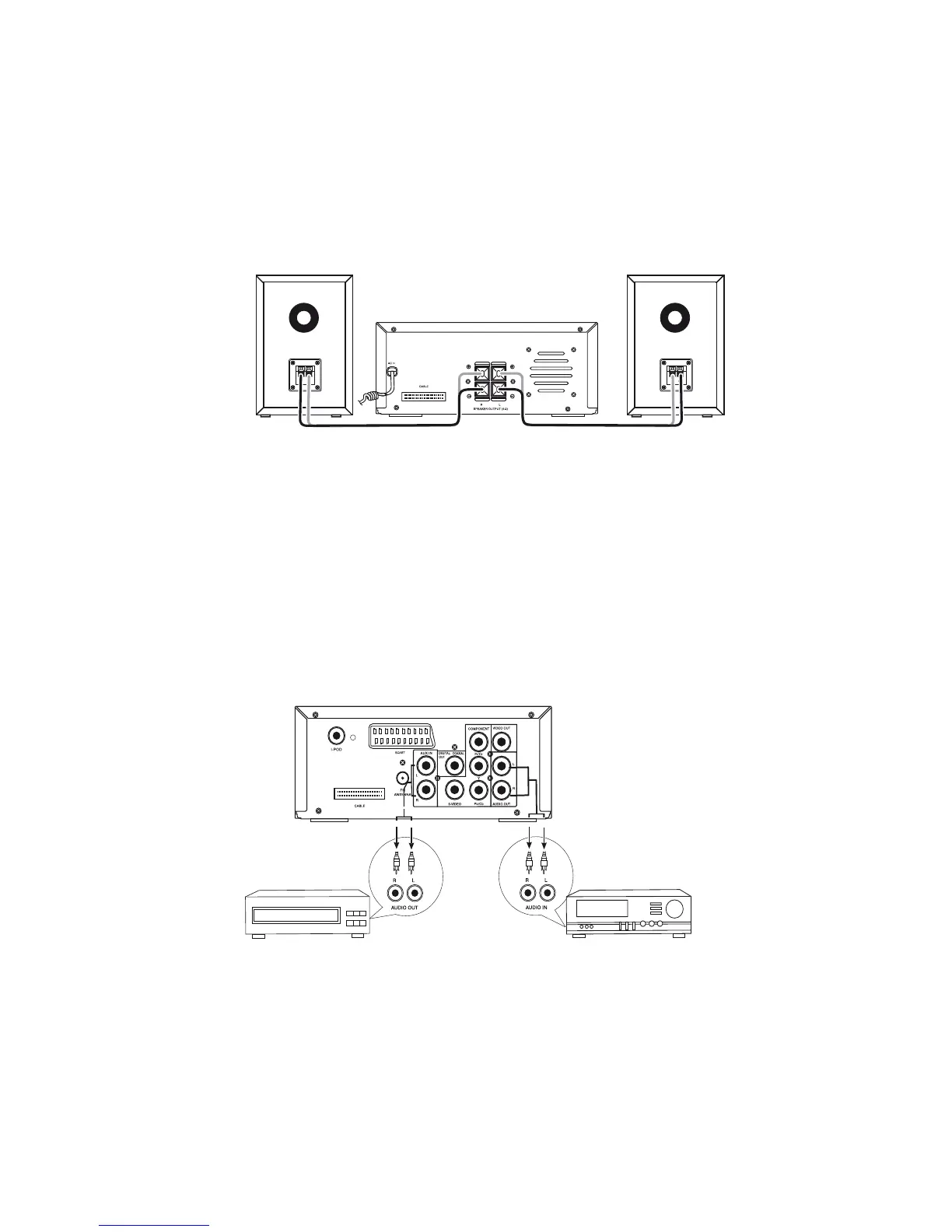
Connect the speaker cords between the terminals as shown below.
Connect the cords with a gold line to the (+) (L) (R) terminals and cords with a silver line to the (-)
terminals.
Right Speaker Box Back View Left Speaker Box Back View
Connection precautionsConnection precautions
Connection precautionsConnection precautions
Connection precautions
1. This unit has a high power output and wide dynamic range. If speakers other than those
supplied are used, they must be chosen according to speaker specification, or the speakers
can be damaged.
2. Before connecting or removing mains power, please turn off the power on the unit and turn
the volume to minimum or it may damage the speakers.
Connecting Assistance EquipmentConnecting Assistance Equipment
Connecting Assistance EquipmentConnecting Assistance Equipment
Connecting Assistance Equipment
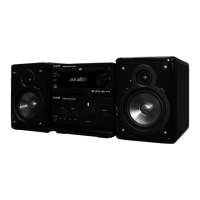
1. This unit has one groups of AUX IN terminal, you can use signal line to connect this unit’s
AUX IN terminal and assistance equipment’s audio output terminals respectively, then you
can hear the sound sources.
Terminal board for the Amplifier
Terminal board for the DVD player
Auxiliary Equipment
Auxiliary Equipment


 To Next Page