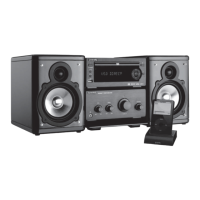
Need help?
Do you have a question about the VIETA VMD600 and is the answer not in the manual?
Important safety warnings and cautions to prevent hazards like electric shock and fire.
Guidelines for safe operation, including handling, placement, and environmental factors.
Instructions for connecting the DVD player to a television using various video outputs.
Steps for connecting the FM antenna for radio reception.
Details on connecting the DVD player to the amplifier using a control cable.
Guidance on how to connect the speaker wires to the amplifier terminals.
How to connect external audio devices to the AUX IN and audio output terminals.
Instructions for connecting the DVD player's coaxial output to an amplifier.
Guide on connecting headphones to the amplifier for private listening.
Instructions for plugging the system into a power outlet.
Steps for inserting batteries into the remote control for operation.
Identification and function of buttons and terminals on the DVD player unit.
Identification and function of knobs and buttons on the amplifier unit.
Detailed list and description of each button on the remote control.
How to load discs, use volume/tone controls, and turn the system on/off.
Switching between playback sources like DVD, Tuner, or USB.
Using remote buttons for playback functions like chapter/track skipping and stopping.
How to select subtitle languages and navigate DVD titles.
Setting repeat modes (chapter, track, etc.) and using fast forward/backward.
Switching to USB or AUX input sources for playback.
Adjusting loudness, bass, zoom, audio modes, and sleep/daily timers.
Adjusting volume and controlling playback with play/pause buttons.
Using fast forward/backward and setting up programmed playback sequences.
Using the goto button to navigate by time or track/chapter number.
Instructions for loading picture CDs and selecting desired images.
Description of available playback modes like Slide Show and Thumbnail Mode.
How to connect USB flash drives and play MP3 music or pictures.
Guidelines for safe handling of USB devices to prevent data loss or damage.
How to select FM function and tune into stations using scan or presets.
Instructions for saving tuned FM stations into memory for quick access.
Explanation of RDS features like PS (Program Service Name) and PTY (Program Type).
How to cycle through different RDS information displays on the screen.
Steps to set the current time on the system display.
Configuring the unit to turn on automatically at a set time daily.
How to set the sleep timer to automatically turn off the system after a duration.
Instructions on how to cancel the daily or sleep timer settings.
Guide on how to enter and navigate the system's setup menus.
Settings for TV display, OSD language, and screen saver.
Options for digital audio output, dual mono, reverb, HDCD, and night mode.
Settings for video output, picture quality like sharpness, brightness, and contrast.
Configuring TV type (PAL/NTSC) and selecting audio/subtitle languages.
Setting parental rating levels and region restrictions for disc playback.
Setting up a password for the unit and resetting to factory defaults.
Proper methods for handling, cleaning, and storing discs to prevent damage.
A guide to diagnosing and resolving common system problems and symptoms.
Technical details for the system, DVD player, amplifier, speakers, and remote.
Lists the items included with the DVD mini system, such as antennas and cables.
 General
| Brand | Vieta |
|---|---|
| Model | VMD600 |
| Category | Home Theater System |
| Speaker Configuration | 5.1 |
| Subwoofer | Yes |
| Remote Control | Yes |
| USB Port | Yes |
| Bluetooth | Yes |
| FM Radio | Yes |
| Playable Formats | MP3, WMA |
| Audio Input | AUX |
| Connectivity | Bluetooth, USB, AUX |

 To Next Page