21
Audio Setup PageAudio Setup Page
Audio Setup PageAudio Setup Page
Audio Setup Page
ww
ww
w
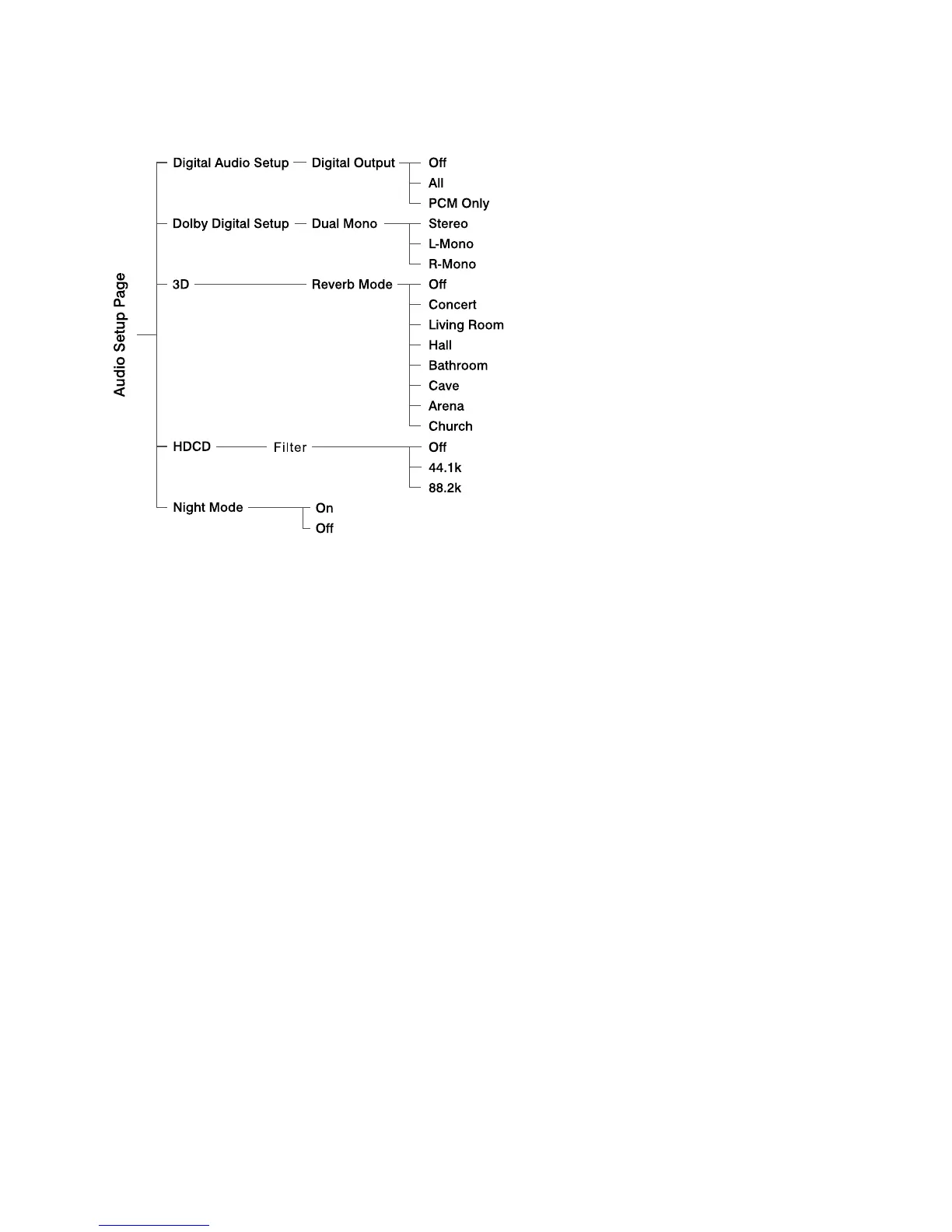
Digital OutputDigital Output
Digital OutputDigital Output
Digital Output
You can choose output mode when
playing different disc.
Off --- Turns off the SPDIF output.
All --- If you have connected your
DIGITAL OUT (COAXIAL) to a
multi-channel decoder/receiver.
PCM only --- Only if your receiver is not
capable of decoding multi-channel
audio.
ww
ww
w
DUAL MONODUAL MONO
DUAL MONODUAL MONO
DUAL MONO
Select the setting that matches the
number of speakers you have
connected.
STEREO --- Left mono sound will send
output signals to Left speaker and Right
mono sound will send output signals to
Right speaker.
L-Mono --- Left mono sound will send
output signals to Left speaker and Right
speaker.
R-Mono --- Right mono sound will send
output signals to Left speaker and Right
speaker.
ww
ww
w
Reverb ModeReverb Mode
Reverb ModeReverb Mode
Reverb Mode
Reverb mode provides a virtual surround
sound experience using just two
speakers.
ww
ww
w
HDCDHDCD
HDCDHDCD
HDCD
Set the audio output cut off frequency
point when playing an HDCD disc.
ww
ww
w
Night ModeNight Mode
Night ModeNight Mode
Night Mode
In this mode, the high volume outputs
are softened and low volume outputs
are brought upward to an audible level.
It is useful for watching your favourite
action movie without disturbing others at
night.
ww
ww
w
ComponentComponent
ComponentComponent
Component
Sets the video output according to your
video connection. This setting is not
required if you are using the VIDEO
Video Setup PageVideo Setup Page
Video Setup PageVideo Setup Page
Video Setup Page


 To Next Page