5
1. Using the supplied wire Antenna.
2. Using the coaxial type connector .
A 75Ohm antenna with coaxial type connector should be connected to the FM 75 ohm coaxial
terminal.
3. If reception is poor, connect the outside antenna.
Note: Note:
Note: Note:
Note: Before attaching a 75 ohm coaxial lead (the kind with a round wire going to an outside
antenna), disconnect the supplied FM wire antenna.
Caution:Caution:
Caution:Caution:
Caution: To avoid noise, keep antennas away from the system, the connecting cord and the AC
cord.
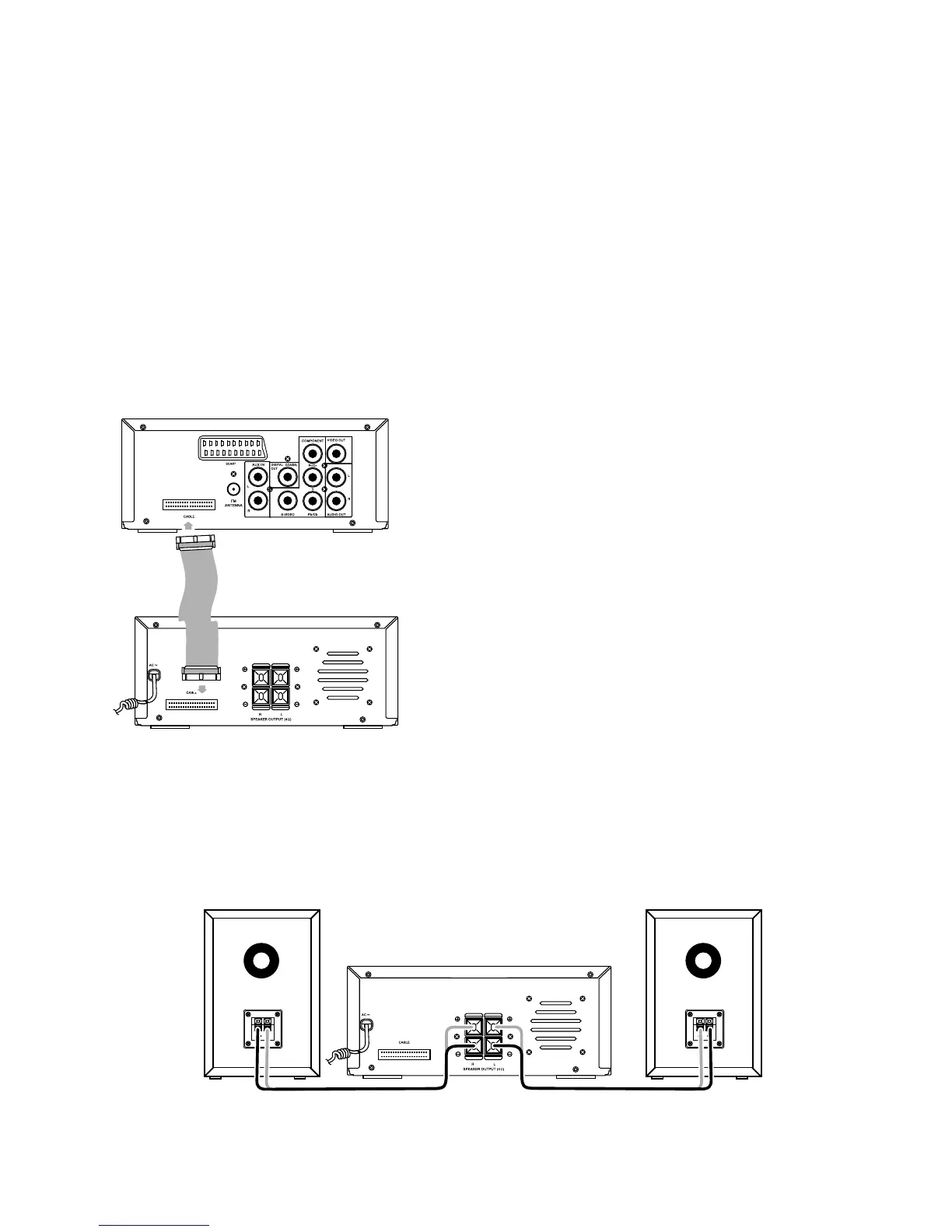
Connecting Control CableConnecting Control Cable
Connecting Control CableConnecting Control Cable
Connecting Control Cable
Connect signal line between the DVD Player and
the Amplifier back board.
Connecting the SpeakersConnecting the Speakers
Connecting the SpeakersConnecting the Speakers
Connecting the Speakers
Connect the speaker cords between the terminals as shown below.
Connect the cords with a gold line to the (+) (L) (R) terminals and cords with a silver line to the (-)
terminals.
Right Speaker Box Back View Left Speaker Box Back View
Terminal board for the DVD player
Terminal board for the Amplifier
Terminal board for the Amplifier


 To Next Page