EasyManua.ls Logo

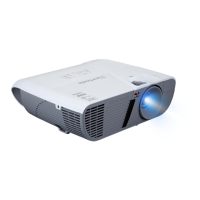
ViewSonic PJD6552LWS - User Manual

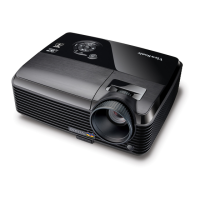
ViewSonic PJD6552LWS
95 pages
Print Icon
To Next Page IconTo Next Page
Loading...
PJD6350/PJD6351LS/PJD6352/
PJD6352LS/PJD6550LW/
PJD6551LWS/PJD6552LW/
PJD6552LWS
DLP Projector
User Guide
Model No.
VS15877/VS15878/VS15947/VS15948/VS15879/
VS15880/VS15949/VS15950
IMPORTANT: Please read this User Guide to obtain important information on installing
and using your product in a safe manner, as well as registering your product for future
service. Warranty information contained in this User Guide will describe your limited
coverage from ViewSonic Corporation, which is also found on our web site at http://
www.viewsonic.com in English, or in specic languages using the Regional selection
box in the upper right corner of our website. “Antes de operar su equipo lea cu
idadosamente las instrucciones en este manual”

Table of Contents

Questions and Answers

  • K
    kimtracyJul 27, 2025
    What to do if ViewSonic PJD6552LWS remote control does not work?
    • C
      Courtney SpencerJul 27, 2025
      If your ViewSonic Projector's remote control isn't working, try these solutions: * Replace the battery with a new one. * Ensure there is no obstacle between the remote control and the projector. * Make sure you are within 8 meters (26 feet) of the projector. * Adjust the remote control code if it's inconsistent with the projector's.
  • L
    Luis WatsonAug 3, 2025
    Why my ViewSonic PJD6552LWS Projector does not turn on?
    • H
      Holly AndersonAug 3, 2025
      Your ViewSonic projector might not be turning on due to these reasons: * **No power:** Ensure the power cord is securely plugged into both the projector's AC inlet and a functioning power outlet. If the outlet has a switch, verify it's on. * **Cooling process:** If you've recently turned the projector off, wait for the cooling process to complete before attempting to turn it on again.
  • J
    johnruizAug 11, 2025
    How to fix no picture on ViewSonic Projector?
    • R
      Randall MontoyaAug 12, 2025
      If you're not seeing a picture on your ViewSonic Projector, consider these potential causes and solutions: * **Video source:** Ensure the video source is turned on and the signal cable is correctly connected. * **Connection:** Verify that the projector is correctly connected to the input signal device. * **Input signal:** Select the correct input signal using the Source key on the projector or remote control.
  • B
    Brandi MathewsAug 18, 2025
    How to fix blurred image on ViewSonic PJD6552LWS?
    • A
      Amy YoungAug 18, 2025
      If you're experiencing a blurred image with your ViewSonic Projector, here's what you can do: * **Focus:** Adjust the focus of the lens using the focus ring. * **Alignment:** Adjust the projection angle, direction, and height of the projector to properly align it with the screen.

Summary

Compliance Information

FCC Compliance Statement

Details the projector's compliance with FCC Rules for operation and interference.

CE Conformity for European Countries

States compliance with EMC and Low Voltage Directives for European markets.

Declaration of RoHS2 Compliance

Declares compliance with the EU directive restricting hazardous substances.

Important Safety Instructions

General Safety Precautions

Lists essential safety guidelines for operating the projector to prevent hazards.

Ceiling Mounting Safety Precautions

Provides specific safety recommendations for mounting the projector overhead.

Product Registration

Registering Your Product

Explains the process and benefits of registering the projector online or via CD.

Product Information for Records

Section for users to record product details like Model, Serial Number, and Purchase Date.

Introduction

Projector Features Overview

Highlights the key functionalities and capabilities of the projector.

Shipping Contents and Accessories

Lists standard and optional accessories included with the projector.

Projector Exterior View and Ports

Identifies and describes the external ports and controls of the projector.

Controls and Functions

Projector Unit Controls

Explains buttons, rings, and indicator lights on the projector unit itself.

Remote Control Operations

Details the functions of buttons on the remote control for projector operation.

Remote Control Modes and Range

Covers using the remote for mouse control and its effective operating range.

Connection

Connecting Signal Sources

Guides on connecting various video and audio sources to the projector.

Connecting Computer and Monitor

Instructions for connecting a PC to the projector and an external monitor.

Video and Audio Connection Methods

Details connection methods for HDMI, Component, S-Video, and Composite video sources.

Microphone and Cable Management

Explains microphone connection and using the cable management cover.

Operation

Starting Up and Basic Operation

Covers powering on, OSD navigation, and initial settings.

Picture and Image Adjustments

Adjusting brightness, contrast, color, aspect ratio, and keystone.

Advanced Features and Settings

Includes CEC, 3D functions, LAN control, audio settings, and timers.

Menu Operation

Menu System Overview

Provides a structured view of the projector's OSD main and sub-menus.

DISPLAY Menu Functions

Detailed explanation of functions within the DISPLAY menu.

PICTURE Menu Functions

Detailed explanation of functions within the PICTURE menu.

SOURCE Menu Functions

Detailed explanation of functions within the SOURCE menu.

SYSTEM SETTING Menu Functions

Detailed explanation of BASIC and ADVANCED SYSTEM SETTING menus.

Troubleshooting

Power and Startup Issues

Addresses issues related to power and cooling processes.

Image Display Problems

Solutions for missing video signals or unclear projected images.

Remote Control Issues

Troubleshooting steps for a non-functional or inconsistent remote control.

Specifications

General, Optical, and Electrical Specs

Details product name, resolution, display system, lamp, power, and weight.

Input;Output Terminals

Lists all available input and output ports on the projector.

Dimensions and Mounting

Provides physical dimensions and information on ceiling mount installation.

Timing Charts

Displays compatible signal resolutions and refresh rates for various inputs.

Appendix

IR Control Table

Lists infrared remote control codes for various projector functions.

RS232 Command Table

Provides pin assignments and serial communication protocols for RS232 control.

Customer Support

Worldwide Support Contacts

Lists contact details (website, phone, email) for technical support worldwide.

Limited Warranty

Warranty Coverage and Exclusions

Outlines what is covered, what is not covered, and who the warranty protects.

Obtaining Service and Legal Rights

Details the process for warranty service and states legal rights.

Mexico Limited Warranty

Mexico Warranty Terms and Conditions

Specific warranty terms and conditions for products sold in Mexico.

ViewSonic PJD6552LWS Specifications

General IconGeneral
TV Tunerno
White Brightness3500 lumens
Native Resolution1280 x 800
Contrast Ratio22, 000:1
Aspect Ratio16:10
Throw Ratio Range1.21 - 1.57:1
3 Chip Technologyno
Keystone Effectyes
3Dyes
Minimum Screen Size30 inches
Maximum Screen Size300 inches
Digital Zoomyes
Minimum Distance3.3 feet
Maximum Distance32.8 feet
USB Ports1
Video Inputhdmi
Inputsvga
Remote Controlyes
OS Compatibilitymac
Weight and Dimensions IconWeight and Dimensions
Depth8.98 inches
Height4.08 inches
Width12.44 inches
Net Weight5.1 pounds

Related product manuals