
 Need help?
Do you have a question about the ViewSonic PRO8400 and is the answer not in the manual?
Details the FCC compliance rules and conditions for device operation.
Confirms compliance with Canadian ICES-003 for digital apparatus.
States compliance with EMC and Low Voltage Directives for European countries.
Read, keep, and follow all instructions. Avoid water, ensure ventilation, and heed warnings.
Declaration of RoHS Compliance stating maximum concentration values for hazardous substances.
Register your product on the Internet for future needs and additional information.
Lists features like DLP technology, 1080p resolution, multiple input options, and connectivity.
Lists all components included in the projector package: cables, remote, batteries, and manual.
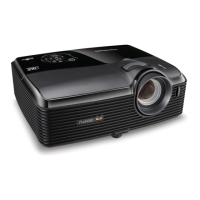
Diagram and labels for front panel components like lens, buttons, sensors, and ventilation holes.
Diagrams and labels for rear and bottom panel ports, including connection, power, and mounting points.
Detailed description of buttons on the projector's control panel and their functions.
Detailed identification and description of all input/output ports on the projector's rear panel.
Explanation of each button on the remote control and its purpose.
Step-by-step guide on how to open the cover and insert batteries correctly.
Instructions on aiming the remote at the sensor and optimal operating range.
General advice on turning off equipment, using correct cables, and ensuring firm insertion.
Steps for connecting computers, notebooks, desktops, and external monitors.
Overview of Component, S-Video, and Composite video connection options.
Detailed procedures for connecting Component Video and S-Video sources.
Procedure for connecting Composite Video sources using a standard Video cable.
Detailed steps for turning the projector on and off, including warm-up and cool-down.
How to adjust projector height, zoom, and focus for optimal image.
Table and graphic for determining screen size and projection distance.
How to enable/disable the control panel lock to prevent accidental changes.
Adjustments for video timing, audio inputs, and system settings like Auto Keystone.
Controls for color mode, brightness, contrast, saturation, sharpness, tint, and color temperature.
Password, OSD, Closed Caption, Zoom, DCR, Test Pattern, Display Type, Swap, Function.
Steps to configure wired LAN settings including IP address, subnet mask, and gateway.
Steps to configure wireless LAN settings including SSID, connection mode, and IP configuration.
How to connect and control the projector via a wired LAN connection.
Steps to connect and control the projector wirelessly using a dongle.
Instructions to enter the projector's IP address into a web browser to access control system.
Guide to download, install, and launch the pwPresenter application.
Configuring language, capture mode size, and notification messages in pwPresenter.
Adjusting image quality, capture rate, and network port settings in pwPresenter.
Connecting a USB storage device and navigating images using the ImageViewer.
Instructions for cleaning the projector lens and exterior housing.
Procedure for cleaning or replacing the projector's filter cover.
Important safety warnings and guidelines before and during lamp replacement.
Details on display system, resolution, zoom, focal length, input/output terminals.
Information on operating environment, power requirements, consumption, dimensions, and weight.
List of supported computer resolutions and corresponding H-Sync/V-Sync frequencies.
List of supported video resolutions and corresponding H-Sync/V-Sync frequencies.
Solutions for power-on issues, no image, or out-of-focus images.
Troubleshooting steps if the remote control is not functioning correctly.
Table listing RS-232 commands for various functions like power, source, menu navigation.
Mapping of IR remote control buttons to specific hexadecimal codes.
List of ViewSonic customer support websites, phone numbers, and emails by region.
Information on what is covered, what is not covered, and warranty duration.
Specific warranty terms and service procedures for Mexico.
 General
| Matrix size | 0.7 \ |
|---|---|
| Projection distance | 0.9 - 10 m |
| Vertical scan range | 45 - 85 Hz |
| Horizontal scan range | 31 - 91 kHz |
| Projection technology | DLP |
| Contrast ratio (typical) | 2600:1 |
| Screen size compatibility | 30 - 300 \ |
| Projector native resolution | 1080p (1920x1080) |
| Audio input | 1 |
| Aspect ratio | 4:3, 16:9 |
| Compatibility | - PC VGA \u003C 1080p - Mac \u003C 1080p |
| Dimensions (WxDxH) | 414 x 375.9 x 190.5 mm |
| Zoom capability | Yes |
| Focal length range | - mm |
| Lamp power | 280 W |
| Light source type | Lamp |
| Service life of light source | 5000 h |
| DVI port | No |
| Audio (L/R) in | - |
| Serial interface type | RS-232 |
| USB 2.0 ports quantity | USB 2.0 ports have a data transmission speed of 480 Mbps, and are backwards compatible with USB 1.1 ports. You can connect all kinds of peripheral devices to them. |
| VGA (D-Sub) ports quantity | 3 |
| Analog signal format system | PAL B, PAL D, PAL G, PAL H, PAL I, SECAM D/K |
| RMS rated power | 10 W |
| Image formats supported | BMP, GIF, JPG, PNG, TIF |
| Product type | Standard throw projector |
| Product color | Black |
| AC input voltage | 100 - 240 V |
| AC input frequency | 50 - 60 Hz |
| Power consumption (standby) | 1 W |
| Power consumption (typical) | 360 W |
| Noise level | 33 dB |
| Certification | CB, RoHS, SVHC, WEEE, UL/cUL, FCC-B, ICES-004, TUV-S, NOM, PSB, C-tick, KC, CE, GOST-R, Hygienic, UKrSEPRO, CCC |
| Noise level (economic mode) | 29 dB |
| Operating altitude | 0 - 3048 m |
| Operating temperature (T-T) | 0 - 40 °C |
| Operating relative humidity (H-H) | 10 - 90 % |
| Cables included | AC, HDMI, VGA |
 Weight and Dimensions
| Weight | 3860 g |
|---|---|
| Package weight | 5360 g |



 To Next Page
