18
USB Connecon
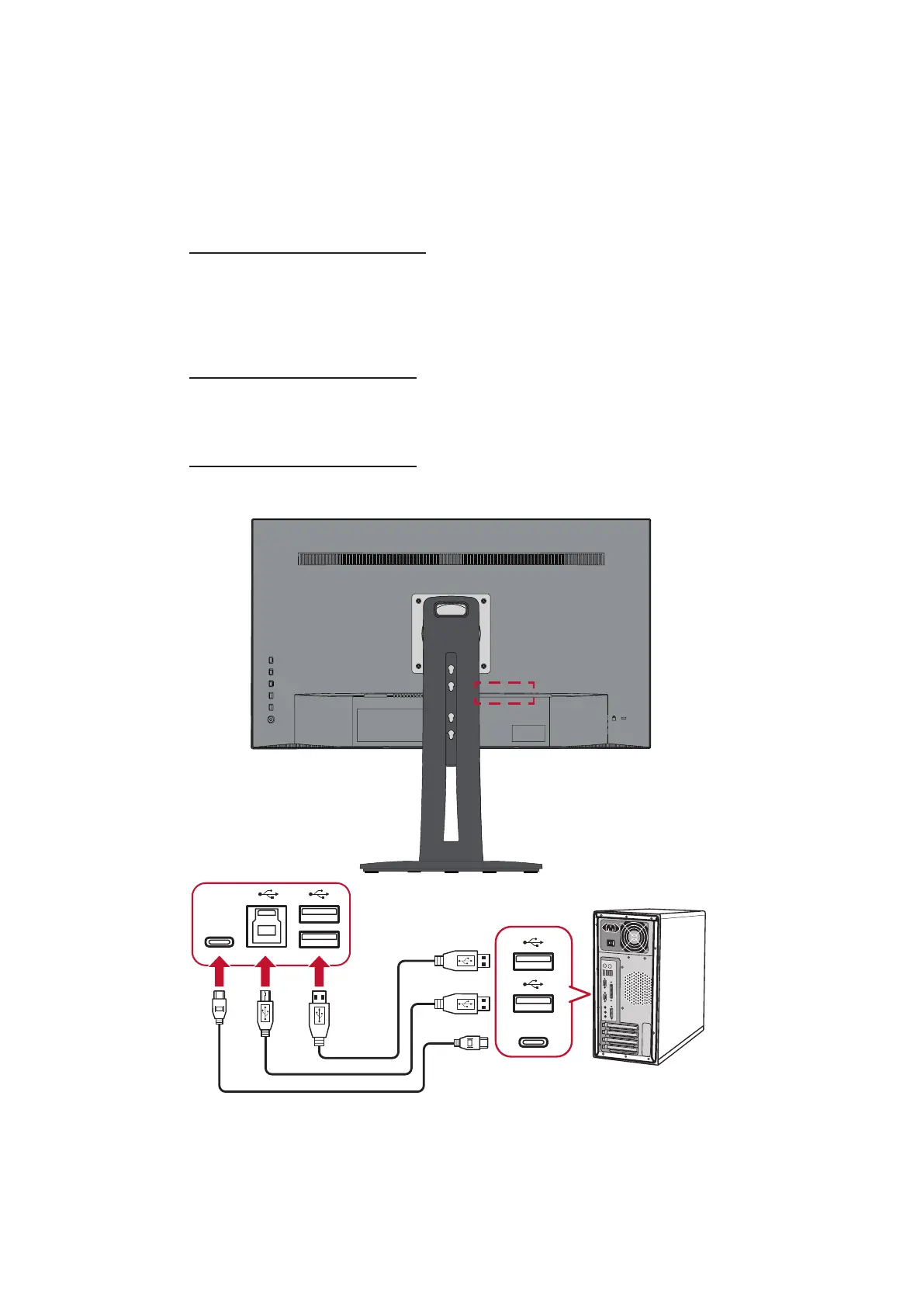
Connect one end of a USB cable to a USB port of the monitor. Then connect the
other end of the cable to a USB port of your computer.
NOTE: The monitor supports three (3) types of USB ports. When making the
connecon(s), observe the following guidelines:
• Two (2) USB Type A ports: Connecon for your Type A peripheral
device(s) (i.e. storage device, keyboard, mouse).
NOTE: To use some peripherals, please ensure your computer is
also connected to the monitor’s USB Type B port.
• One (1) USB Type B port: Connect the USB Type B male cable (square
with 2 cut corners) to this port, and then connect the other end of the
cable to the USB downstream port of your computer.
• One (1) USB Type C port: Make sure your Type-C output device and
cable support video signal transmission.
Type-C
Type-C
NOTE: It is not necessary to connect to all three types of USB ports at the same
me. The user’s personal usage scenario will determine which, if any,
USB ports are used.



 To Next Page