This document is a user guide for the ViewSonic VX2478-smhd Display, Model No. VS16523. It provides comprehensive information on the display's features, installation, usage, and maintenance, along with compliance and warranty details.
Function Description:
The ViewSonic VX2478-smhd is a high-resolution LCD display designed for various computing needs. It serves as a visual output device for computers, offering a clear and vibrant display for tasks ranging from general office work to multimedia consumption. The display supports multiple input types, allowing for flexible connectivity with different computer systems. Its design emphasizes ease of use, with on-screen display (OSD) controls for image adjustments and power management features to optimize energy consumption. The display is also designed with wall-mounting capabilities for versatile placement options.
Important Technical Specifications:
- Display Type: TFT (Thin Film Transistor), Active Matrix 2560 x 1440 Display. This indicates a high-resolution panel capable of delivering sharp images.
- Pixel Pitch: 0.20535 mm. A smaller pixel pitch generally means a sharper image.
- Display Size: Metric: 60.33 cm; Imperial: 24" (23.75" viewable). This positions it as a standard-sized desktop monitor.
- Color Filter: RGB vertical stripe.
- Glass Surface: Anti-Glare. This feature helps reduce reflections and improve viewing comfort.
- Input Signal: TMDS digital (100ohms); Horizontal Frequency (fH): 15-120KHz; Vertical Frequency (fV): 24-85KHz. These specifications define the range of video signals the display can accept.
- Compatibility:
- PC: Up to 2560 x 1440 Non-interlaced.
- Macintosh: Up to 2560 x 1440 (Supported by limited graphic cards). Older Macintosh computers (pre-G3) may require an adapter.
- Resolution:
- Recommended: 2560 x 1440 @ 60 Hz. This is the optimal resolution and refresh rate for the display.
- Supported: Includes a wide range of resolutions from 640 x 480 to 1920 x 1440, with various refresh rates (e.g., 1280 x 1024 @ 60, 75 Hz; 1920 x 1080 @ 60 Hz).
- Power: 100-240 VAC, 50/60 Hz (auto switch). This allows for global compatibility with different power standards.
- Display Area (Full Scan): 476.064 mm (H) x 267.786 mm (V) or 18.74" (H) x 10.54" (V).
- Operating Conditions:
- Temperature: +32 °F to +104 °F (0°C to +40 °C).
- Humidity: 20% to 90% (non-condensing).
- Altitude: To 16404 feet.
- Storage Conditions:
- Temperature: -4 °F to +140 °F (-20 °C to +60 °C).
- Humidity: 5% to 90% (non-condensing).
- Altitude: To 40,000 feet.
- Physical Dimensions: 541.4 mm (W) x 421.0 mm (H) x 190.0 mm (D) or 21.31" (W) x 16.57" (H) x 7.48" (D).
- Wall Mount Distance: 100 x 100 mm (VESA standard).
- Physical Weight: 7.65 lb (3.47 kg).
- Power Saving Modes: On: 29W (Typical) (White LED); Off: <0.3W. This highlights its energy efficiency.
Usage Features:
- Quick Installation: The guide provides clear steps for connecting video cables (HDMI, DisplayPort, Mini DisplayPort) and the power cord, emphasizing the importance of turning on the display before the computer. It also mentions the need for Macintosh adapters for older models.
- Timing Mode Setting: Users are guided to set the optimal resolution (e.g., 1920 x 1080) and refresh rate (e.g., 60 Hz) for maximum image quality and reduced eye strain, with a warning about non-supported modes.
- On-Screen Display (OSD) Controls: The display features an intuitive OSD menu for various adjustments.
- Audio Adjust: Controls volume, mute, and input toggling for multiple sources.
- Brightness: Adjusts the background black level.
- Color Adjust: Offers preset color temperatures and a User Color mode for independent adjustment of Red, Green, and Blue.
- Contrast: Adjusts the difference between image background and foreground.
- Information: Displays current timing mode, model number, serial number, and ViewSonic website URL.
- Input Select: Toggles between different video inputs.
- Manual Image Adjust: Provides a menu for various image quality adjustments.
- Memory Recall: Resets adjustments to factory settings for preset timing modes.
- Setup Menu: Adjusts OSD settings.
- OSD and Power Lock Settings:
- OSD Lock/Unlock: Prevents accidental changes to OSD settings by requiring a specific button combination ([2] and [3] for 10 seconds).
- Power Button Lock/Unlock: Prevents accidental power off/on by requiring a specific button combination ([2] and [4] for 10 seconds). The display automatically turns ON after a power failure, regardless of this setting.
- Power Management: The display automatically enters Sleep/Off mode with a black screen and reduced power consumption after 5 minutes of no signal input, contributing to energy savings.
- Wall Mounting: The display is VESA compatible (100 x 100 mm) for wall mounting, with instructions provided for removing the base and attaching a mounting bracket.
Maintenance Features:
- Cleaning the Display:
- Screen: Users are advised to turn off the display and wipe the screen with a clean, soft, lint-free cloth. For stubborn dirt, a small amount of non-ammonia, non-alcohol-based glass cleaner can be applied to the cloth (not directly to the screen).
- Case: The case can be cleaned with a soft, dry cloth. For more thorough cleaning, a small amount of non-ammonia, non-alcohol-based, mild non-abrasive detergent can be applied to the cloth.
- Disclaimer: ViewSonic explicitly does not recommend ammonia or alcohol-based cleaners due to potential damage to the screen or case.
- Troubleshooting: The guide includes a troubleshooting section to address common issues such as:
- No power: Checks for power button status, secure power cord connection, and proper voltage from the outlet.
- Power is ON but no screen image: Advises checking video cable connections, adjusting brightness/contrast, and considering Macintosh adapters for older systems.
- Wrong or abnormal colors: Suggests checking video cable connections for loose or broken pins, connecting to another computer, or contacting ViewSonic for a non-DDC adapter if using an older graphics card.
- Control buttons do not work: Recommends pressing only one button at a time.
The display adheres to several regulatory standards:
- FCC Compliance Statement: Complies with part 15 of FCC Rules for Class B digital devices, ensuring it does not cause harmful interference and accepts received interference.
- Industry Canada Statement: Complies with CAN ICES-3 (B)/NMB-3(B).
- CE Conformity for European Countries: Complies with EMC Directive 2014/30/EU and Low Voltage Directive 2014/35/EU.
- WEEE Directive 2012/19/EU: Marked for proper disposal, indicating it should not be treated as unsorted municipal waste.
- Declaration of RoHS2 Compliance (Directive 2011/65/EU): Confirms the product's compliance with restrictions on hazardous substances, with maximum concentration values for substances like Lead, Mercury, Cadmium, Hexavalent Chromium, PBB, and PBDE. Exemptions for certain components are also listed.
- Indian Restriction of Hazardous Substances: Complies with the "India E-waste Rule 2011," prohibiting the use of specified hazardous substances above certain concentrations, with exemptions.
ViewSonic provides a limited warranty covering defects in material and workmanship under normal use.
- Warranty Period: 1 to 3 years, depending on the country of purchase, covering all parts (including the light source) and labor from the first consumer purchase date.
- Who it protects: Only the first consumer purchaser.
- What it does not cover: Products with defaced serial numbers, damage from accidents, misuse, neglect, unauthorized modifications, shipping damage, external causes (e.g., power fluctuations), use of non-ViewSonic parts, normal wear and tear, "image burn-in" from static images, and service charges for removal, installation, insurance, and setup.
- How to get service: Requires contacting ViewSonic Customer Support, providing the product's serial number, original dated sales slip, personal information, problem description, and shipping the product freight prepaid to an authorized service center.
- Limitation of implied warranties: No warranties beyond the description, including merchantability and fitness for a particular purpose.
- Exclusion of damages: ViewSonic's liability is limited to the cost of repair or replacement. It is not liable for damages to other property, inconvenience, loss of use, profits, business opportunity, goodwill, commercial loss, or any incidental/consequential damages.
- Effect of state law: Warranty rights may vary by state.
- Sales outside U.S.A. and Canada: Specific warranty terms apply for other regions, including mainland China (Maintenance Guarantee Card) and Europe (details on ViewSonic Europe website).
- Mexico Limited Warranty: Specific contact information for sales and authorized service centers within Mexico is provided, along with details on obtaining service and the same limitations and exclusions as the general limited warranty.

 Need help?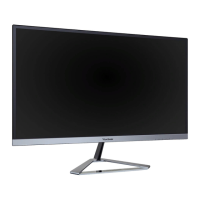



 To Next Page
 General