EasyManua.ls Logo

ViewZ 22-INCH TFT-LCD - Motion Detection Configuration

ViewZ 22-INCH TFT-LCD
37 pages
Print Icon
To Next Page IconTo Next Page
To Previous Page IconTo Previous Page
Loading...
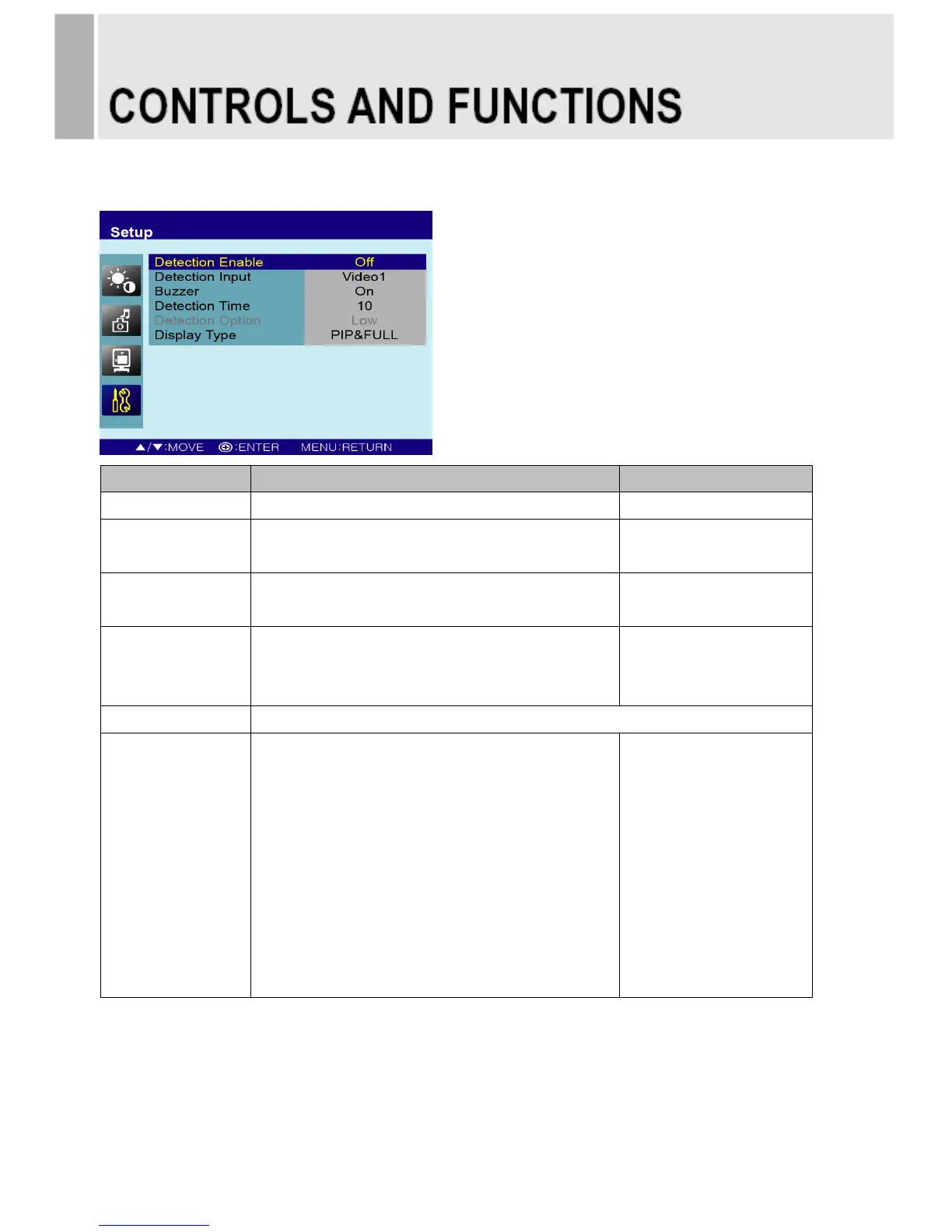
Motion Detection (Built-in PIR sensor; Passive Infra-Red)
Option
Function
Value
Detection Enable
Activates the Motion Detection feature.
Off or On
Detection Input
Selects the input source for the Motion Detection.
AV1, AV2, S-Video,
RGB PC, DVI or HDMI
Buzzer
Activates an audible signal when the monitor
receives a motion detection signal.
On or Off
Detection Time
Selects the amount of time, in seconds,
that the monitor displays the motion detection
input image.
3 ~ 100
Detection Option
Inactivated.
Display Type
Selects the mode in which the monitor displays
the motion detection input. The monitor takes one
of the following actions:
- PIP & FULL: Displays the motion detection input
in the PIP of the current video input source.
Note: The main video source must support the
motion detection input source as a PIP option.
See section “Input Source” in “C. PIP”.
- FULL: Switches the display to show the motion
detection input in the full screen.

PIP & FULL or FULL
14 ………………………………………………………………………. INSTRUCTION MANUAL