XMA Limited, VHQ, 7 Handley Page Way, Old Parkbury Lane, Colney Street, St. Albans, Hertfordshire AL2 2DQ
Tel: 01727 201 850 | Fax: 01727 201858 | Email: technical@viglen.co.uk| Web: www.xma.co.uk
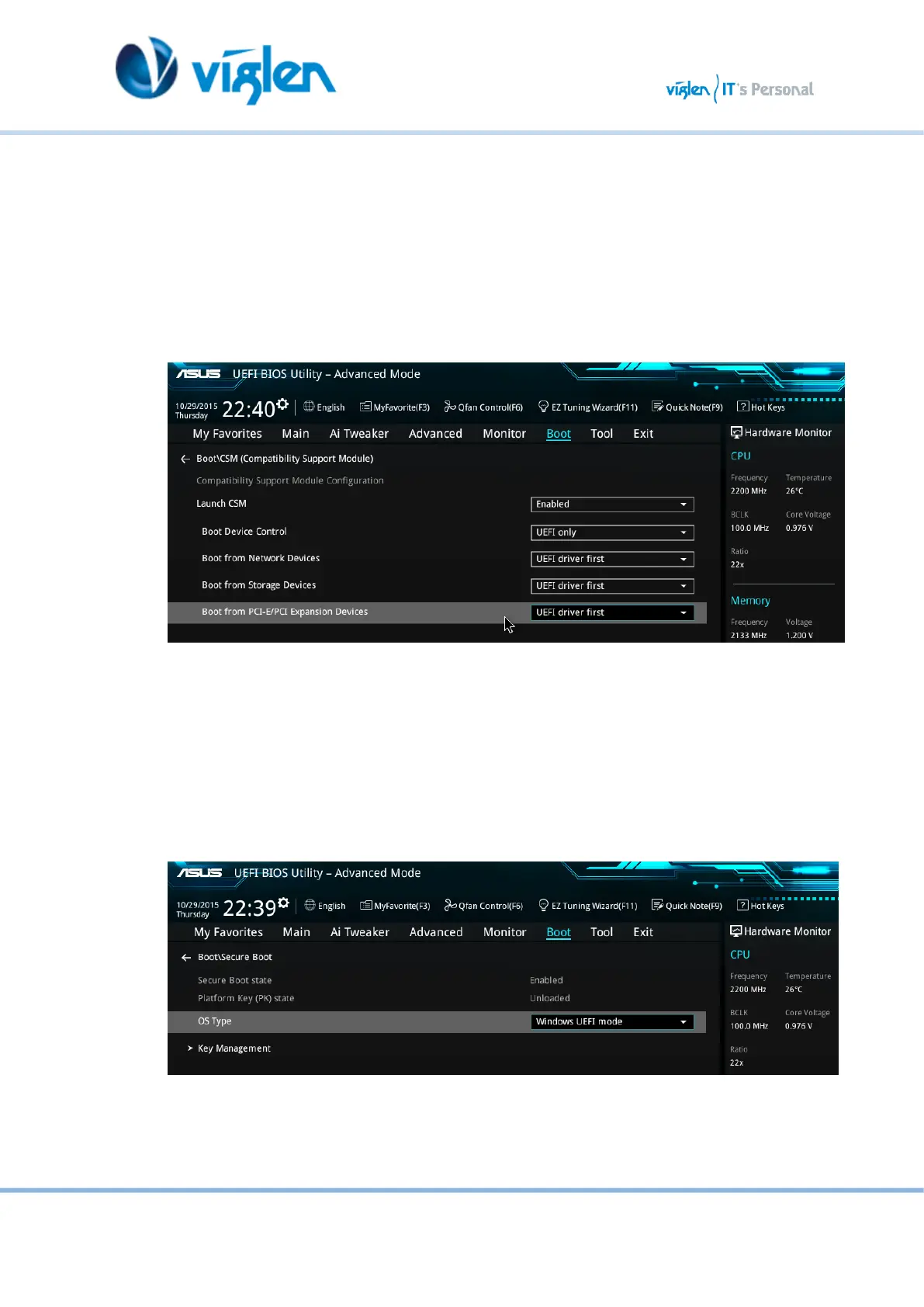
4. In the CSM (Compatibility Support Module) change following settings for Windows 8/8.1
& 10
Launch CSM [Enabled]
Boot Device Control [UEFI Only]
Boot from Network Devices [UEFI drivers first]
Boot from Storage Devices [UEFI drivers first]
Boot from PCI-E/PCI Expansion Devices [UEFI drivers first]
Figure 7-Compatibility Support Module
When these settings have been changed, press <Esc> or the Back Button to go back to
the Boot Sub Menu to enable Windows UEFI for secure boot.
5. Navigate to Secure Boot from within the Boot sub menu.
6. Change OS Type to Windows UEFI.
Figure 8-Secure Boot Menu



 To Next Page