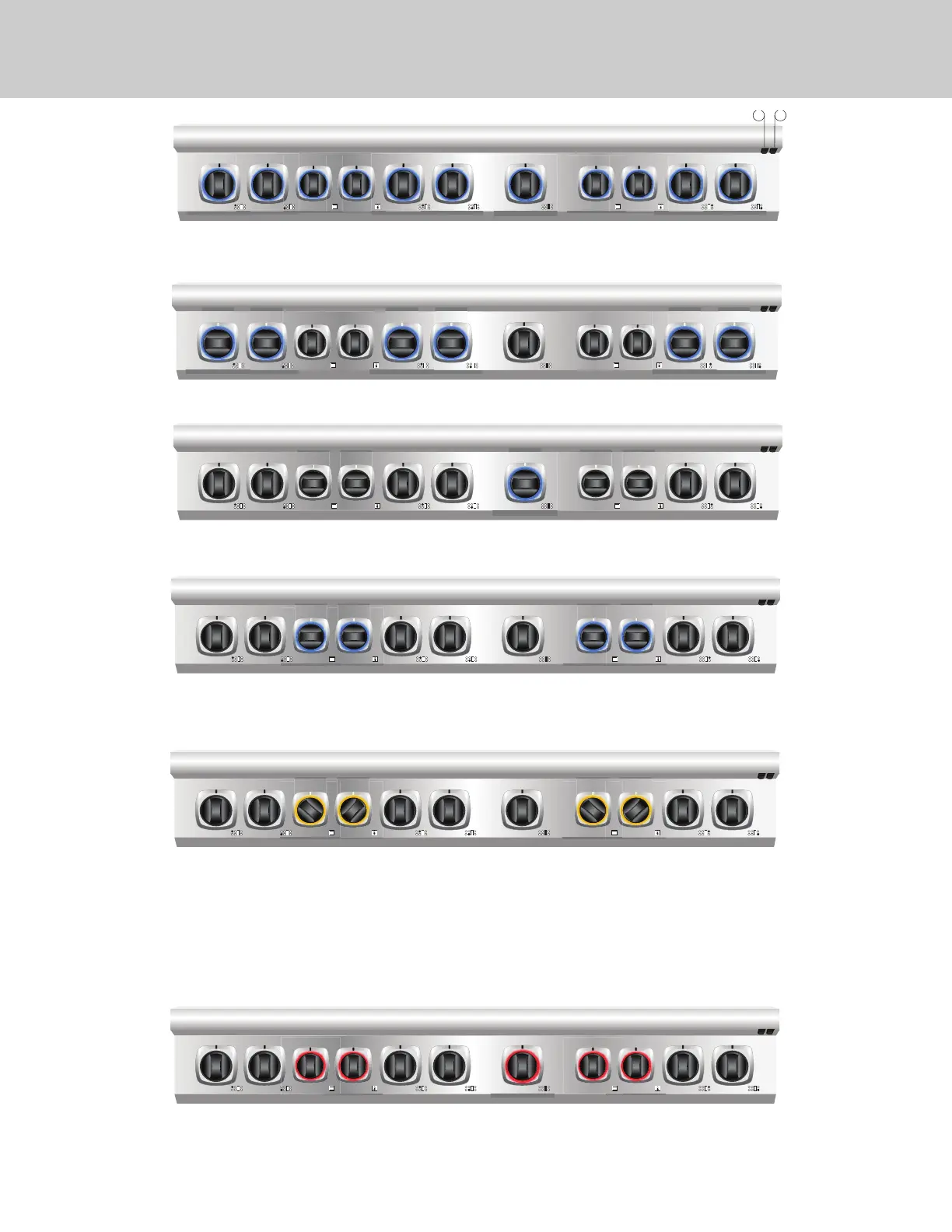
Burner knob lighting
• Knob tic: hard on/o
• Knob ring: fade on (white or blue) (2 sec) when knob is turned on; fade o (1 sec) when knob is turned o.
.
Griddle Knob/ Gas oven knob lighting
• Knob tic: hard on/o; cycles.
• Knob ring: fade on (white or blue) (2 sec) when knob is turned on; fade o (1 sec) when knob is turned o.
• Ring preheat: ring pulses until temp is initially reached; then solid until the knob is turned o.
Error Code
• Backlight will be red
• Griddle / oven knob(s): errors should ash the corresponding rings at the dened rate/qty times for each error code
Dual Fuel Oven Knob Lighting
• Selector knob tic: hard on when knob is turned on; hard o when knob is turned o
• Temp knob tic (cycle light): hard on/o; cycles.
• Selector knob ring: fade on (white or blue) (2 sec) when knob is turned on; fade o (1 sec) when knob is turned o.
• Temp knob ring: fade on (2 sec) when knob is turned on; fade o (1 sec) when knob is turned o.
• Ring preheat: rings pulse 180 out of phase until temp is initially reached; then solid until the knob(s) are turned o.
Backlight Night Light Function & Color Change
• The night light functions turns all of the bezel back lights on (button 1 on the right hand under side of the bull nose) NOTE: buttons 1 & 2 are on the right
side for ranges and the left side for range tops
• The back light color can be cycled between blue, white, and o by holding the number 2 button. Release the switch when you reach the desired setting.
• The error code will still function when the number 2 switch is cycled to o.
2 1
Self-Clean
• Backlight color will be yellow
• Selector knob tic: hard on when knob is turned on; hard o if knob is turned o
• Temp knob tic (cycle light): hard on/o; cycles.
• Selector knob ring: fade on (2 sec) when knob is turned on; fade o (1 sec) when knob is turned o.
• Temp knob ring: fade on (2 sec) when knob is turned on; fade o (1 sec) when knob is turned o.
• Ring preheat: rings pulse 180 out of phase until temp is initially reached; then solid until the knob(s) are turned o.
• Ring cooldown: once door is unlocked rings to revert back to Viking blue until knobs are manually turned o.
• Note: if one oven is in self clean, the other will not go into self clean. If you place the other oven in self-clean with one already being in self-clean
only the indicator for the selector knob will illuminate, the temperature knob indicator will not turn on as the door has not locked; also, the knob
backlights will turn on but will not pulse, indicating that the oven has not started its self-clean preheat
Note: If the self-clean cycle is cancelled before the door latch is fully engaged within the rst 30 seconds, the door may be locked.
To unlock the door, turn the selector and temperature knob to SELF- CLEAN until bezel pulses yellow. Once the bezel pulses yellow, turn both knobs to “OFF”.
The bezel will turn to a solid yellow color and when the solid yellow color disappears, the door will be unlocked.


 To Next Page