Page 6 For technical questions, please call 1-888-866-5797. Item 56796
SAFETY OPERATION MAINTENANCESETUP
Specifications
Electrical Rating 120 VAC / 60 Hz / 3.5 A
Charge Settings* 2 A / 8 A / 15 A
Battery Cables
6', 14 AWG
Red = Positive
Black = Negative
Power Cord 6'
*Amperage is only present while connected to a battery.
Setup
Read the ENTIRE IMPORTANT SAFETY INFORMATION section at the beginning of this
manual including all text under subheadings therein before set up or use of this product.
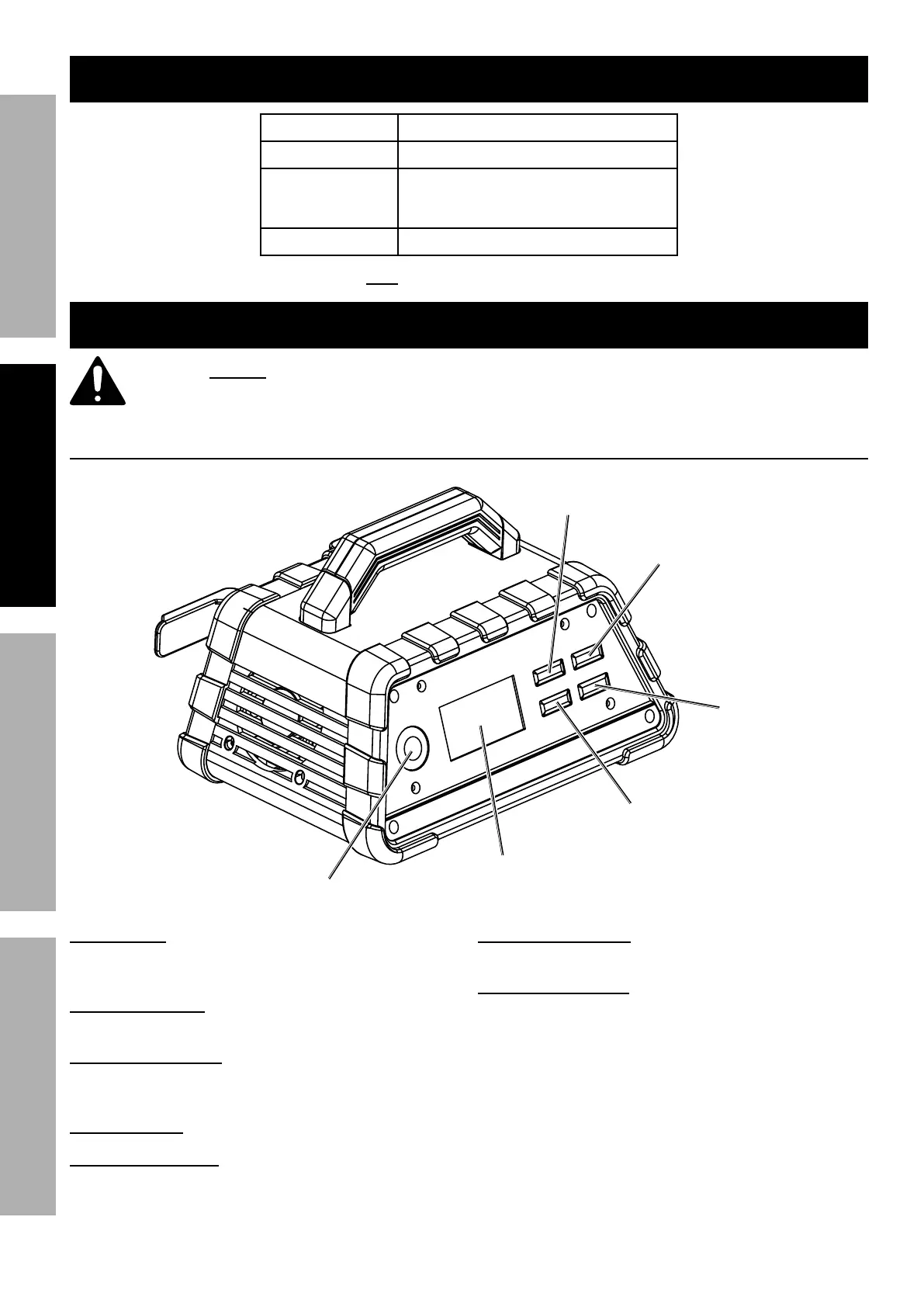
Controls
Amperage
Button
Charge Button
LCD
Display
Battery Type
Button
Recondition
Button
Winter Mode
Button
LCD Display: Displays charging status, charging
current, voltage, battery type, recondition
mode, winter mode, and error codes.
Amperage Button: Use to set the amperage output
from 2 A, 8 A, 15 A and automatic charging rate.
Battery Type Button: Use to select the
battery type from standard or AGM. For
GEL batteries use the standard setting.
Charge Button: Use to begin charging manually.
Recondition Button: Use to activate the
battery reconditioning function for weak,
sulfated, or deeply discharged batteries.
Winter Mode Button: Use to activate the
winter charging mode in cold weather.
Protection Features:
• Overheating protection – If the Charger overheats,
it will automatically shut off. Charger will
automatically resume when it has cooled down.
• Reverse polarity – if the cables are connected
incorrectly, the Charger will not function, and LCD
screen displays reverse polarity error code.
• Overcharging protection – if the battery
cannot be fully charged within 24 hours,
Charger will stop charging automatically.


 To Next Page
 Loading...