Before Using Your Unit
To obtain the best possible results from your unit, it is important that
you operate it properly. This section tells you how to set the
temperature controls, how to operate the features in your unit, and
how to save energy.
Using the power on/off switch (power interrupter switch)
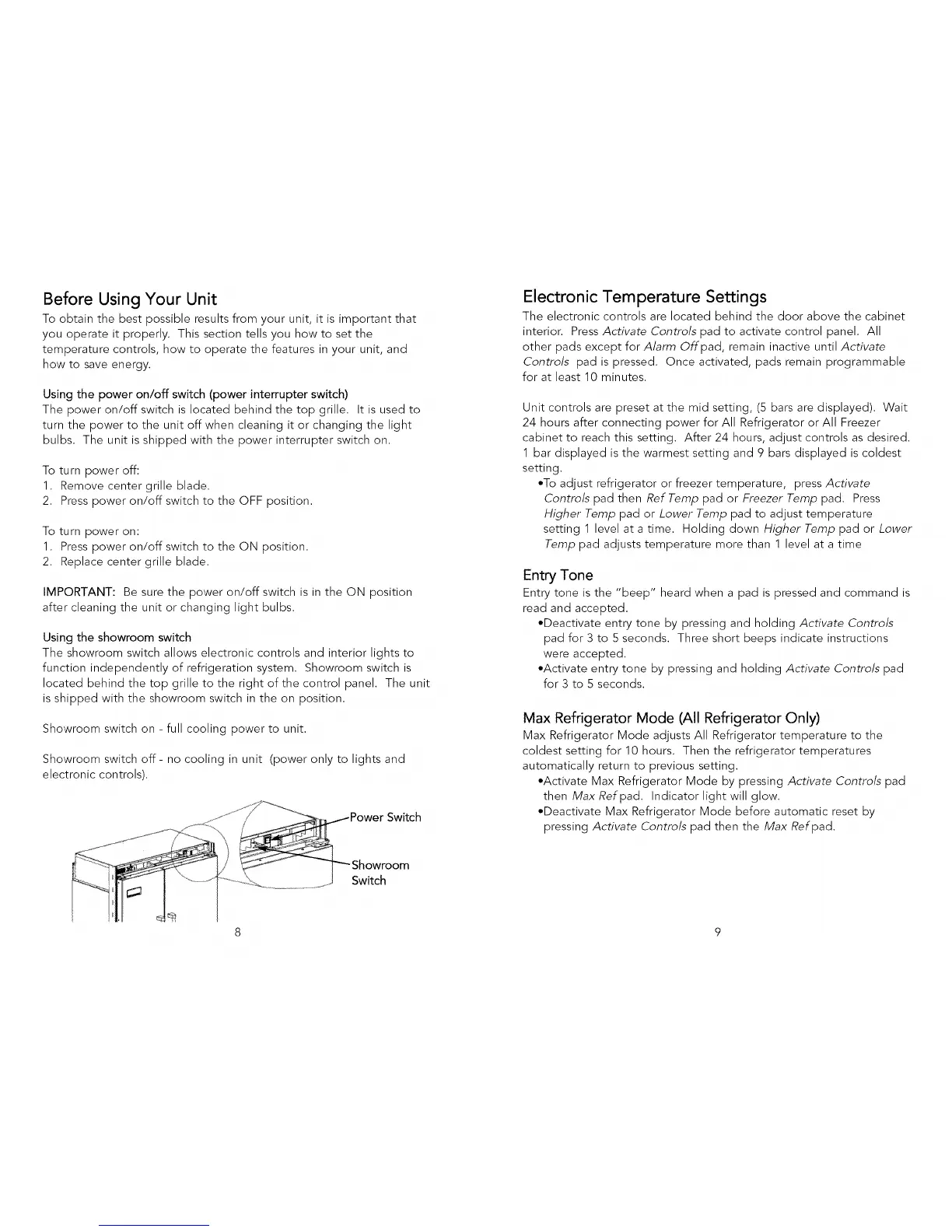
The power on/off switch is located behind the top grille. It is used to
turn the power to the unit off when cleaning it or changing the light
bulbs. The unit is shipped with the power interrupter switch on.
To turn power off:
1. Remove center grille blade.
2. Press power on/off switch to the OFF position.
To turn power on:
1. Press power on/off switch to the ON position.
2. Replace center grille blade.
IMPORTANT: Be sure the power on/off switch is in the ON position
after cleaning the unit or changing light bulbs.
Using the showroom switch
The showroom switch allows electronic controls and interior lights to
function independently of refrigeration system. Showroom switch is
located behind the top grille to the right of the control panel. The unit
is shipped with the showroom switch in the on position.
Showroom switch on - full cooling power to unit.
Showroom switch off- no cooling in unit (power only to lights and
electronic controls).
Switch
Electronic Temperature Settings
The electronic controls are located behind the door above the cabinet
interior. Press Activate Contro/s pad to activate control panel. All
other pads except for A/arm Offpad, remain inactive until Activate
Controls pad is pressed. Once activated, pads remain programmable
for at least 10 minutes.
Unit controls are preset at the mid setting, (5 bars are displayed). Wait
24 hours after connecting power for All Refrigerator or All Freezer
cabinet to reach this setting. After 24 hours, adjust controls as desired.
1 bar displayed is the warmest setting and 9 bars displayed is coldest
setting.
*To adjust refrigerator or freezer temperature, press Activate
Contro/s pad then Ref Temp pad or Freezer Temp pad. Press
Higher Temp pad or Lower Temp pad to adjust temperature
setting 1 level at a time. Holding clown Higher Temp pad or Lower
Temp pad adjusts temperature more than 1 level at a time
Entry Tone
Entry tone is the "beep" heard when a pad is pressed and command is
read and accepted.
*Deactivate entry tone by pressing and holding Activate Controls
pad for 3 to 5 seconds. Three short beeps indicate instructions
were accepted.
*Activate entry tone by pressing and holding Activate Controls pad
for 3 to 5 seconds.
Max Refrigerator Mode (All Refrigerator Only)
Max Refrigerator Mode adjusts All Refrigerator temperature to the
coldest setting for 10 hours. Then the refrigerator temperatures
automatically return to previous setting.
*Activate Max Refrigerator Mode by pressing Activate Controls pad
then Max Refpad. Indicator light will glow.
*Deactivate Max Refrigerator Mode before automatic reset by
pressing Activate Controls pad then the Max Ref pad.
8 9




 To Next Page