10
9
8
7
6
Background
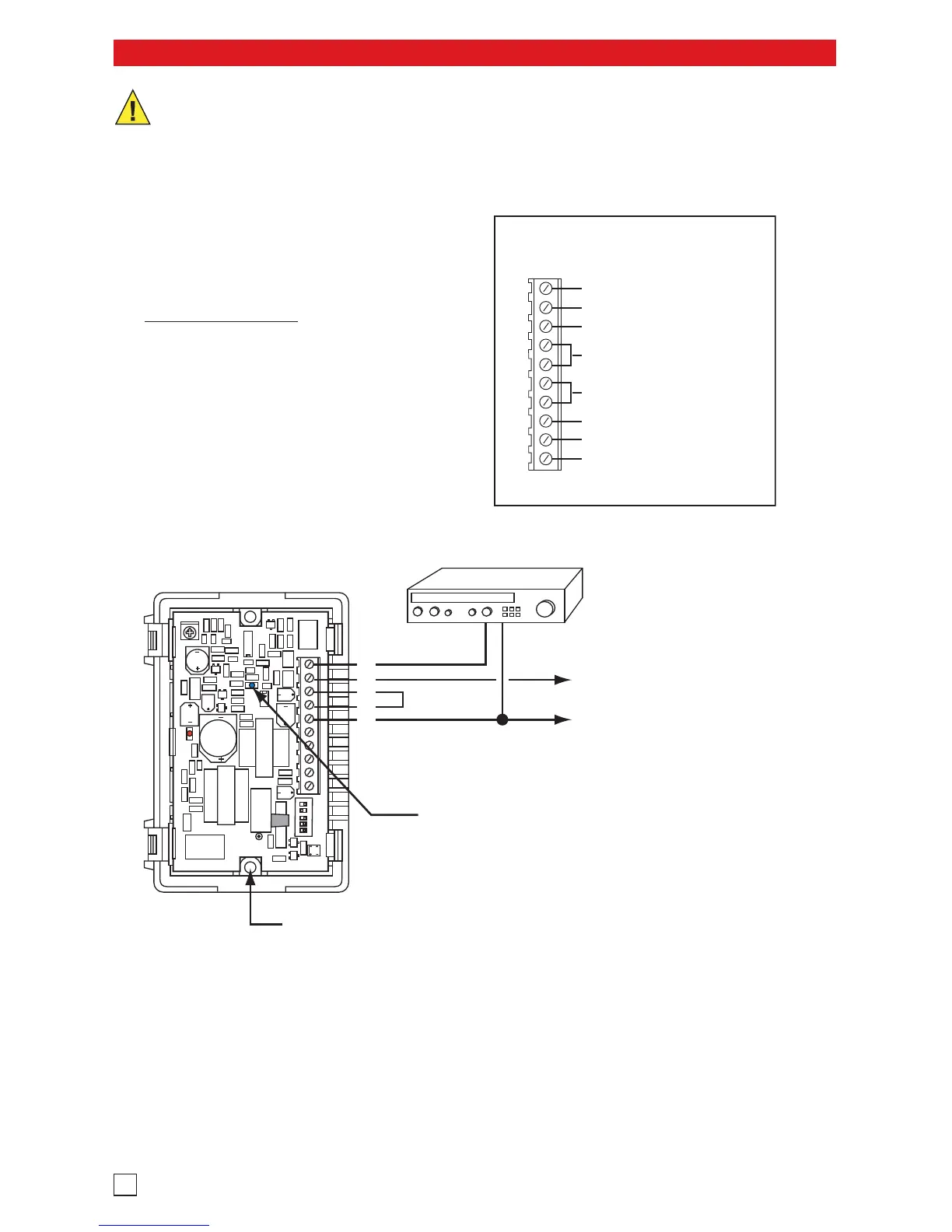
Music Source
(not included)
To Paging Amplifier: Floating
600 ohm output. Connect to
input of paging amplifier.
Internal View of the FXI-1
(2) #6x3/4 panhead
screws (included)
Blue LED indicates that the FXI-1
is active (paging) in all modes.
A. Adding Background Music
Terminal Detail
N.C.
COM Relay Contacts
N.O.
600 Ω Audio Output
FXS (ring trip), FXO (loop start)
or VOX (page port) input
Night Bell
Ground
Power
10
9
8
7
6
5
4
3
2
1
If background music is not available on the
central paging amplifier, the FXI-1 can be
wired as shown below. This application
works in all modes
and the music is
suppressed during paging.
IMPORTANT: Electronic devices are susceptible to lightning and power station electrical surges from both the AC
outlet and the telephone line. It is recommended that a surge protector be installed to protect against such surges.


 To Next Page