EX
X70
M
o
b
i
l
e
I
n
t
e
r
n
e
t
D
e
v
i
c
e
8
English
MID
Names of Parts
Top/Front View
1
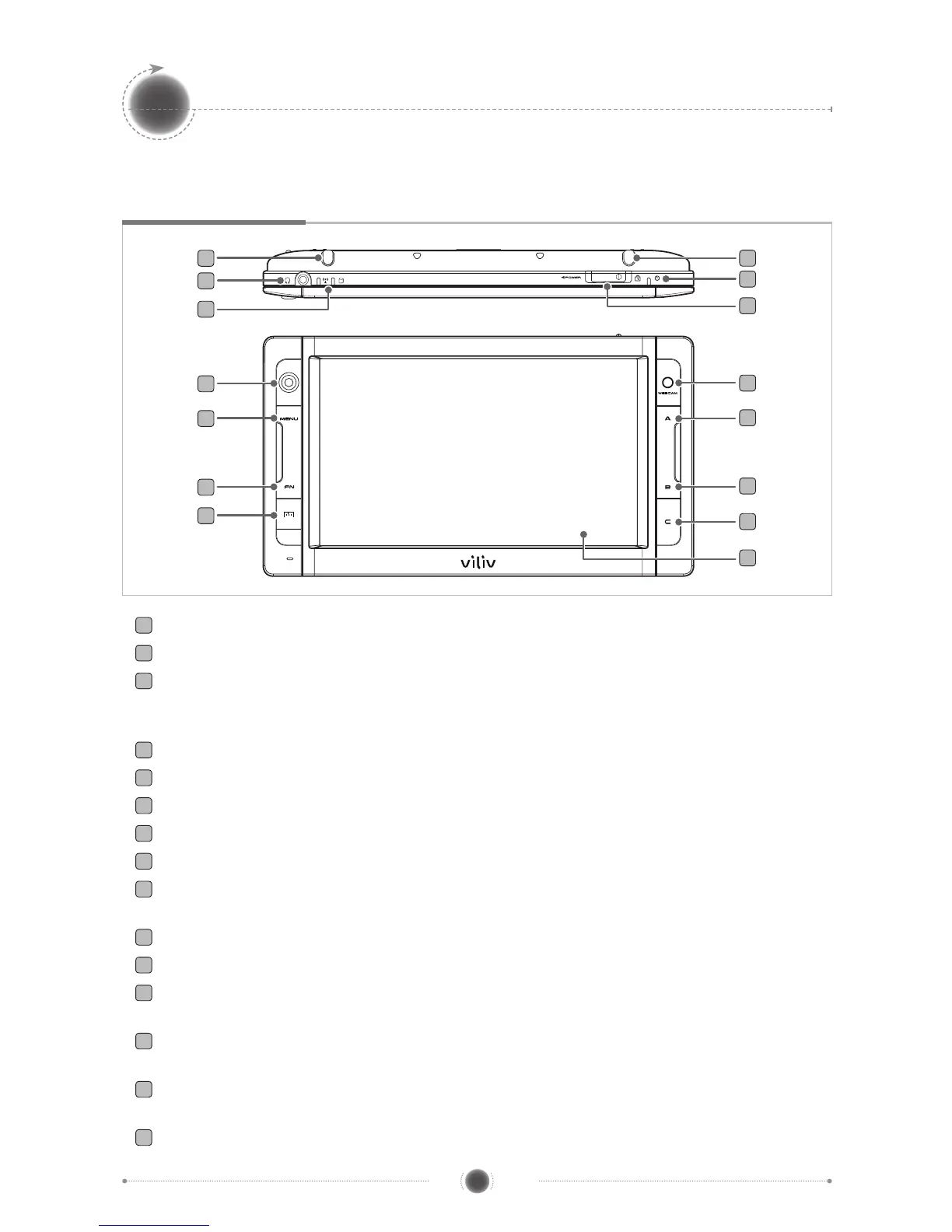
Stylus Pen Stores a stylus pen.
2
Earphones Port Connects earphones.
3
Operation Indicator
WLAN
Indicates the status of the WLAN equipment operation.
HDD Indicator
Turns on when accessing the HDD.
4
3G Modem Built-in antenna. (Optional)
5
Power Status Indicator Indicates the status of power connection.
6
Power/Hold Switch Provides Power On/Off and key input locking functions.
7
Jog Dial It is used to move in Up↑/Down↓/Left←/Right→ direction on screen.
8
Menu Button Moves to main menu.
9
FN BIOS Mode F8 (Advance Win XP Mode)
Win XP Mode F10
10
Virtual Keyboard Activates viliv virtual keyboard.
11
WEBCAM Equipped with a web camera.
12
A
BIOS Mode
ESC
Win XP Mode OK (Left mouse button)
13
B
BIOS Mode
F11 (Popup board)
Win XP Mode Right mouse button
14
C
BIOS Mode
F10 (Recovery)
Win XP Mode User-dened mode
15
TFT LCD/Touch Screen The user can operate the device on the touch screen.
7
1
2
3
11
4
5
6
8
12
9
13
10
14
15


 To Next Page