App Download
Download the Villo app for your device by searching for the Villo
App through the Apple App Store™ or Google Play Store™. The
Villo App is designed for iOS and Android devices only such as
smartphones or Wi-Fi enabled tablets, it is not available for
use on regular desktop or laptop computers.
Setup Your Speaker
Make sure your device is connected to a Wi-Fi network via a
2.4Ghz wireless router. Power-on your speaker and launch
Powering On
Your speaker is supplied with a universal AC adapter kit, select
the suitable plug for your region and snap it onto the AC adapter.
Insert the round plug from the AC adapter into the round jack
on the back of the speaker (below the metal stand), and plug the
adapter into any standard (100v-240v AC) wall outlet.
To turn the speaker on (or off), press and hold the on the
front for 3 seconds. The Logo LED will turn white when the
device is on.
VILLO APP
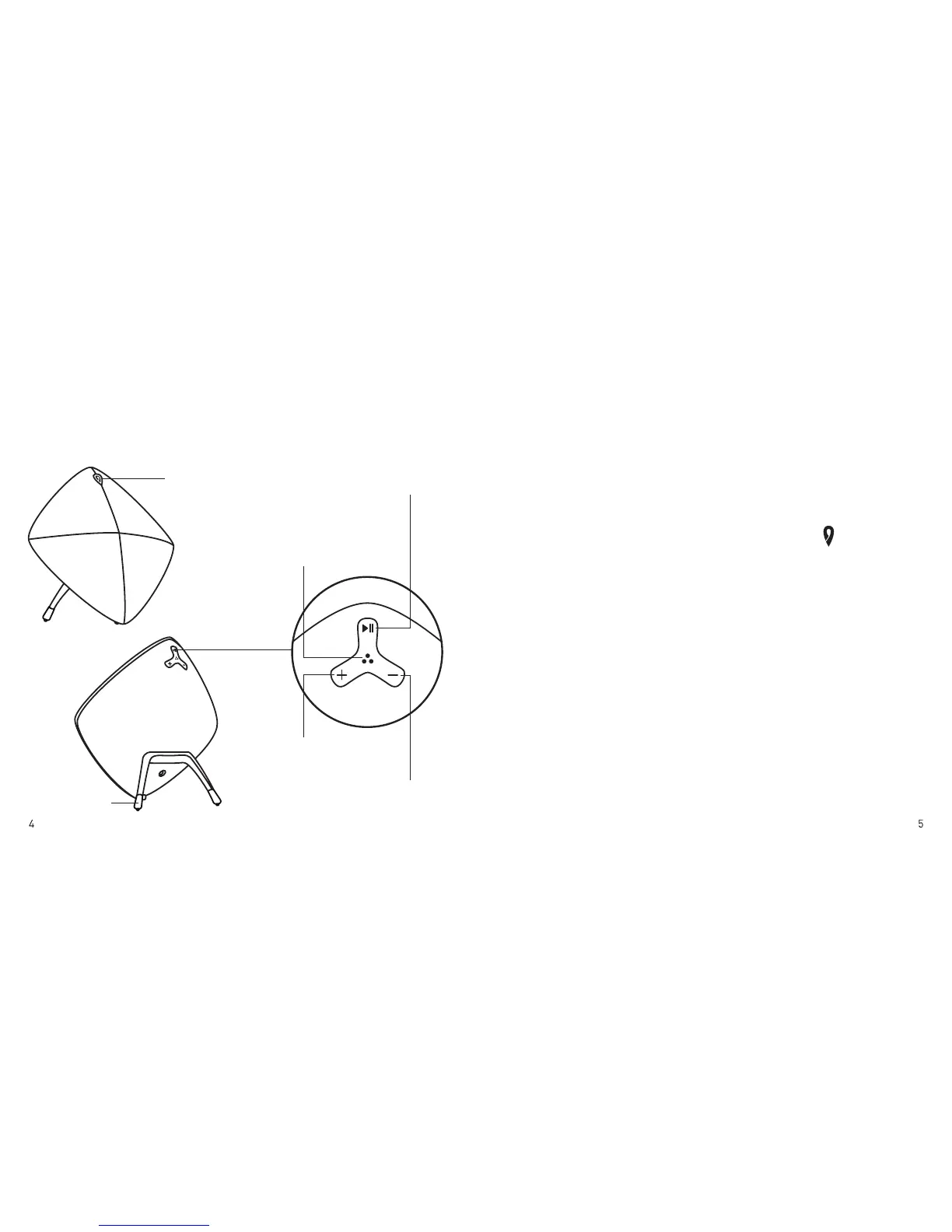
Power Button
(Logo LED
White: Wi-Fi
Blue: Bluetooth)
Play/Pause
Hold 3 sec: Bluetooth
/Wi-Fi toggle
Wi-Fi Pairing
Hold 6 sec: factory reset
Volume Up
Hold: next track
Volume Down
Hold: previous track
Metal Stand
Controls
PRODUCT OVERVIEW


 To Next Page