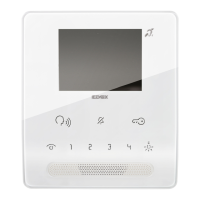
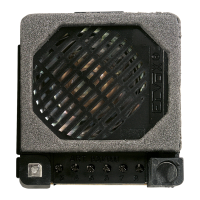
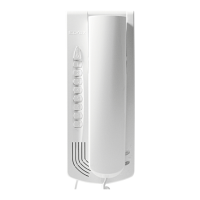
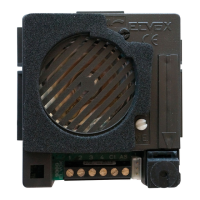
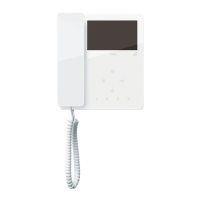
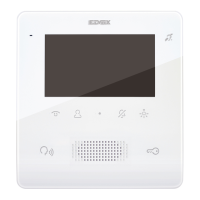
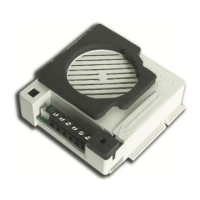
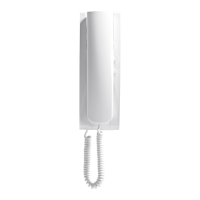
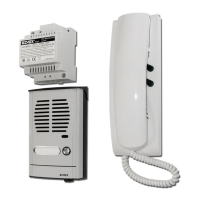
The Vimar Tab Free 7539 is a hands-free video entryphone designed for Due Fili Plus systems, featuring a 3.5" color display and a capacitive keyboard. It supports various functions including answering calls, door release, self-start, auxiliary services, and intercom calls. The device allows for adjustments to volume, brightness, and contrast, and can differentiate between various call ringtones. Visual signals are provided for "door/gate open," "missed calls," "user away," "ringtone mute," and "alert" statuses. It is also compatible with hearing aid wearers (Teleloop function).
Function Description:
The Tab Free 7539 video entryphone is designed to receive calls from Indoor Stations, Outdoor Stations, and the Reception switchboard. It can initiate self-start of the Outdoor Station, make intercom calls with other Indoor Stations, and call the Reception switchboard. Calls can be answered, and the lock of the Outdoor Station can be released using dedicated keys. Additionally, several programmable keys are available for activating other functions, such as relay actuation or specific intercom calls.
Key Functions and Status LEDs (Front View):
The video entryphone is operated via touch keys.
- Self-start (Key A): Activates the main outdoor station (ID 1).
- Ringtone Mute (Key B): Disables/enables the ringtone. When an incoming call is received, pressing this key mutes the current ringtone and disables subsequent ringtones.
- Lock Release (Key C): Activates the lock of the calling Outdoor Station. This function is also available in stand-by mode. If not configured, the indoor station in stand-by opens the lock for the last calling outdoor station.
- Auxiliary 1 (Key D): Activates the first relay of the Due Fili Plus system (Aux 1), typically used for stair lights.
- Talk/Listen (Key F): Used to answer and end conversations.
- Volume Control (Key G): Adjusts volume and contrast.
- Brightness Control (Key H): Adjusts display brightness.
- Programmable Keys (1, 2, 3, 4): By default, these keys are assigned as follows:
- Key 1 (Auxiliary 2): Activates the second relay (Aux 2) of the Due Fili Plus system.
- Key 2 (Free): A free programmable key.
- Key 3 (F1 Control): Sends an F1 control to Outdoor Stations.
- Key 4 (F2 Control): Sends an F2 control to Outdoor Stations.
These functions can be modified via configuration to perform other auxiliary functions or intercom calls.
Status LEDs:
- Ringtone Mute LED:
- Permanently lit: Ringtone is muted.
- Flashing: Receiving a call from an Outdoor Station or Indoor Station (different flash patterns).
- Flashing during configuration.
- If configured via SaveProg: 1 flash every 10 seconds indicates received and missed calls from the switchboard; 1 flash every second indicates "user away" (Indoor Station refuses calls from Outdoor Station).
- Talk/Listen LED:
- Steady light: Communication is underway.
- Flashing: During the timeout for sending a call to the reception switchboard.
- Auxiliary Services/Alert LED:
- Steady light: An opening has been left open (if connected by the installer).
- Flashing: During configuration.
- Possible "Alert" signaling (refer to Alert function section).
All keys are backlit and light up when touched.
Usage Features:
- Answering a Call: When an Outdoor Station calls, the display shows video, and the Talk/Listen key flashes. Press the Talk/Listen key to answer and again to end the conversation.
- Lock Release: Press the Lock Release key to open the lock of the connected Outdoor Station.
- Answering Calls from Indoor Station or Reception Switchboard: When an Indoor Station or Reception switchboard calls, the Talk/Listen key flashes. Press the Talk/Listen key to answer and again to end the conversation. If the Reception switchboard has a camera, its video signal will be visible. Missed call signals persist even after a power outage.
- Self-start: Briefly press the Self-start key to activate the master entrance panel. If the master entrance panel is audio-only, press the Talk/Listen key and then the Self-start key while it flashes (for 5 seconds). Only video is activated initially; press the Talk/Listen key to activate communication and again to end it. A busy tone will be heard if another communication is in progress. Specific Outdoor Stations can be self-started using programmable keys after configuration.
- Calling an Indoor Station (Intercom): Other Indoor Stations can be called using configured programmable keys. During the call, the calling station emits a tone. If the called station is busy, a busy tone is heard. Communication activates automatically when the called party answers. Press the Talk/Listen key to end the conversation. The maximum intercom conversation length is 5 minutes (unless programmed otherwise via SaveProg).
- Calling a Reception Switchboard: To call the reception switchboard, press the Talk/Listen key and, within 5 seconds, press the Self-start key. The Talk/Listen key flashes during the timeout.
- Landing Call: The device can receive calls from a Landing button connected to the FP-M terminals. Pressing the push button sends a landing call. The ringtone duration depends on how long the key is pressed, up to a maximum of 10 seconds.
- Alert Function: This function sends a notice to the Reception Switchboard (art 40510) even if the Due Fili Plus bus is busy. A push button connected to FP-M terminals is required, and the operating mode is set via SaveProg. The video entryphone enters stand-by and receives visual or acoustic answers from the Reception switchboard based on configuration.
Adjustments and User Configurations:
- Ringtone Volume Adjustment: The ringtone volume has 10 levels. Press the '-' key to decrease and '+' key to increase the volume. To adjust, press and hold the Ringtone Mute key for 2 seconds until it flashes and an audible warning sounds. Then, use the '+' or '-' keys to play and adjust the volume. Repeatedly press '+' or '-' to select the desired volume. Press the Ringtone Mute key again to save, or wait 15 seconds. The Ringtone Mute key stops flashing after configuration.
- Brightness Control: Adjust brightness during communications and self-start by pressing the '-' and '+' keys on the right side.
- Contrast Adjustment (Volume Key): Adjust contrast during self-start (without activating the voice unit) by pressing the '-' or '+' keys on the left side.
- External Call Voice Unit Volume Adjustment: Adjust the voice unit volume (10 levels) during a conversation with an Outdoor Station using the '+' and '-' keys on the left side.
- Internal Call Voice Unit Volume Adjustment: Adjust the voice unit volume (10 levels) during a conversation with an Indoor Station or Reception switchboard using the '+' and '-' keys on the left side.
- Ringtone Mute: Press the Ringtone Mute key to mute the ringtone. Deactivation is confirmed by a low-pitched tone and the key lighting up steadily. Reactivation is signaled by a high-pitched tone and the key turning off.
- Selecting Call Tunes: (Done with the indoor station in stand-by) Choose from 10 melodies. Key 1 selects the Entrance Panel Call melody, Key 2 selects the Intercom Call melody, and Key 3 selects the Landing Call melody. To configure, press and hold the Ringtone Mute key for 2 seconds until it flashes with an audible warning. Press Key 1, 2, or 3 to play the last melody. Repeatedly press the same key to select a new melody. Press the Ringtone Mute key to save, or wait 15 seconds.
Configurations:
The device can be configured in "Simplified" mode (via indoor station keys, available from firmware version 6.34), "Standard" mode (via indoor station keys), or via "SaveProg" software on a PC.
- First Power-up: After installation, assign a unique ID code to each indoor station. All configuration operations must be performed with the system on, the indoor station in stand-by, and after connecting and programming entrance panels.
- Manual ID Code Configurations:
- ID Code Configuration ("Simplified" Mode): Programmed via a main (MASTER) entrance panel. Press and hold the Lock Release key for 6 seconds until a "beep" (0.5 s) sounds. Release the key, and a different frequency "beep" signals communication. Press the call key on the MASTER outdoor station. An acoustic signal confirms successful ID association.
- ID Code Configuration ("Standard" Mode): Press and hold the Talk/Listen key. Press and hold the Lock Release key until it flashes. Release both keys. Press the Lock Release key within 5 seconds and hold until a warning tone sounds and communication activates. Release the key. Within 25 seconds, associate the ID code from the external electronic unit by pressing the call key on the MASTER outdoor station. An acoustic signal confirms successful ID association.
- Secondary ID Code Configuration ("Simplified" Mode): For multiple indoor stations to ring simultaneously. The "master" indoor station is configured first, then additional group indoor stations are programmed with a secondary ID code. Press and hold the Lock Release key for 6 seconds (first "beep"). Continue holding for another 2 seconds (two "beeps"). Release the key (different frequency "beep"). Press the call key on the MASTER outdoor station. An acoustic signal confirms successful secondary ID association.
- Secondary ID Code Configuration ("Standard" Mode): Press and hold the Talk/Listen key. Press and hold the Lock Release key until it flashes. Release both keys. Press and hold the Talk/Listen and Lock Release keys simultaneously within 5 seconds until a warning tone sounds and communication activates. Release both keys. Within 25 seconds, associate the secondary ID code from the external electronic unit by pressing the call key on the MASTER outdoor station. An acoustic signal confirms successful secondary ID association.
- Key Configuration for Intercom Calls ("Simplified" Mode): Press and hold the desired programmable key (1, 2, 3, or 4) for at least 6 seconds. Release the key when a "beep" sounds. Press the Lock Release key on the entryphone/video entryphone you want to call. Another "beep" confirms successful programming.
- Key Configuration for Intercom Calls ("Standard" Mode): Press and hold the Talk/Listen key. Press and hold the Self-start key until it flashes. Release both keys. Press and hold the programmable key (1, 2, 3, or 4) until a continuous tone sounds. Release the key. Press a key on the indoor station to call. An audible warning confirms success.
- Configuration of a Key for Self-start of a Specific Outdoor Station ("Simplified" Mode): Press and hold the desired programmable key (1, 2, 3, or 4) for at least 6 seconds. Release the key when a "beep" sounds. From the outdoor station concerned, make a call to the indoor station being programmed within 60 seconds. A high tone confirms the end of the procedure.
- Configuration of a Key for Self-start of a Specific Outdoor Station ("Standard" Mode): Press and hold the Talk/Listen key. Press and hold the Self-start key until it flashes. Release both keys. Press and hold the desired programmable key (1, 2, 3, or 4). Wait for an audible warning. Release the key. Call the indoor station from the outdoor station. An audible warning confirms success.
- Configuration of a Key for Lock Release of a Specific Outdoor Station ("Simplified" Mode): Press and hold the desired programmable key (1, 2, 3, or 4) for at least 6 seconds (first "beep"). Continue holding for another 2 seconds (two "beeps"). Release the key. From the outdoor station concerned, make a call to the indoor station being programmed within 60 seconds. The indoor station receives the call and confirms with a new "beep".
- Procedure for Restoring Default Data for Each Individual Key ("Simplified" Mode): Press and hold the key to be reprogrammed for at least 6 seconds. After 6 seconds, a "beep" (high tone) sounds. Release the key, then press it again to return it to its default setting. A confirmation tone indicates the key has been reset.
- Procedure for Restoring Default Data for Each Individual Key ("Standard" Mode): Press and hold the Talk/Listen key. Press and hold the Self-start key until it flashes. Release both keys. Press and hold the programmable key (1, 2, 3, or 4) until the indoor station beeps. Release the key and press it again.
- Restoring Default Data (Total Deletion of Configurations) ("Simplified" Mode): Press and hold the Lock Release key for 6 seconds (first "beep"). Continue holding for another 2 seconds (two "beeps"). Continue holding for another 2 seconds (continuous tone for 5 seconds). Release the key. While the continuous tone is still emitting, press the Lock Release key. Release and press the Lock Release key again (three "beeps").
- Restoring Default Data (Total Deletion of Configurations) ("Standard" Mode): Press and hold the Talk/Listen key. Press and hold the Lock Release key until it flashes. Release both keys. Press and hold the Lock Release key. When an audible warning is emitted, release the key and briefly press the Talk/Listen key. The indoor station configurations are deleted. Press the Talk/Listen key to confirm (3 beeps).
Advanced Configurations (via SaveProg software):
SaveProg is PC software for advanced configuration of Due Fili Plus Systems. It allows:
-
Modifying configurations of all keys.
-
Creating groups.
-
Enabling and disabling functions.
-
Alert Function Configuration via SaveProg: The FP-M input can be configured as active for the alert function, replacing the local door landing call. The Indoor Station waits for an alert from the switchboard, sending chosen signaling to the user. If no answer, the message is resent every 10 seconds (stops after 5 failed attempts). Upon confirmation from the switchboard, chosen signaling is sent. If the switchboard operator calls the Indoor Station from the warnings list, a message is sent to end the alert procedure.
- Enabling: Disabled (default) or Enabled.
- Active State Polarity: Contact normally open (default) or Contact normally closed.
- Activation Delay: 0.1 seconds (default), 0.5 seconds, 1 second, or 2 seconds.
- Signaling Mode: None, LED associated with the Stair Light key (default), or Sound.
- LED Timer / Sound Timer: Different flashing/tone patterns for "waiting for warning" and "received confirmation."
Firmware Updating:
- Disconnect the device from the Due Fili Plus bus.
- Connect it to the PC via USB.
- Start the WinBoot update within 30 seconds.
- Follow the WinBoot user instructions.
Important Technical Specifications:
- Display: 3.5" color display.
- System: Due Fili Plus systems.
- Keyboard: Capacitive.
- Ringtone Levels: 10.
- Intercom Conversation Length: 5 minutes (default).
- Firmware: Configuration mode available from version 6.34.
Maintenance Features:
- Cleaning: Clean using a soft cloth. Do not pour water onto the appliance or use any chemical products.
- Warnings for the User: Do not open or tamper with the appliance. In case of faults, contact specialized personnel. For installation, refer to the instruction sheet.
- Regulatory Compliance: EMC directive, RoHS directive. Standards EN 62368-1, EN 61000-6-1, EN 61000-6-3, EN IEC 63000. REACH (EU) Regulation no. 1907/2006 – art.33 (product may contain traces of lead).
- WEEE - User Information: The crossed bin symbol indicates separate collection of waste. Equipment must be handed over to municipal centers for differentiated collection of electrical and electronic waste. Alternatively, it can be delivered free of charge to distributors when purchasing a new equivalent appliance, or for electronic products smaller than 25 cm without purchase obligation. Proper waste collection promotes recycling and prevents negative environmental and health impacts.
- Installation: Must be carried out by qualified persons in compliance with current regulations for electrical equipment installation in the country.

 Need help?
 General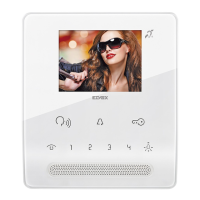

 To Next Page