User's Manual
Arctic GPRS Gateway
Firmware Version 5.0.7 13 Document Version 1.6
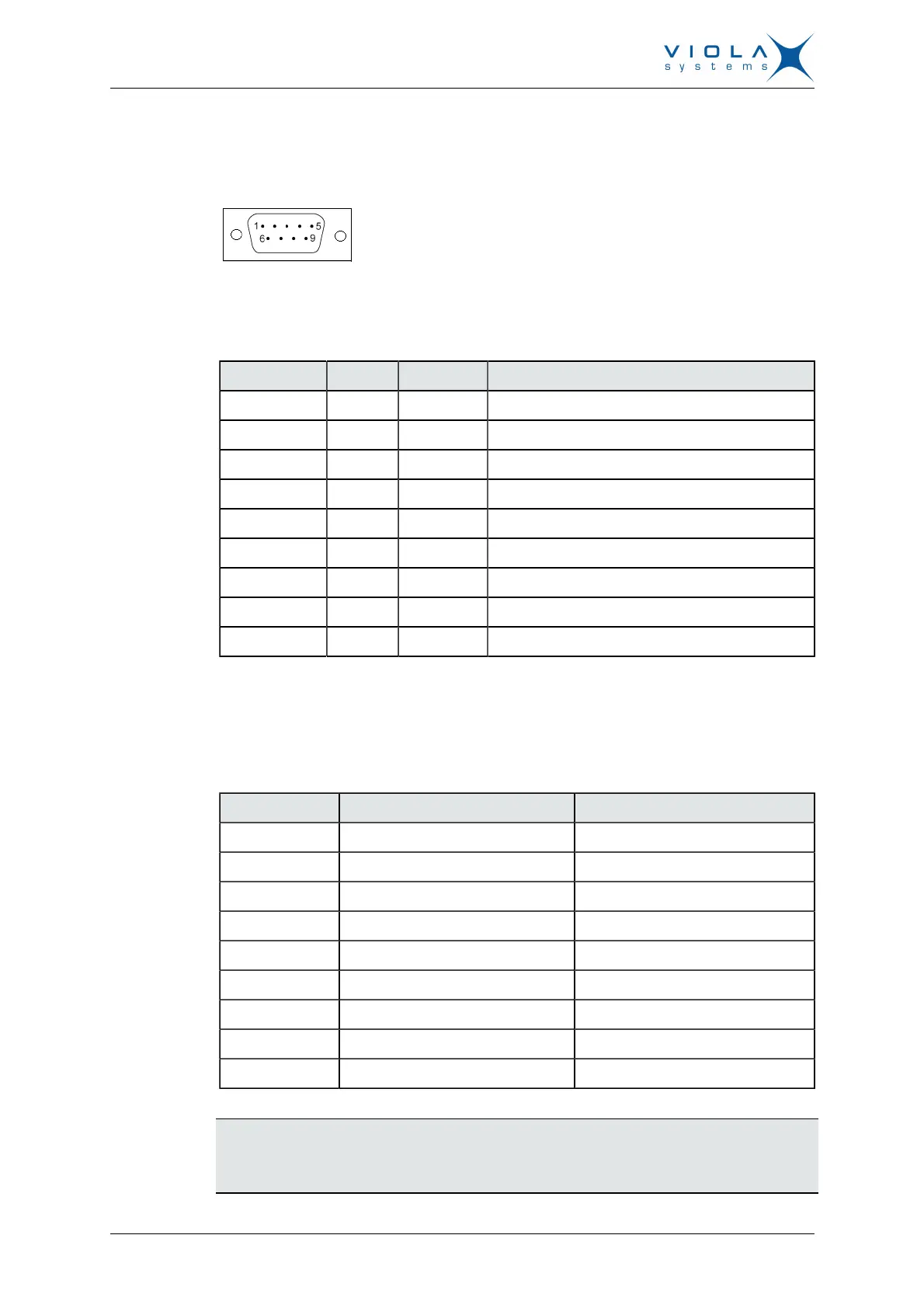
a PC. The Arctic supports CTS/RTS flow control. The figure of Arctic’s DB9
(DTE) Male connector is shown in Figure 4:
Figure 4. DB9 male connector
The serial port 1 (RS1) is a full RS-232 port. The pin description of this port is
as follows:
Table 2: RS-232 Port PIN Description
Pin Number Name Direction Explanation
1 DCD IN Data Carrier Detect
2 RXD IN Received Data
3 TXD OUT Transmitted Data
4 DTR OUT Data Terminal Ready. Handshake output
5 GND - Signal ground.
6 DSR IN Data Set Ready. Handshake input
7 RTS OUT Ready To Send. Handshake output
8 CTS IN Clear To Send. Handshake input
9 RI IN Ring Indicator
The serial port 2 (RS2) can be configured either as a half RS-232 or an
RS-422/485 (DTE Master). The Pin description is same as in RS1, when in
RS-232 mode. The pin description of this port is as follows in RS-485 mode.
Table 3: RS-485 Port PIN Description
Pin Number RS-485,Full duplex (4-wire) RS-485 Half duplex (2-wire)
1 NC NC
2 RXD+ (in) NC
3 TXD–(out) TXD/RXD- (out/in)
4 NC NC
5 GND GND
6 NC NC
7 TXD+ (out) TXD/RXD+ (out/in)
8 RXD–(in) NC
9 NC NC
Note!
Make sure that you DO NOT connect RS-422 or RS-485 devices to a port
which has been configured to operate as an RS-232 port.


 To Next Page